
Gepard
-
Posts
7,097 -
Joined
-
Last visited
-
Days Won
363
Content Type
Profiles
Forums
Gallery
Downloads
Store
Everything posted by Gepard
-
BMP=Boyevaya Mashina Pekhoty better translation Infantry Fighting Vehicle or in german Schützenpanzer
-
529 downloads
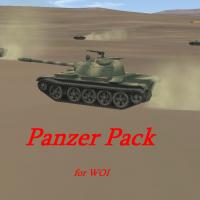
WOI Panzer Pack This package includes modded versions of TK's panzers of WOI plus a T-34/85 and the israeli version of the T-55. All of this tanks i gave additionally to the gun an coaxial MG and in some cases Flak MG. All tanks are now able to defend themself against engaging planes, so that tank butchering now becomes more challenging for the pilots. ************************************************ INSTALLATION Unzip all files into your objects/groundobjects folder. Thats it. *********************************************** Credits: All honour for the stock tank models goes to TK For the T-34 i want to say thank you to Pasko. *********************************************** You will need a weapon pack to make the soviet vehicles able to fire their coaxial MG and the T-34's to fire their gun. Or you add following lines into you gundata.ini file. Make sure to exchange the xx with the correct sequence number. [GunData0xx] TypeName=7.62mm_PKB FullName=PanzerMG PK Caliber=7.620000 ROF=900.000000 MuzzleVel=935.000000 AmmoWt=0.009730 WarheadWt=0.000000 Reliability=97.000000 Accuracy=80.000000 AddLight=FALSE MaxLightRange=1000.000000 FireColor=0.150000,0.150000,0.150000 GunFireEffect=LmgFireEffect GunFireSound=50cal EffectClassName=LmgEffects EffectTime=0.100000 TracerTexture=Tracer.tga TracerSize=0.120000 TracerDistFactor=0.002000 TracerLength=0.015000 MaxVisibleDist=4000.000000 MaxStreakVisibleDist=1000.000000 TimeFuzed=FALSE [GunData0xx] TypeName=85MM_ZIS-S-53 FullName=85mm Kanone Caliber=85.000000 ROF=8.000000 MuzzleVel=1042.000000 AmmoWt=5.040000 WarheadWt=0.000000 Reliability=100.000000 Accuracy=75.000000 AddLight=TRUE MaxLightRange=1200.000000 FireColor=0.500000,0.450000,0.320000 GunFireEffect=TankGunFireEffect GunFireSound=AAA EffectClassName=TankGunEffects EffectTime=0.100000 TracerTexture=Tracer2.tga TracerSize=0.200000 TracerDistFactor=0.002000 TracerLength=0.018000 MaxVisibleDist=6000.000000 MaxStreakVisibleDist=1000.000000 TimeFuzed=FALSE ************************************************* Hope you enjoy it. Michael (Gepard) -
View File Panzer Pack for WOI WOI Panzer Pack This package includes modded versions of TK's panzers of WOI plus a T-34/85 and the israeli version of the T-55. All of this tanks i gave additionally to the gun an coaxial MG and in some cases Flak MG. All tanks are now able to defend themself against engaging planes, so that tank butchering now becomes more challenging for the pilots. ************************************************ INSTALLATION Unzip all files into your objects/groundobjects folder. Thats it. *********************************************** Credits: All honour for the stock tank models goes to TK For the T-34 i want to say thank you to Pasko. *********************************************** You will need a weapon pack to make the soviet vehicles able to fire their coaxial MG and the T-34's to fire their gun. Or you add following lines into you gundata.ini file. Make sure to exchange the xx with the correct sequence number. [GunData0xx] TypeName=7.62mm_PKB FullName=PanzerMG PK Caliber=7.620000 ROF=900.000000 MuzzleVel=935.000000 AmmoWt=0.009730 WarheadWt=0.000000 Reliability=97.000000 Accuracy=80.000000 AddLight=FALSE MaxLightRange=1000.000000 FireColor=0.150000,0.150000,0.150000 GunFireEffect=LmgFireEffect GunFireSound=50cal EffectClassName=LmgEffects EffectTime=0.100000 TracerTexture=Tracer.tga TracerSize=0.120000 TracerDistFactor=0.002000 TracerLength=0.015000 MaxVisibleDist=4000.000000 MaxStreakVisibleDist=1000.000000 TimeFuzed=FALSE [GunData0xx] TypeName=85MM_ZIS-S-53 FullName=85mm Kanone Caliber=85.000000 ROF=8.000000 MuzzleVel=1042.000000 AmmoWt=5.040000 WarheadWt=0.000000 Reliability=100.000000 Accuracy=75.000000 AddLight=TRUE MaxLightRange=1200.000000 FireColor=0.500000,0.450000,0.320000 GunFireEffect=TankGunFireEffect GunFireSound=AAA EffectClassName=TankGunEffects EffectTime=0.100000 TracerTexture=Tracer2.tga TracerSize=0.200000 TracerDistFactor=0.002000 TracerLength=0.018000 MaxVisibleDist=6000.000000 MaxStreakVisibleDist=1000.000000 TimeFuzed=FALSE ************************************************* Hope you enjoy it. Michael (Gepard) Submitter Gepard Submitted 06/08/2008 Category Ground Objects Mods
-
WOI Battle of El Mansoura Egypt 1973
Gepard replied to porkwind's topic in Mission/Campaign Building Discussion
Uploaded it some minutes ago. Has to wait till an administrator give his okay. -
895 downloads
The Air Battle of Al Mansura mission pack ================================= This missions are written for "Wings over Israel". ================================= HISTORICAL BACKGROUND The air battle of Al Mansura was the biggest air combat between Mach 2 fighterplanes. It was fought during Yom Kippur War on 14.October 1973 between the Egyptian Air Force and the israeli Heyl hav Avir. The israelis tried to knock out the egyptian airbase Al Mansura with a massive air raid and were intercepted by egyptian MiG's. Al Mansura was damaged, but finally the israelis lost 17 planes the egyptian 6. Up today the Israelis deny that this battle has taken place. ----------------------------------------------------------------- This missions pack contains 6 missions. You can fly this battle for the egyptian side and for the israelis. You can choose between intercept (MiG's), escort (Kurnass, Nesher) and strike (Ahit) missions. ------------------------------------------------------------------ INSTALLATION Unzip all files into your Wings Over Israel\ missions folder Thats it. ------------------------------------------------------------------- This missions are FREEWARE. No commercial use is allowed. ------------------------------------------------------------------ Hope you enjoy it Michael (Gepard) Made in Germany June 2008 -
View File Al Mansura Air Battle mission pack for WOI The Air Battle of Al Mansura mission pack ================================= This missions are written for "Wings over Israel". ================================= HISTORICAL BACKGROUND The air battle of Al Mansura was the biggest air combat between Mach 2 fighterplanes. It was fought during Yom Kippur War on 14.October 1973 between the Egyptian Air Force and the israeli Heyl hav Avir. The israelis tried to knock out the egyptian airbase Al Mansura with a massive air raid and were intercepted by egyptian MiG's. Al Mansura was damaged, but finally the israelis lost 17 planes the egyptian 6. Up today the Israelis deny that this battle has taken place. ----------------------------------------------------------------- This missions pack contains 6 missions. You can fly this battle for the egyptian side and for the israelis. You can choose between intercept (MiG's), escort (Kurnass, Nesher) and strike (Ahit) missions. ------------------------------------------------------------------ INSTALLATION Unzip all files into your Wings Over Israel\ missions folder Thats it. ------------------------------------------------------------------- This missions are FREEWARE. No commercial use is allowed. ------------------------------------------------------------------ Hope you enjoy it Michael (Gepard) Made in Germany June 2008 Submitter Gepard Submitted 06/08/2008 Category User Made Missions
-
WOI Battle of El Mansoura Egypt 1973
Gepard replied to porkwind's topic in Mission/Campaign Building Discussion
And here are the lines of a WOI version of my Al Mansura Battle: [MissionHeader] AircraftType=A-4E_Ahit_73 MissionMap=IsraelME MissionType=Strike StartTime=8:30:00 StartDate=10/14/1973 [MissionData] FriendlyAirActivity=1 EnemyAirActivity=1 EnemyAirDefenseActivity=3 FriendlyAirDefenseActivity=1 PlayerMissionID=1 PlayerPositionID=1 MissionNumber=5641 AdjustStartPosition=FALSE AdjustBaseWaypoint=TRUE [Weather] WeatherType=SCATTERED WeatherAlt=4000.0 WeatherThickness=500.0 FogAmount=0.6 ContrailAlt=8000.0 StartWindDirection=180 StartWindSpeed=2.57222 WindGustingAmount=2.57222 [AircraftMission001] AircraftType=A-4E_Ahit_73 Name=RAMROD FormationType=USFighter Size=8 RandomChance=100 MissionType=Strike TargetArea=Al Mansurah Airbase ObjectiveID=1 RatingForSuccess=80 Position=215090.0,604265.0,2800.0 Heading=203.0 Speed=265 Alignment=FRIENDLY Nation=Israel SquadronMarking=0 AircraftNumber=50 PilotTrainingStandard=EXCELLENT Loadout=Strike Waypoint[01].Command=INITIAL_POINT Waypoint[01].Speed=295.0 Waypoint[01].Position=190000.0,578000.0,2800.0 Waypoint[01].Size=1500.0 Waypoint[02].Command=OBJECTIVE_POINT Waypoint[02].Position=174000,524000,1000.0 Waypoint[02].Objective=True Waypoint[02].Size=1500.0 Waypoint[02].Speed=300 Waypoint[03].Command=WAYPOINT Waypoint[03].Position=270090.0,604586.0,800.0 Waypoint[03].Size=1500.0 Waypoint[03].Speed=295.0 Waypoint[04].Command=WAYPOINT Waypoint[04].Position=450000,600000,2800.0 Waypoint[04].Size=1500.0 Waypoint[04].Speed=265.0 Waypoint[05].Command=APPROACH Waypoint[05].Position=450000,606000,1000.0 Waypoint[05].Size=1500.0 Waypoint[05].Speed=265.0 Waypoint[06].Command=LAND_LINEUP Waypoint[06].Position=450000,606000,500.0 Waypoint[06].Size=1500.0 Waypoint[06].Speed=70.0 Waypoint[07].Command=LAND_TOUCHDOWN Waypoint[07].Position=450000,606000,0.0 Waypoint[07].Size=500.0 Waypoint[07].Speed=70.0 [AircraftMission002] AircraftType=F-4E_Kurnass Name=WOLFPACK FormationType=USFighter TextureSet=001 Size=16 RandomChance=100 MissionType=Escort ObjectiveID=1 RatingForSuccess=50 Position=215000.0,604000.0,3000.0 Heading=203.0 Speed=265 Alignment=FRIENDLY Nation=Israel SquadronMarking=0 AircraftNumber=14 PilotTrainingStandard=EXCELLENT Loadout=AirToAirLongRange Waypoint[01].Command=Waypoint Waypoint[01].Speed=295.0 Waypoint[01].Position=190000.0,578000.0,3000.0 Waypoint[01].Size=1500.0 Waypoint[02].Command=OBJECTIVE_POINT Waypoint[02].Speed=300 Waypoint[02].Position=174000,524000,2800.0 Waypoint[02].Size=1500.0 Waypoint[03].Command=WAYPOINT Waypoint[03].Position=270090.0,604586.0,2800.0 Waypoint[03].Size=1500.0 Waypoint[03].Speed=295.0 Waypoint[04].Command=WAYPOINT Waypoint[04].Position=450000,600000,2800.0 Waypoint[04].Size=1500.0 Waypoint[04].Speed=265.0 Waypoint[05].Command=APPROACH Waypoint[05].Position=450000,606000,1000.0 Waypoint[05].Size=1500.0 Waypoint[05].Speed=265.0 Waypoint[06].Command=LAND_LINEUP Waypoint[06].Position=450000,606000,500.0 Waypoint[06].Size=1500.0 Waypoint[06].Speed=70.0 Waypoint[07].Command=LAND_TOUCHDOWN Waypoint[07].Position=450000,606000,0.0 Waypoint[07].Size=500.0 Waypoint[07].Speed=70.0 [AircraftMission003] AircraftType=A-4E_Ahit_73 Name=BISON FormationType=USFighter Size=16 RandomChance=100 MissionType=Strike TargetArea=Al Mansurah Airbase ObjectiveID=7 RatingForSuccess=100 Position=216090.0,604265.0,2500.0 Heading=203.0 Speed=295 Alignment=FRIENDLY Nation=Israel SquadronMarking=0 AircraftNumber=20 PilotTrainingStandard=EXCELLENT Loadout=Strike Waypoint[01].Command=INITIAL_POINT Waypoint[01].Speed=300.0 Waypoint[01].Position=190000.0,578000.0,2500.0 Waypoint[01].Size=1500.0 Waypoint[02].Command=OBJECTIVE_POINT Waypoint[02].Position=174000,524000,1000.0 Waypoint[02].Objective=True Waypoint[02].Size=1500.0 Waypoint[02].Speed=300 Waypoint[03].Command=WAYPOINT Waypoint[03].Position=270090.0,604586.0,800.0 Waypoint[03].Size=1500.0 Waypoint[03].Speed=295.0 Waypoint[04].Command=WAYPOINT Waypoint[04].Position=430000,550000,2500.0 Waypoint[04].Size=1500.0 Waypoint[04].Speed=265.0 Waypoint[05].Command=APPROACH Waypoint[05].Position=436000,550000,1000.0 Waypoint[05].Size=1500.0 Waypoint[05].Speed=265.0 Waypoint[06].Command=LAND_LINEUP Waypoint[06].Position=436000,550000,500.0 Waypoint[06].Size=1500.0 Waypoint[06].Speed=70.0 Waypoint[07].Command=LAND_TOUCHDOWN Waypoint[07].Position=436000,550000,0.0 Waypoint[07].Size=500.0 Waypoint[07].Speed=70.0 [AircraftMission004] AircraftType=Nesher Name=FORD FormationType=USFighter Size=16 RandomChance=100 MissionType=Escort ObjectiveID=3 RatingForSuccess=100 Position=216090.0,604065.0,2900.0 Heading=203.0 Speed=265 Alignment=FRIENDLY Nation=Israel TextureSet=001 SquadronMarking=0 AircraftNumber=53 PilotTrainingStandard=EXCELLENT Loadout=AirToAirLongRange Waypoint[01].Command=Waypoint Waypoint[01].Speed=300.0 Waypoint[01].Position=190000.0,578000.0,2900.0 Waypoint[01].Size=1500.0 Waypoint[02].Command=OBJECTIVE_POINT Waypoint[02].Speed=300 Waypoint[02].Position=174000,524000,800.0 Waypoint[02].Size=1500.0 Waypoint[03].Command=WAYPOINT Waypoint[03].Position=270090.0,604586.0,800.0 Waypoint[03].Size=1500.0 Waypoint[03].Speed=295.0 Waypoint[04].Command=APPROACH Waypoint[04].Position=436000,550000,1000.0 Waypoint[04].Size=1500.0 Waypoint[04].Speed=265.0 Waypoint[05].Command=LAND_LINEUP Waypoint[05].Position=436000,550000,500.0 Waypoint[05].Size=1500.0 Waypoint[05].Speed=70.0 Waypoint[06].Command=LAND_TOUCHDOWN Waypoint[06].Position=436000,550000,0.0 Waypoint[06].Size=500.0 Waypoint[06].Speed=70.0 [AircraftMission005] AircraftType=F-4E_Kurnass Name=Moshe FormationType=USFighter Size=8 RandomChance=100 MissionType=SEAD TargetArea=Al Mansurah ObjectiveID=1 RatingForSuccess=100 Position=215090.0,604265.0,1800.0 Heading=203.0 Speed=295 Alignment=FRIENDLY Nation=Israel TextureSet=001 SquadronMarking=0 AircraftNumber=20 PilotTrainingStandard=EXCELLENT Loadout=ATTACK Waypoint[01].Command=INITIAL_POINT Waypoint[01].Speed=305.0 Waypoint[01].Position=190000.0,578000.0,2500.0 Waypoint[01].Size=1500.0 Waypoint[02].Command=OBJECTIVE_POINT Waypoint[02].Position=174000,524000,1000.0 Waypoint[02].Objective=True Waypoint[02].Size=1500.0 Waypoint[02].Speed=300 Waypoint[03].Command=WAYPOINT Waypoint[03].Position=270090.0,604586.0,800.0 Waypoint[03].Size=1500.0 Waypoint[03].Speed=305.0 Waypoint[04].Command=WAYPOINT Waypoint[04].Position=430000,550000,2500.0 Waypoint[04].Size=1500.0 Waypoint[04].Speed=265.0 Waypoint[05].Command=APPROACH Waypoint[05].Position=436000,550000,1000.0 Waypoint[05].Size=1500.0 Waypoint[05].Speed=265.0 Waypoint[06].Command=LAND_LINEUP Waypoint[06].Position=436000,550000,500.0 Waypoint[06].Size=1500.0 Waypoint[06].Speed=70.0 Waypoint[07].Command=LAND_TOUCHDOWN Waypoint[07].Position=436000,550000,0.0 Waypoint[07].Size=500.0 Waypoint[07].Speed=70.0 // ----------------- Ägypter [AircraftMission006] AircraftType=MiG-21PFM Name=Al Kuz FormationType=SovietFighter Size=16 RandomChance=100 MissionType=CAP ObjectiveID=1 Position=161190.0,576265.0,2200.0 Heading=0.0 Speed=210.0 Alignment=ENEMY Nation=EGYPT TextureSet=002 SquadronMarking=-1 AircraftNumber=71 PilotTrainingStandard=EXCELLENT Loadout=AirToAir Waypoint[01].Command=WAYPOINT Waypoint[01].Objective=TRUE Waypoint[01].Position=190000.0,578000.0,2500.0 Waypoint[01].Size=1500.0 Waypoint[01].Speed=210.0 Waypoint[02].Command=WAYPOINT Waypoint[02].Position=174000,524000,2800.0 Waypoint[02].Size=1500.0 Waypoint[02].Speed=210.0 Waypoint[03].Command=WAYPOINT Waypoint[03].Position=180090.0,590000.0,2800.0 Waypoint[03].Size=1500.0 Waypoint[03].Speed=210.0 Waypoint[04].Command=APPROACH Waypoint[04].Position=174000,524000,1000.0 Waypoint[04].Size=1500.0 Waypoint[04].Speed=210.0 Waypoint[05].Command=LAND_LINEUP Waypoint[05].Position=174000,524000,500.0 Waypoint[05].Size=1500.0 Waypoint[05].Speed=75.0 Waypoint[06].Command=LAND_TOUCHDOWN Waypoint[06].Position=174000,524000,0.0 Waypoint[06].Size=500.0 Waypoint[06].Speed=75.0 [AircraftMission007] AircraftType=MiG-21MF Name=Al Hambra FormationType=SovietFighter Size=16 RandomChance=100 MissionType=SWEEP ObjectiveID=1 Position=190000.0,538000.0,2000.0 Heading=0.0 Speed=210.0 Alignment=ENEMY Nation=EGYPT TextureSet=001 SquadronMarking=-1 AircraftNumber=21 PilotTrainingStandard=EXCELLENT Loadout=AirToAir Waypoint[01].Command=WAYPOINT Waypoint[01].Objective=TRUE Waypoint[01].Position=190000.0,578000.0,2500.0 Waypoint[01].Size=1500.0 Waypoint[01].Speed=210.0 Waypoint[02].Command=WAYPOINT Waypoint[02].Position=174000,524000,2800.0 Waypoint[02].Size=1500.0 Waypoint[02].Speed=210.0 Waypoint[03].Command=WAYPOINT Waypoint[03].Position=180090.0,590000.0,2800.0 Waypoint[03].Size=1500.0 Waypoint[03].Speed=210.0 Waypoint[04].Command=APPROACH Waypoint[04].Position=174000,524000,1000.0 Waypoint[04].Size=1500.0 Waypoint[04].Speed=210.0 Waypoint[05].Command=LAND_LINEUP Waypoint[05].Position=174000,524000,500.0 Waypoint[05].Size=1500.0 Waypoint[05].Speed=75.0 Waypoint[06].Command=LAND_TOUCHDOWN Waypoint[06].Position=174000,524000,0.0 Waypoint[06].Size=500.0 Waypoint[06].Speed=75.0 [AircraftMission008] AircraftType=MiG-21MF Name=Sala u Hudin FormationType=SovietFighter Size=16 RandomChance=100 MissionType=CAP ObjectiveID=1 Position=190000.0,539000.0,2200.0 Heading=0.0 Speed=210.0 Alignment=ENEMY Nation=EGYPT TextureSet=002 SquadronMarking=-1 AircraftNumber=41 PilotTrainingStandard=EXCELLENT Loadout=AirToAir Waypoint[01].Command=WAYPOINT Waypoint[01].Objective=TRUE Waypoint[01].Position=190000.0,578000.0,2500.0 Waypoint[01].Size=1500.0 Waypoint[01].Speed=210.0 Waypoint[02].Command=WAYPOINT Waypoint[02].Position=174000,524000,2800.0 Waypoint[02].Size=1500.0 Waypoint[02].Speed=210.0 Waypoint[03].Command=WAYPOINT Waypoint[03].Position=180090.0,590000.0,2800.0 Waypoint[03].Size=1500.0 Waypoint[03].Speed=210.0 Waypoint[04].Command=APPROACH Waypoint[04].Position=174000,524000,1000.0 Waypoint[04].Size=1500.0 Waypoint[04].Speed=210.0 Waypoint[05].Command=LAND_LINEUP Waypoint[05].Position=174000,524000,500.0 Waypoint[05].Size=1500.0 Waypoint[05].Speed=75.0 Waypoint[06].Command=LAND_TOUCHDOWN Waypoint[06].Position=174000,524000,0.0 Waypoint[06].Size=500.0 Waypoint[06].Speed=75.0 [AircraftMission009] AircraftType=MiG-21MF Name=Gizeh FormationType=SovietFighter Size=16 RandomChance=100 MissionType=SWEEP ObjectiveID=1 Position=177190.0,556265.0,2200.0 Heading=0.0 Speed=210.0 Alignment=ENEMY Nation=EGYPT TextureSet=003 SquadronMarking=-1 AircraftNumber=61 PilotTrainingStandard=EXCELLENT Loadout=AirToAir Waypoint[01].Command=WAYPOINT Waypoint[01].Objective=TRUE Waypoint[01].Position=190000.0,578000.0,2500.0 Waypoint[01].Size=1500.0 Waypoint[01].Speed=210.0 Waypoint[02].Command=WAYPOINT Waypoint[02].Position=174000,524000,2800.0 Waypoint[02].Size=1500.0 Waypoint[02].Speed=210.0 Waypoint[03].Command=WAYPOINT Waypoint[03].Position=180090.0,580000.0,2800.0 Waypoint[03].Size=1500.0 Waypoint[03].Speed=210.0 Waypoint[04].Command=APPROACH Waypoint[04].Position=174000,464000,1000.0 Waypoint[04].Size=1500.0 Waypoint[04].Speed=210.0 Waypoint[05].Command=LAND_LINEUP Waypoint[05].Position=174000,464000,500.0 Waypoint[05].Size=1500.0 Waypoint[05].Speed=75.0 Waypoint[06].Command=LAND_TOUCHDOWN Waypoint[06].Position=174000,464000,0.0 Waypoint[06].Size=500.0 Waypoint[06].Speed=75.0 [AircraftMission010] AircraftType=MiG-21F Name=Harb FormationType=SovietFighter Size=16 RandomChance=100 MissionType=CAP ObjectiveID=1 Position=188190.0,546265.0,2200.0 Heading=0.0 Speed=210.0 Alignment=ENEMY Nation=EGYPT TextureSet=003 SquadronMarking=-1 AircraftNumber=21 PilotTrainingStandard=EXCELLENT Loadout=AirToAir Waypoint[01].Command=WAYPOINT Waypoint[01].Objective=TRUE Waypoint[01].Position=190000.0,578000.0,2900.0 Waypoint[01].Size=1500.0 Waypoint[01].Speed=210.0 Waypoint[02].Command=WAYPOINT Waypoint[02].Position=174000,524000,2800.0 Waypoint[02].Size=1500.0 Waypoint[02].Speed=210.0 Waypoint[03].Command=WAYPOINT Waypoint[03].Position=180090.0,590000.0,2500.0 Waypoint[03].Size=1500.0 Waypoint[03].Speed=210.0 Waypoint[04].Command=APPROACH Waypoint[04].Position=192000,488000,1000.0 Waypoint[04].Size=1500.0 Waypoint[04].Speed=210.0 Waypoint[05].Command=LAND_LINEUP Waypoint[05].Position=192000,488000,500.0 Waypoint[05].Size=1500.0 Waypoint[05].Speed=75.0 Waypoint[06].Command=LAND_TOUCHDOWN Waypoint[06].Position=192000,488000,0.0 Waypoint[06].Size=500.0 Waypoint[06].Speed=75.0 [AircraftMission011] AircraftType=MiG-21PFM Name=Dar FormationType=SovietFighter Size=16 RandomChance=100 MissionType=SWEEP ObjectiveID=1 Position=187190.0,550265.0,1200.0 Heading=0.0 Speed=210.0 Alignment=ENEMY Nation=EGYPT TextureSet=001 SquadronMarking=-1 AircraftNumber=44 PilotTrainingStandard=EXCELLENT Loadout=AirToAir Waypoint[01].Command=WAYPOINT Waypoint[01].Objective=TRUE Waypoint[01].Position=190000.0,578000.0,3500.0 Waypoint[01].Size=1500.0 Waypoint[01].Speed=210.0 Waypoint[02].Command=WAYPOINT Waypoint[02].Position=174000,524000,1200.0 Waypoint[02].Size=1500.0 Waypoint[02].Speed=210.0 Waypoint[03].Command=WAYPOINT Waypoint[03].Position=180090.0,590000.0,1200.0 Waypoint[03].Size=1500.0 Waypoint[03].Speed=210.0 Waypoint[04].Command=APPROACH Waypoint[04].Position=192000,488000,1000.0 Waypoint[04].Size=1500.0 Waypoint[04].Speed=210.0 Waypoint[05].Command=LAND_LINEUP Waypoint[05].Position=192000,488000,500.0 Waypoint[05].Size=1500.0 Waypoint[05].Speed=75.0 Waypoint[06].Command=LAND_TOUCHDOWN Waypoint[06].Position=192000,488000,0.0 Waypoint[06].Size=500.0 Waypoint[06].Speed=75.0 -
StructuralFactor=2000.0 is to big I tried StructuralFactor=100.0 with a standard carrier without removing anything and was able to sink it with 4 Mk.84 bombs.
-
Only an idea. Perhaps it will work 1.)Open carrier data ini 2.)look for StructuralFactor=10000.0 3.)change it into StructuralFactor=2000.0
-
First look into the targets.ini before you post wrong statements // --- Trägerkampfgruppen [TargetArea227] Name=X-Ray Station Position=484000,671000 Radius=5657 ActiveYear=1975 Location=3 Alignment=FRIENDLY CarrierStation=TRUE Target[001].Type=SumnerFRAM2 Target[001].Offset=1320,860 Target[001].Heading=270 Target[002].Type=SumnerFRAM2 Target[002].Offset=1320,-860 Target[002].Heading=270 Target[003].Type=SumnerFRAM2 Target[003].Offset=-308,-660 Target[003].Heading=270 Target[004].Type=SumnerFRAM2 Target[004].Offset=-308,660 Target[004].Heading=270 Target[005].Type=SumnerFRAM2 Target[005].Offset=-692,206 Target[005].Heading=270 Target[006].Type=SumnerFRAM2 Target[006].Offset=-392,1581 Target[006].Heading=270 Target[007].Type=Cargoship Target[007].Offset=192,581 Target[007].Heading=270 Target[008].Type=SumnerFRAM2 Target[008].Offset=792,-1381 Target[008].Heading=270 Target[009].Type=CVA-63 Target[009].Offset=155,414 Target[009].Heading=270 [TargetArea228] Name=Yankee Station Position=582000,820000 Radius=5657 ActiveYear=1970 Location=3 Alignment=FRIENDLY CarrierStation=TRUE Target[001].Type=SumnerFRAM2 Target[001].Offset=1320,860 Target[001].Heading=270 Target[002].Type=SumnerFRAM2 Target[002].Offset=1320,-860 Target[002].Heading=270 Target[003].Type=SumnerFRAM2 Target[003].Offset=-308,-660 Target[003].Heading=270 Target[004].Type=SumnerFRAM2 Target[004].Offset=-308,660 Target[004].Heading=270 Target[005].Type=SumnerFRAM2 Target[005].Offset=-692,206 Target[005].Heading=270 Target[006].Type=SumnerFRAM2 Target[006].Offset=-392,1581 Target[006].Heading=270 Target[007].Type=Cargoship Target[007].Offset=192,581 Target[007].Heading=270 Target[008].Type=SumnerFRAM2 Target[008].Offset=792,-1381 Target[008].Heading=270 Target[009].Type=CVA-63 Target[009].Offset=155,414 Target[009].Heading=270 [TargetArea229] Name=Zulu Station Position=482000,541000 Radius=5657 ActiveYear=1960 Location=3 Alignment=FRIENDLY CarrierStation=TRUE Target[001].Type=SumnerFRAM2 Target[001].Offset=1320,860 Target[001].Heading=270 Target[002].Type=SumnerFRAM2 Target[002].Offset=1320,-860 Target[002].Heading=270 Target[003].Type=SumnerFRAM2 Target[003].Offset=-308,-660 Target[003].Heading=270 Target[004].Type=SumnerFRAM2 Target[004].Offset=-308,660 Target[004].Heading=270 Target[005].Type=SumnerFRAM2 Target[005].Offset=-692,206 Target[005].Heading=270 Target[006].Type=SumnerFRAM2 Target[006].Offset=-392,1581 Target[006].Heading=270 Target[007].Type=Cargoship Target[007].Offset=192,581 Target[007].Heading=270 Target[008].Type=SumnerFRAM2 Target[008].Offset=792,-1381 Target[008].Heading=270 Target[009].Type=CVA-63 Target[009].Offset=155,414 Target[009].Heading=270
-
Soviet pre emptive strike to counter "Barbarossa"
Gepard replied to Gepard's topic in Mods/Skinning Discussion
I will start working on such a terrain. -
There are 14 taiwanese SAM sites and 19 PRC SAM sites. If you have no or few SAM activity you should select "Heavy Air Defence" in the Single Mission selection screen. The other reason for few SAM activity is, that you fly in a year that is outside of the service time of SAM systems. There are 3 carrier stations. One in the north, one in the middle of Formosa Strait, near Makung and the third carrier station is south west of Taiwan. All carrier station have one carrier, one cargoship and some destroyers as escord vessels. If you has other ships than the WOE standard you can included them easiely in the carrier groups.
-
In the book "Unternehmen Barbarossa" i found the theorie, that Hitlers attack on the USSR on 22. June 1941 was a pre emptive strike. The author wrote, that the Soviets had planned to engage Germany in July or August 1941. Personally i believe, that this theory is rubbish. But it would be interessting to make a campaign to see, wether the soviet attack on the german Wehrmacht would have been successfull or not. Groundobjects and planes we have for such a campaign, we only need a terrain. Is there interesst in the community for such a terrain or is it not worth the effort?
-
In file Formosa v1.0.zip you find included the file GroundObject.zip. Unzip this file into your objects.folder. Should run.
-

2,994 downloads
FORMOSA STRAIT TERRAIN ===================== I. Formosa Strait terrain is made for "Wings Over Europe" WOE. With certain limitations you can use it in WOV, WOI and SFP1 too. (See PS on bottom of this file.) ============================================== II. Formosa Strait Terrain covers the island of Taiwan, a part of the coastline of the Peoples Republic of China (PRC) and the Strait between which has different names like Formosa Strait, Taiwan Strait or Taiwanhaixia. All names i use are taken from an old german atlas and it seems to be that there are a lot of different transcriptions of chinese names in german or english language. Formosa Strait Terrain is a nearly 100% terrain, what means, that the distances are not cut down to 60% as in the GermanyCE standard terrain.Certain differences are caused by warp while converting GOTOPO30 satellite height data into WOE format. The position of the runways should be more or less correct, their direction is not always as in reality. The airfields themself are made by using variations of WOE standard airfileds and by using the 9 airfileds i made for Deutschland terrain. Formosa Terrian has 233 target areas this are 14 waypointdefinitions for panzer battles 2 missile bases (PRC) 6 coast defence missile batteries(PRC) 15 Bridges (PRC) 10 Bridges (Taiwan) 19 SAM sites (PRC) 14 SAM sites (Taiwan) 7 airfields (PRC) 15 airfields (Taiwan) 41 industrial targets in towns (PRC) 44 industrial targets in towns (Taiwan) 1 powerplant complex with 3 industrial areas (PRC) 1 power plant complex(Taiwan) 2 ports (PRC) 9 ports (Taiwan) 4 EWR (PRC) 5 EWR (Taiwan) 3 PRC Warship groups 4 taiwanese Warship groups 3 Carrier Battle stations etc To use Formosa Strait Terrain you should have installed a WeaponPack and western SAM. You can fins HAWK SAM and WeaponPack at www.combatace.com ++++++++++++++++++++++++++++++++++++++++ III. INSTALLATION 1.)unzip all files into your Wings over Europe/Terrain folder 2.)unzip Groundobject.zip into your Objects folder. (this file install modified versions of the SumnerFram2 destroyer and the Cargoship. It also install a Silkwork Anti Ship missiles launcher and chinese Panzers of the Types 59, 63, 69 and 80) Thats it. ++++++++++++++++++++++++++++++++++++++ IV. I want to say thank you to Darreck for the Coolingtowers and Enrico Gennari for the files which i used to create the ports, which were originaly made for individual airbases which are available for SFP1 Deutschland terrain and WOE. ******************************************* V. Formosa Strait Terrain IS FREEWARE. COMMERCIAL USE IS NOT ALLOWED. If you find bugs please post them in StrikeFighters section of Combatace.com forum. +++++++++++++++++++++++++++++++++++++ VI. Hope you enjoy it. Michael (Gepard) ============================================ VII. Made in Germany Mai 2008 ============================================ VIII. PS Q: How i can get Formosa Strait Terrain running in WOV, WOI or SFP1 A: 1. Open file Formosa.ini 2. Look for line CatFile=..\GermanyCE\GermanyCE.cat 3. Replace this line with: for WOV: CatFile=..\VietnamSEA\VietnamSEA.cat for WOI: CatFile=..\IsraelME\IsraelME.cat for SFP1: CatFile=..\Desert\Desert.cat 4. Download a WOE capable terrain replacement tileset via Internet. Such tilesets you can find at www.combatace.com Limitations are caused by the fact, that certain objects which are standard in WOE (power plants, bridges) are not always included in WOV, WOI or SFP1. -
View File Formosa Strait Terrain version 1.0 FORMOSA STRAIT TERRAIN ===================== I. Formosa Strait terrain is made for "Wings Over Europe" WOE. With certain limitations you can use it in WOV, WOI and SFP1 too. (See PS on bottom of this file.) ============================================== II. Formosa Strait Terrain covers the island of Taiwan, a part of the coastline of the Peoples Republic of China (PRC) and the Strait between which has different names like Formosa Strait, Taiwan Strait or Taiwanhaixia. All names i use are taken from an old german atlas and it seems to be that there are a lot of different transcriptions of chinese names in german or english language. Formosa Strait Terrain is a nearly 100% terrain, what means, that the distances are not cut down to 60% as in the GermanyCE standard terrain.Certain differences are caused by warp while converting GOTOPO30 satellite height data into WOE format. The position of the runways should be more or less correct, their direction is not always as in reality. The airfields themself are made by using variations of WOE standard airfileds and by using the 9 airfileds i made for Deutschland terrain. Formosa Terrian has 233 target areas this are 14 waypointdefinitions for panzer battles 2 missile bases (PRC) 6 coast defence missile batteries(PRC) 15 Bridges (PRC) 10 Bridges (Taiwan) 19 SAM sites (PRC) 14 SAM sites (Taiwan) 7 airfields (PRC) 15 airfields (Taiwan) 41 industrial targets in towns (PRC) 44 industrial targets in towns (Taiwan) 1 powerplant complex with 3 industrial areas (PRC) 1 power plant complex(Taiwan) 2 ports (PRC) 9 ports (Taiwan) 4 EWR (PRC) 5 EWR (Taiwan) 3 PRC Warship groups 4 taiwanese Warship groups 3 Carrier Battle stations etc To use Formosa Strait Terrain you should have installed a WeaponPack and western SAM. You can fins HAWK SAM and WeaponPack at www.combatace.com ++++++++++++++++++++++++++++++++++++++++ III. INSTALLATION 1.)unzip all files into your Wings over Europe/Terrain folder 2.)unzip Groundobject.zip into your Objects folder. (this file install modified versions of the SumnerFram2 destroyer and the Cargoship. It also install a Silkwork Anti Ship missiles launcher and chinese Panzers of the Types 59, 63, 69 and 80) Thats it. ++++++++++++++++++++++++++++++++++++++ IV. I want to say thank you to Darreck for the Coolingtowers and Enrico Gennari for the files which i used to create the ports, which were originaly made for individual airbases which are available for SFP1 Deutschland terrain and WOE. ******************************************* V. Formosa Strait Terrain IS FREEWARE. COMMERCIAL USE IS NOT ALLOWED. If you find bugs please post them in StrikeFighters section of Combatace.com forum. +++++++++++++++++++++++++++++++++++++ VI. Hope you enjoy it. Michael (Gepard) ============================================ VII. Made in Germany Mai 2008 ============================================ VIII. PS Q: How i can get Formosa Strait Terrain running in WOV, WOI or SFP1 A: 1. Open file Formosa.ini 2. Look for line CatFile=..\GermanyCE\GermanyCE.cat 3. Replace this line with: for WOV: CatFile=..\VietnamSEA\VietnamSEA.cat for WOI: CatFile=..\IsraelME\IsraelME.cat for SFP1: CatFile=..\Desert\Desert.cat 4. Download a WOE capable terrain replacement tileset via Internet. Such tilesets you can find at www.combatace.com Limitations are caused by the fact, that certain objects which are standard in WOE (power plants, bridges) are not always included in WOV, WOI or SFP1. Submitter Gepard Submitted 05/31/2008 Category Terrains
-
Ye, this beast had had lift engines behind the cockpit.
-
For the E-8 i think it would be a must, but for your E-9 not.
-
Dont worry about my critics. My intention is to help.
-
Your E-8 has a curved belly, the real thing had a flat one.
-
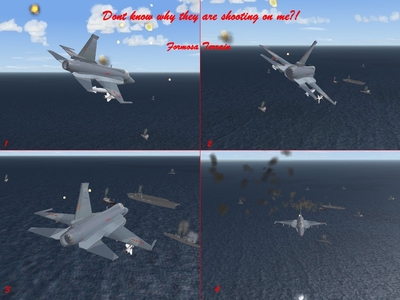
Formosa terrain now with carrier battle groups. Dont know why this american bastards are shooting on me:
-
-
The real E-8 taken from a russian web site
-
You should make the air intake section longer, so that it fit into the engine section.
-
This bird was called "Sotka". "Cost a hundret tons of gold" and was much to expensive.
