madvad
-
Posts
505 -
Joined
-
Last visited
-
Days Won
5
Content Type
Profiles
Forums
Gallery
Downloads
Store
Everything posted by madvad
-
-
-
Hello! E aí, beleza? Bem vindo!
-
SF2 not well optimized for newer systems?
madvad replied to JamesWilson's topic in General Discussion
Its a old game running in a 32-bit software engine. So, don´t matter how much RAM your machine have, the SF2 never gonna use more than 3Gb or something around this. Its the same with Windows 32 and 64 bit versions: you need the 64-bit version to take full advantage of all the installed RAM. -
 A must have!
- 1 comment
-
- 1
-

-
- 1960th
- battle of britain
- (and 1 more)
-
Operation Desert Storm: 30th Anniversary Edition
madvad replied to Menrva's topic in File Announcements
What do you mean? I've always used LGBs to attack any ground target, be it tanks, AAA, etc. and "hard" targets like hangars, buildings, etc. But it is only possible to aim at these targets if you have the designator pod. Without the pod, the bombs will only hit the primary target, because as the game manual says, it is as if "some FAC or soldier on the ground was illuminating the target with a laser". Therefore, the pods are not just "eye-candy"...without them the bombs do not really "lock" on the targets, with the main exception for the reasons stated above. -
Happen to have a question for terrain masters present
madvad replied to simonmiller416's topic in Mods & Skinning Discussion
Something that really frustrates me a bit is the lack of scale in the buildings. I know there's a reason for that, they always seem far away, but when you put the aircraft next to the building, it looks like a miniature. -
Can I give my 2 cents?: The Saab´s Draken and Viggen, Tomcats... These models are superb 10 or 15 years ago, but the news models/modder raised the bar, and these planes gonna look awesome with the new "standards"...
-
SF2NA USS California showing up with black texture
madvad replied to BernardStaCruz's topic in General Discussion
Probably the file is corrupted -
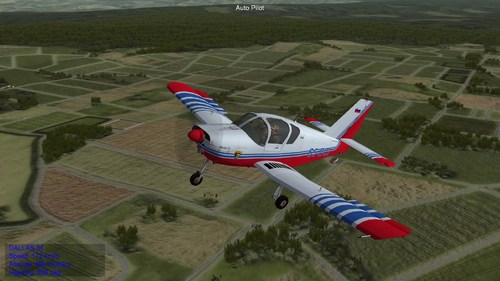 Yes, I tested it and it only works with non-Hard flight physics. And a tip for future fix updates: the rudder and ailerons have inverted movements.
 -
Dunno why, but is unflayable for me. Just explodes on the runway in the beginning of the flight, and if I start already in air, is uncontrollable, only flying straight with autopilot. Maybe its because I use hard settings for controls?
-
Never saw that happening
-
Do not play the merged games using SF2 Europe. My sugestion is play them all using the newest of them all, the NorthAtlantic.
-
Yes...I can play Rent´s GermanyCE whitout a problem, Anatolia V1 and others heavy detailed maps whitout a problem, but others like Anatolia V2, IraqWA80 and ODS 30Th I used to play smoothly, but not anymore, crash almost 50/50. Something is changed, and I dunno what. Probably something changed in the NVIDIA/Windows drivers a while ago and is causing this.
-
I will try to force DX9=TRUE and see whats gonna happen... It doesn't seem right to me that a crash while the game is still loading the objects has to do with the graphics capacity of the video card being powerful or not, because the action hasn't even started yet, and if it did, theoretically it would run with very low fps, or it would crash while the game was running.
-
And I agree with you. I've already checked my GroundObjects folder and there weren't many high-res textures. The ones I found, I reduced to 1024, and to be honest, I didn't see any difference in gameplay in terms of visual quality. There are things that don't make sense to me, like a missile or rocketpod with 4096 textures, for example.I think it's unnecessary, it's such a small object to have such a refined texture, taking up resources, especially in SF2, which everyone here knows has terrible memory management. (It would be great if there was an automatic memory cleanup in the engine, between one mission and another, it would solve a lot. This probably wasn't a problem when the game was created, and it used textures in 256, 512 and few objects). As I said before, I understand that many may think that my video card is insufficient, but in my opinion, the crashes that occur have more to do with some failure like this at 80% than with graphical inability. Remembering that this doesn't always happen, generally only on maps where the map creator himself has already warned that CTDs can occur. What bothers me is that I used to play without any problems, but now I don't. Maybe some recent NVIDIA driver started causing this, because when I look in the event viewer, the error is associated with "DX10.dll". Who knows That's why I thought that maybe some different configuration in those flightengine.ini parameters could fix this. ArmA has always been a co-op game, focused on milSim. So much so that it didn't appeal to the average competitive FPS player, like BF or CoD. When A3 came out, and I saw that strange gameplay, the strange physics, those weird animations, the strange way enemies died, that standard FPS crosshair instead of the excellent one from previous games, I left a bad taste in my mouth. For me, it didn't have the same immersion as the previous games, where you felt immersed in a conflict in Afghanistan, or Eastern Europe. Those futuristic weapons that were so senseless, were unbearable to me (And yes, I know why). I tried to play it for months, but not even the people I played with liked it, and we always went back to the fights in Fallujah and etc. in the good old OA with ACE and other mods. But I understand that for Bohemia it was a financial success, even if it displeased the more hardcore fans. The Reforger seems to me like a call to these old fans, the Cold War era, if the A4 continues on this path, I think it will be cool.
-
OFFtopic: The ArmA series is the game of my life. I started with Operation Flashpoint, then I moved on to ArmA2+OA, where I have thousands of hours, created mods, servers... for me, it's the perfect MilSim game. When A3 came out, I bought all the DLCs and was super excited, only to be deeply saddened, because, in my opinion, they ruined the game. The graphics were obviously a huge improvement over OA, and the Workshop was an innovation, but other than that, the gameplay and storyline, I found horrible. They tried to make ArmA more palatable to FPS players like BF and CoD, and I didn't like that. I went to play Reforger without high expectations, and to my surprise, it's basically an A2 brought to 2024, obviously with its limitations, after all, it's just a "test mule" for A4.
-
Yeah, this is what I talking about. Video cards aside, I think there is another reason for these crashes. As you mentioned, I used to run the campaign in Anatolia without any problems, and with the new terrain, and using the same aircraft, etc., I have been having crashes. I don't know if it has to do with some NVIDIA update, there was one of them that my game didn't run at all, I reverted to the previous one and it worked. And today with the latest driver, it works as well. I know that my video card (1050Ti) is far from powerful by today's standards, but I don't consider my machine that bad (I5 from not so old generation, 16Gb RAM), and I run several current games with graphics set to good settings without any problems, such as ArmA Reforger, GTA V, Assetto Corsa and others. Another example is my notebook, with a 3GB video card that used to run smoothly what I can't run today (like ODS 30Th for example). For example, the "Iraq 80" and "IraqWA" maps from ODS suddenly stopped working, even though I had already reinstalled them and done everything. "Iraq 03" and "IranIraq" work fine, just like the GermanyCE (you mention doesn't work for you, it's ok for me). I have the impression that something is corrupted, I don't know... I still don't understand... :)
-
Yes, but apart from that SF2 itself has a problem related to the allocated memory hash, and it crashes after some missions. If the mods are getting heavier and heavier, what are we going to do?
-
Well, that's what I believe. Missions with large maps full of details like Anatolia are a matter of luck, they often crash. I remember that in the past everything ran without any problems, but then I also remember that in the past there were no mods with textures of such high quality. When I see that the mod has very high textures, I convert and reduce them to 2048 or 1024. But...
-
Guys, analyzing the reason why sometimes my game crashes at 80% of loading, and the reason appears to be something related to directx10.dll (even though I have a 4gb video card, which I consider OK for an old game like this), I went to take a look at this flightengine.ini file and found some entries that I would like to know what they do, such as the ones I pointed out: [GraphicsSettings] ZBufferDepth=24 MaxVertexCount=16384 MaxIndexCount=98303 MaxTextureCount=4096 MaxModelType=2024 //MaxModelType=2048 MaxMeshPerScene=4096 //MaxLightPerScene=256 MaxLightPerScene=512 MaxModelPerScene=2024 //MaxModelPerScene=2048 AspectRatio=1.333333 MinPixelSize=1.0 [UnlimitedDetailOption] HorizonDistance=62000.0 //HorizonDistance=70000.0 DetailMeshSize=11 DetailLevel=2 WaterEffect=2 NoiseTexture=1 //MaxTextureRes=-1 MaxTextureRes=3072 The ones that are listed as commented // I probably copied them from someone over the years, but to be honest, apart from the obvious ones, I don't know what they improve individually. And if anyone has a file like this that allows some improvement in the game, or even that fixes what might be wrong with mine, I'd appreciate it.
-
-