


MigBuster
-
Posts
9,165 -
Joined
-
Last visited
-
Days Won
27
Content Type
Profiles
Forums
Gallery
Downloads
Store
Everything posted by MigBuster
-
That about says it all - despite the history behind it all the conflict is still very much in the minds of all - The Falklands will never be given away now.
-
A sad sight - but quite a lot more there than what they have found http://news.bbc.co.uk/1/hi/world/americas/8530165.stm
-
Mr C5 - glad to see you're still around!
-
Make a copy of your folder with the mods in it. Delete the one from saved games, run the game again to create a new one, Then copy the subfolders from your modded folder over - but don't overwrite options.ini
-
View File F-16A SEA skin for Mirage Factory Blk1/10 Alternate South East Asia camo scheme for the Mirage Factory F-16A Block 1 and Block 10 - Non wrap around for a request size: 1024x1024 Tested on (Mirage Factory): F-16A Block 1 (folder:F-16A_Blk1) F-16A Block 10 (folder:F-16A_Blk10-NDC) Please read the README file to ensure the decals are installed properly. Many thanks to the Mirage Factory for the F-16 Model. Press the button below to download this skin and save it to your Desktop. Migbuster Feb 2010 Submitter MigBuster Submitted 02/21/2010 Category F-16 Fighting Falcon Skins
-
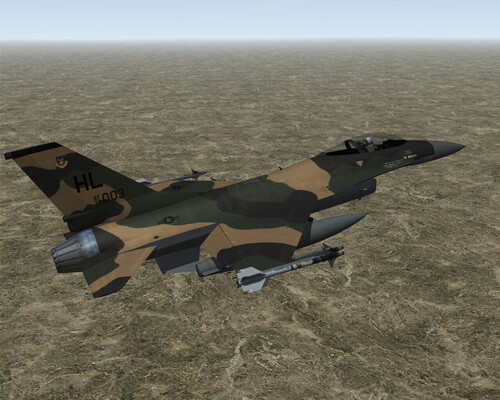
233 downloads
Alternate South East Asia camo scheme for the Mirage Factory F-16A Block 1 and Block 10 - Non wrap around for a request size: 1024x1024 Tested on (Mirage Factory): F-16A Block 1 (folder:F-16A_Blk1) F-16A Block 10 (folder:F-16A_Blk10-NDC) Please read the README file to ensure the decals are installed properly. Many thanks to the Mirage Factory for the F-16 Model. Press the button below to download this skin and save it to your Desktop. Migbuster Feb 2010 -
Just when you thought you had caught up...
MigBuster replied to FastCargo's topic in General Discussion
Keep your NF4 install at the patch level its designed for Just update your other installs to later patches. -
Sukhoi T-50 PAK FA - first flight!
MigBuster replied to Kulbit80's topic in Military and General Aviation
A nice new paint scheme -
Love those books - my F-105 Units turned up last week.
-
Ace - does that put us at the bottom of the table now Still well done to her - cant be easy having to do all your training at an Xscape Wheres Eddie the Eagle when you need him!
-
Another dispute over oil again - whod have thought - hopefully it wont come to anything though - besides I dont think the Argentine FAA have half the resources they did in 82 - and pretty much the same ancient jets. With a determined Sea assualt taking a lot of casualties - Argentina might be able to retake the Islands, and get a nice big airfield along with the bargain though not sure how theyd hold it. We could then send our task force again...with GR9s only...great!
-
If you see section 23 - which isnt that detailed but when dealing with hardpoints you have to consider most of the params - so you need to check the missile and hardpoint values too see they are correct - check the nation of the missile, the weight etc etc As for pylons with two entries, check out the stock F-4D and notice how the AIM-4 and AIM-9s have separate entries for exactly the same pylon
-
First Squadron of JF-17 Thunder inducted in PAF
MigBuster replied to ghostrider883's topic in Military and General Aviation
They need more pics of that thing - bet India is just shakin in its boots btw -
An easy / basic way - Find any SF cloud Mod and just take the cloud1.tga file from it and stick it in "Flight" ...sorted Actually I think the cloud rotation maybe a limitation of using 2D clouds - not sure though
-
Converted the SU-27 over when SF2 came out without any problems like that. see here to make sure you got it covered: http://forum.combatace.com/topic/44026-converting-older-planes-to-work-in-sf2-a-basic-guide-by-migbuster/
-
Theres a bit much there to what you are asking, mnost of your questions can be found by 1. reading the manual; 2. looking at old threads (its all been covered) on here/simhq/frugals(when back); 3. Practise the training missions over and over. heres some basics - if you are using realistic avionics: 1. unlock the target and lock up another one on radar (RWS/TWS), or if they are close use an ACM mode to lock them automatically. 2. You will see the circle get bigger when its in range - you also have other cues - all in manual 3. depends - with IR or Active radar (eg R-77) you wont get a warning - with R-77s - they will show up on your RWR when they go active - this may be too late to save you though. 4. Here you need to use your radar to take out the MiG-25s, then move the radar antenna to find the MiG-29s quickly and take them out - may be best to use unlimited ammo herefor practise - there are about 8 planes in theatre. 5. You can use zoom and NVGoggles (with trackir) - or use the Missile view key even to take a look. Pitbull just means your AMRAAM has gone active - this is in the manual 6. if they have missiles die every time - you screwed up getting into that situation! - if you are talking about the porked radar training mission then learn to shoot with the radar modes and fly fast - dont let any get on your tail or you are dead.
-
Did you delete the original wwiverdun/cambrai folders out of "Terrain"? - if so put the .cat files back in wwiVerdun and wwiCambrai
-
Just incredible work!!
-
Amazing!
-
Sukhoi T-50 PAK FA - first flight!
MigBuster replied to Kulbit80's topic in Military and General Aviation
Taken with a pinch of salt - as all his other work in trying to put down the F-35! -
Wow - nice one!
-
Im sure thats wonderful - but putting it on here wont help you. Maybe add it to the list of requests on the 3rdwire forum
-
Nice shots there - I was suprised at the size of the global Hawk also!
-
Pretty sure from previous threads - that the patches for the original release dont work with the D2D version. You will notice on LPs site there is a 1.0.12 to 1.0.13 patch specifically for D2D - Is the game you have defo at 1.0.11 - if so is there not a 1.0.12 patch on Direct Drives site? If you look at some older threads some people have had the same issue
-
As above - only your actual wingman can attack the target you have specified by pressing E. This is becuase according to 3rdWire - so it forces the player to try and take out the target themselves.