


MigBuster
-
Posts
9,165 -
Joined
-
Last visited
-
Days Won
27
Content Type
Profiles
Forums
Gallery
Downloads
Store
Everything posted by MigBuster
-
If its just terrain tiles and tods for a repaint then expect it work fine if you put it in the right place. If it references anything in SF1 that isnt there in SF2 then it wont work - also if the terrain has old ini files in it you may need to rework them using the new versions - but depends
-
runs in Win7 64 bit okay on a quad core - put in the enbseries mod it maxes out too
-
Make sure you have the correct version of the weps editor for that version of the game - only one will work. In your objects weapons folders ahould be all the weapons files and a file called weapondata.ini - thats the file that you open with the weps editor. When you save it with the editor weapondata.dat is created in the weapons folder also. If the weapons are showing in the editor and you have the above files then check the editor version
-
Cant compare unless I bother sticking XP on my intel i7 PC (which wont happen) - but yeah Win 7 64 bit is great so far
-
Firstly - Make sure you have saved the file as bfops.cfg and not bfops.cfg.txt - because im sure that works for ATI cards also. Install the game outside program files also
-
Yeah you can install SF2s in the program files as normal and it works fine.
-
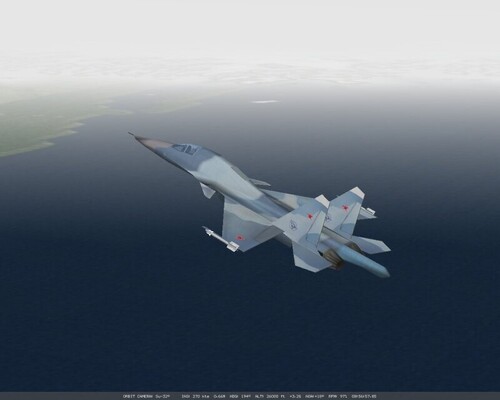
257 downloads
SU-32 and FA-18E skins for Falcon 4 Allied Force Install using the skinpack installer from The Gamers Tools http://www.thegamerstools.com see the readme -
Knew him from playing Wing Commander Guy Gibson in the Dambusters! RIP
-
A guy called Aeyes used to sell and give away pits on his site - best to look for the RV forums. Not sure if hitiles AF actually works when RV is installed - again best to check their forums.
-
You are sticking them in the wrong place I expect - see section 1 here: http://forum.combatace.com/topic/44026-converting-older-planes-to-work-in-sf2-a-basic-guide-by-migbuster/
-
For the old F4 there is Red Viper and Open Falcon - both are seperate mods As for other planes RV may have some instructions Jeez!!! Well mate guess youve never tried the the strike fighters 2 series - maybe its about time you did - try SF2 or SF2 Israel - best money youll ever spend
-
what you mean a proper layout of a sam site like you find in YAP?
-
could be this http://www.lead-pursuit.com/FAQ_01.htm I hear the Intro video music, but no movie shows. Sometimes I also can not get into the User Interface - the parachute icon shows, but I need to press CTRL+ALT+DEL to close the program. What is wrong? You might have installed a 3rd party video codec packages. They can cause all possible issues and problems. For example, the K-Lite video codec package is known to cause problems with Falcon 4.0 Allied Force. If you have this installed, do the following: Open Klite Codec pack > Configuration > Fddshow > Video decoder configuration and change the MP42 format entry to disabled by clicking on libavcodec. As a result the standard MS codec will play the AVI movies and FDDshow is not used for this type. Falcon will run fine with movies then. You could stop the intro movie like this "Quick workaround: In the shortcut commandline ad this: Falcon*.exe -nomovie"
-
Nah its the green hell 2 vietnam repaint in sf2v
-
Now thats a terrain!
-
NOV 2009-B Patch for Wings Over Israel 2 out
MigBuster replied to Flanker562's topic in General Discussion
Yep includes ecm on/off weapons select/message/targetting/ - thats gonna be a big change. Looks like you get a break warning from ground fire too. The main fix not listed is the F-16 glass canopy has been fixed - yah!! But the performance isnt too bad now - nearly on maxed out. -
also: http://forum.combatace.com/topic/44798-adding-aircraft-to-campaigns-in-sf2/
-
NOV 2009-B Patch for Wings Over Israel 2 out
MigBuster replied to Flanker562's topic in General Discussion
This has fixed some stutter issues as well i hope: This Update is for Strike Fighters 2 Israel - stand-alone or merged to other Strike Fighters 2 games. This Update contains all the fixes from previous patches, and it can be applied to any version of the game. Earlier patches do not need to be applied. Nov 2009-B ---------- * Speech subtitle is now color coded - red indicates warning against the player, yellow indicates other speeches to/from player's flight, and blue indicates all other radio chatter. * Less messages are displayed when HUD option is set at Hard setting. * Overcast sky is rendered correctly in cockpit mirror. * Reduced some graphical artifacts showing on horizon with Effects setting at Unlimited. * V-sync is enabled by default in DX10 mode. * Full-screen anti-alisasing now defaults to a lower-quality (and better performance) setting. * Version number displaying incorrectly on the Main Screen is fixed. -
If you are moving the old A-6A cockpit from WOV to SF2V - you need from the object.cat 1. All the A-6 pit files - A-6A_pit.lod, A6_pit1.bmp, A-6A_trim2.bmp etc.............. 2. You need these too: angle_of_attack.bmp radar_gauge.bmp vdi_component.bmp altimeter.bmp clock.bmp rate_of_climb_indicator.bmp f-8e_pit1.bmp gauges15.bmp integrated_position_indicator.bmp power_trim_a.bmp phd_numbers.bmp accelerometer.bmp fuel_quality.bmp dvi2.bmp
-
Fantastic job on this - looks amazing - should be a must have for all WOV and SF2 users
-
Well im sold - where do i sign up
-
Use the catpack extrator - instructions in the SF2 knowledgebase
-
VietnamSEA_Tile_Repaint_v1.0 in merged SF2+SF2V+SF2E?
MigBuster replied to AGOSTINO's topic in General Discussion
You need the GH2_WS_kit from on here http://forum.combatace.com/topic/39923-sf2ve-fixes-and-tweaks/ -
Hello 1. Do you mean the non flyable jets that cant be selected in game? 2. Which config file? Normally it means change the numbers - they have to be in sequence: [223] .... [224] .... etc This needs to come out of the KB btw!!
-
Sorry to hear that Allen - hope youre okay!