Crusader
-
Posts
4,164 -
Joined
-
Last visited
-
Days Won
40
Content Type
Profiles
Forums
Gallery
Downloads
Store
Everything posted by Crusader
-

Yak-38 Forger cockpit
Crusader replied to Stary's topic in Thirdwire: Strike Fighters 2 Series - File Announcements
Check Position= entry in cockpit ini, theres a double entry : Position=Position=.......... -
Bien, buen trabajo :) OK , nice work :)
-
Check the big white FUERZA AREA ARGENTINA, I think there's a E missing ... should be AEREA
-
COMAERO .. excellent series :)
-
Na, he doesn't make a Mitsubishi F-1 ;D
-
you can open the LOD files with the standard text editor ( make sure to uncheck the 'open with editor by default' box if you want) and then use the search function to look for BMP to find the required textures
-
Eurofighter Typhoon preview pic on twitter
-
weapons shadow
Crusader replied to ravenclaw_007's topic in Thirdwire: Strike Fighters 2 Series - General Discussion
Add-on weapons must have the same name for: folder main ini typename lod + lod name in data ini and the proper shadow section in the main ini Or the shadow wont work. If a new lod is made for a stock weapon,t hen it must have the same lod name as the original, Using a differently named lod in the data ini will break the shadow function, as the Mk82 example shows. -
And he continues.. with Su-27 and T-50.. links to TW Twitter page
-
My try at 3D objects
Crusader replied to gerwin's topic in Thirdwire: Strike Fighters 2 Series - Mods & Skinning Discussion
Add_to_Targets.ini [TargetArea00X] Name=Airfield 7 with US vehicles ... The template has Soviet vehicle entries ;) -
check length/diameter/weight/specific station code limits of the station nation/export/service years settings in missile data nation/export settings of the Vautour IIN
-
Supermarine Swift
Crusader replied to Alexander51's topic in Thirdwire: Strike Fighters 2 Series - General Discussion
F.Mk.1 2x 30 mm ADEN with 200 rounds each F.Mk.2 4x 30 mm ADEN with 150 rounds each From Warpaint #58 Supermarine Swift -
Maybe the lod calls for a jpg texture.. save the bmp as jpg and see what happens From what weapon pack or DL is the SUU-20 .. post more info then we can take a look
-
you can check if the texture is used by making a new BMP with the same name but use only red color for it . Or repaint the grey texture
-
A-7D gunsight
Crusader replied to Delta6Actual's topic in Thirdwire: Strike Fighters 1 Series - Mods/Skinning Discussion
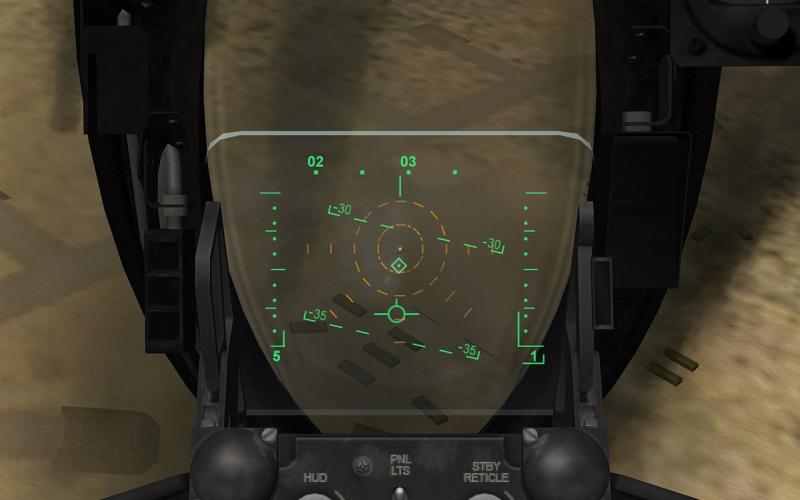
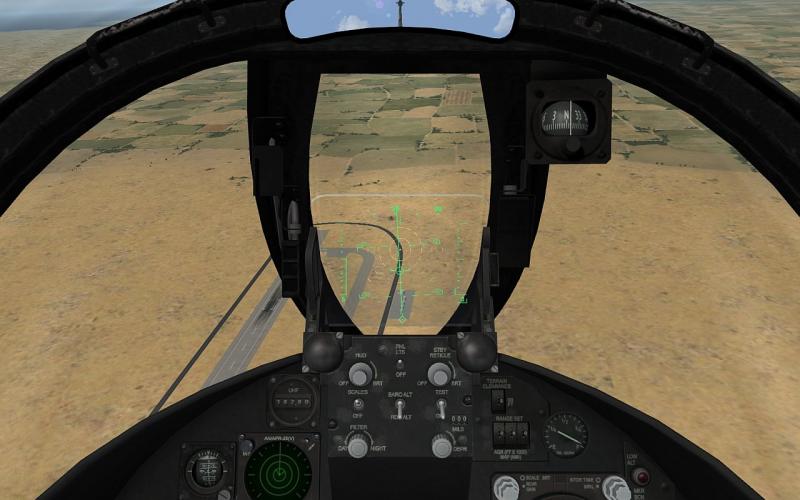
Tested in SF2 only but should work in WOx version Israel and later dark bright new: very bright how : move the 4 tgas into A-7x\Cockpit extract cockpit ini and replace the GunsightFront section with the data below: [GunsightFront] HasGunsight=TRUE GunsightMilSize=150 GunsightName=A-7D_sight.tga LeadComputing=TRUE MinLeadRange=500 MaxLeadRange=500 DefaultLeadRange=500 MaxDepression=260 DefaultDepression=50 GunsightFixedImageName=A-7D_sight_standby.tga The standby reticle is displayed with A2A gun, A2G gun bomb rocket selected. Two Three sights to choose from, dark and bright versions. EDIT: Added a 3rd, very bright (Stary color from his MIII/Nesher sight mod) version which is visible in most light conditions The A-7D_sight.tga is only resized to keep the size proportional to the new standby reticle. I'm making a mod for SF2 for all TW A-7 versions which also includes a HUD steerpoint mod. EDIT: attached file now includes a 3rd, very bright sight which is used by default A-7D standby sight.zip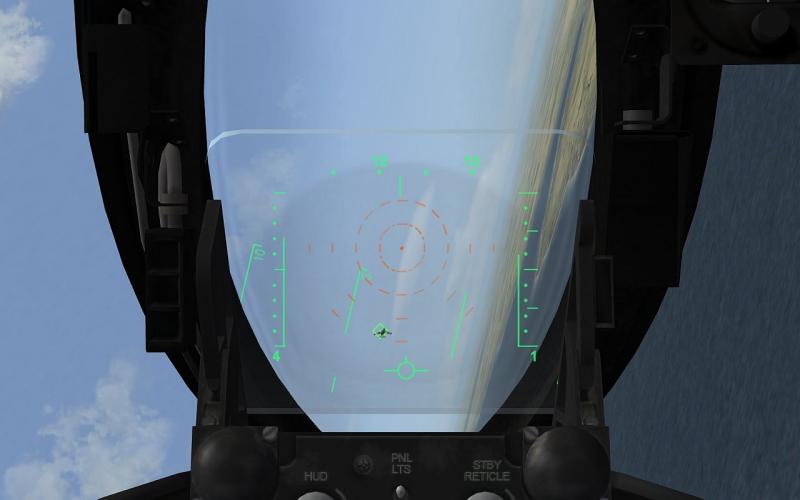
-
RAZBAM and flightengine.ini
Crusader replied to beachav8r's topic in Thirdwire: Strike Fighters 2 Series - General Discussion
Further down in the ini, you'll find [View017] ViewName=ShoulderView ViewClassName=ShoulderViewClass UpdateAlways=FALSE ViewGotoControl=GOTO_VIEW_SHOULDER CycleNextControl= CyclePrevControl= ObjectFrom=SearchAircraft PositionOffsets=0.0,-20.0,4.0 <----------- -
No problem, put "original template by The Mirage Factory" into the readme and you are set.
-
RAZBAM and flightengine.ini
Crusader replied to beachav8r's topic in Thirdwire: Strike Fighters 2 Series - General Discussion
Definitive trash the old WOx FlightEngine.ini It had the GraphicsSettings values increased by a factor of 4 to use the (then) high-poly A-6 models. The latest SF2 series FlightEngine.ini has the increased values by default. Also different are the three SceneClip datablocks which are completely replaced by new blocks for SF2, and the DetailOptions have a new HIGHDetailOption which was not used in WOx. Thats probably screwing up your pit textures. Trash the old ini , problem solved. -
Superb project :)
-
http://en.wikipedia.org/wiki/James_Robinson_Risner
-
Do you have any add-on terrain working at all ? If not, check and make sure that the foder name is Terrains .. with S at the end.... the old SFP1/WOV series used "Terrain" which is not a valid folder name for SF2 series
-
F-4F Link zum Film auf spiegel.tv
-
Some editing .INI help
Crusader replied to Wilches's topic in Thirdwire: Strike Fighters 2 Series - General Discussion
The brute-force "retract at all costs" method.... whatever works ;D -
Great textures !
-
Some editing .INI help
Crusader replied to Wilches's topic in Thirdwire: Strike Fighters 2 Series - General Discussion
If it is animated together with the main gear ( one animation, which is the case IIRC, ), then you cant separate the tail wheel by changing ini stuff. I've heavily updated the 129 for my own WWII/ WoR install which is somewhere in deep storage now. All kinds of stuff.. from engines, RPM, cockpit RPM gauges, ammo counters, ammo loads, gun pod ammo loads, armor ... But I too had to live with a (inaccurately) retracting tail wheel :D And the canopy is opening the wrong way too, IIRC.. moving up instead of sliding back...