Wrench
-
Posts
28,322 -
Joined
-
Last visited
-
Days Won
188
Content Type
Profiles
Forums
Gallery
Downloads
Store
Everything posted by Wrench
-
I just wish I had the MAX files from the TMF Mk.1 -- it'd be easier to make the Mk.V from that by simply added the cannon barrels and magazine bulges ------------------ Ok, Volker, I'll get you everything I have, the model in game, inis, and the MAX file as soon as I can. I say we simply stick to finishing it as the Mk.IX. Easier, simpler, less work and all that! Many thanks from me, the Mod Mafia and the community!
-
still nothing.. I posted the question on the 3W FB page, so we'll see if anything matteralizes
-
EffectOffset .ini entry - starting position?
Wrench replied to swambast's topic in Mods & Skinning Discussion
world center of the object, iirc (like the smokestack effect on the GeneratorBuilding1) . for the stand-alone smokestacks I've been using, it also the 0/0 point (center), but 100 meter up. Even then, they're not always perfectly centered I assume you're using Mue's Lod View for coordinates? also, don't forget I have "fake smokestacks" if you need them -- for building with multiple venting solutions -
I can't remember what it is, but it's one of the inis that came with that mod turned them off. Done for historical reasons. EDIT: check to see if it added a HUDDATA.ini; that one controls the Map Icons
-
it's got a lot of small, extra bits hanging off it, some "thing" in the aft radiator outlet ducts; needs the outer wing meshes cut from the (single piece) wing mesh. Maybe some other stuff I can't see in MAX or the LOD viewer. Also explodes on the runway at mission start. The MAX file is dated 2006, so will need updating to the latest version. As you can see, I have MAX 2009, so I can open the file; just never learned how to work the damn thing!!! If someone can finish it, that would be great. I"ll have to check with Crusader, of course, as this was one of Oli, but I"m sure it'd be ok. As you can see, it's mapped and skinned (and decaled, too!) already. Making a Mk V out of it would take a LOT of work; there's some major differences; not the least of which is the 3 bladed prop, different radiator (oil cooler) under the right wing, and so forth. But I have plenty of data (books on pdf)
-
no and we never finished the Mk.IX either (meaning I've never found someone to do so) But Cocas & I did the Mk.Vs some year back; they're in the download section
-
FM will need a rebuild as well, given the 10 years past since it's release
-
I would try it in the TE -- maybe a fault in the TFD tool. It' looks like an incomplete statement, but I'm assuming that mountain tile has no alpha objects (trees) and definately no solid objects (houses) for TOD items
-
Same here -- can only get to the main page. well, lets just hope it's only down for maintence (with a notice posted), and not what we've been fearing for some time now ...
-
I've never even come close to that number; somewhere below 200 is as far as I've ever needed. I don't use the TFD tool though for The Big Jobs, that's for real 'fine tuning'; fiddling of local (1-2 tile sized) height fields. 99.9% of all my work in done in the 3W TE. In that, like other 3W "things" my guess would be 999, but no one has ever gotten (or needed to go) that high. To get tile alignments correct, are you using my "north arrows" trick? (TFD can't do that as it only uses the tiles DIRECTLY in the terrain's folder) EDIT: are we talking total number of tiles on a terrain, or total of differing types? For total numbers, I know SF2 (for example) can be in the 10s of thousands - and believe me! I know!!!)
-
added to KB, with new screenshot
-
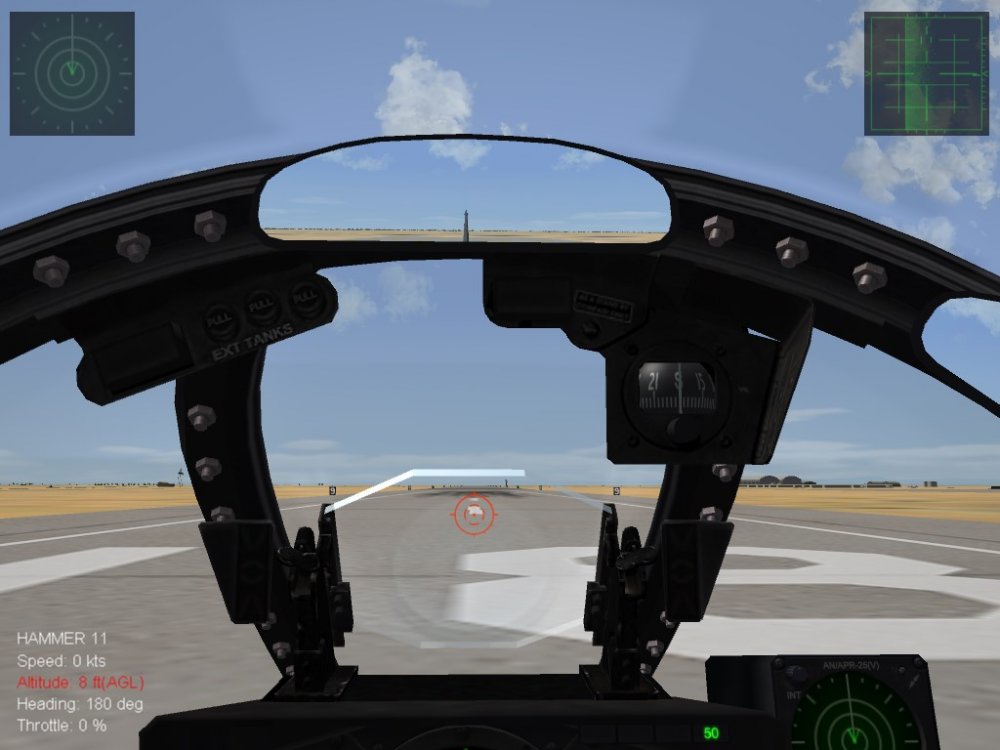
by Crusader, added from an old post of his in the SF/Wo* Forums -- Extract HUDDATA.ini and place it in the FLIGHT folder Add this : RWR will show up permanently for all aircraft that way It also works for aircraft which have no RWR display in the cockpit Just requires the RWR section in avionics ini and DetectSystem section in the aircraft's data ini. (note: if you don't know what these sections are, extract and examine the data and avionics inis of an aircraft that does, example: F-4E, F-4J, F-105D_66, F-16A, F-14A, F-15A for later TEWS equipped) To switch it off, cycle ALT+D game HUD modes. Or comment out the newly added statementy (image below has viewpoint scrolled up, to show the RWR window above the windscreen framing) Works in both SF/Wo* and SF2 series
-
- 4
-

-

-
yup!
-
you did put it into the VNSEA folder in the mods folder, right? The one in the C:\Users\Kevin\Saved Games\ThirdWire\StrikeFighters2 Vietnam (using mine as an example) There is not be a **/Terrains/VietnamSEA terrain folder by default in the mods folder, so you'll have to create one
-
should be!
-
thought that's what would happen -- that mesh is set as "self illuminating" in MAX, and can't be removed. But, hey, as long as you aren't in the outside view, you'll never see it (enemies will, of course)
-
aren't they self illuminating from the lOD? They may not be removable
-
my ancestors (mother's side) come from the Kiev region. Other than that....
-
so, the most obvious and simplest answer, given in post #3 wasn't good enough??? thanks for helping to guy out, Florian!
-
how many times do we have to say that many SF2 lods are exported in Unicode? That is invisible to SF1. Changing the format of the ini to ANSI and the jpgs to bmps won't do anything.
-
and salt; don't forget salt. just like me
-
Well, since no one has given the obvious answer, I guess it's up to me.. I do hear that capun does custom work for 65 USD an hour .... ducks and runs .....................
-
did you also reload DX9? check the /Effects folder for the proper effect parts (inis, tgas, etc) Did you check the complexity setting in the /Options menu? Also, do NOT install the game to the C/ProgramFiles *** section. All 1stGens should be installed at the root of C/ (ie: C:/WoE)
-
when you said Vampires, THIS is what came to mind:
-
from mue's read me: