


Wrench
-
Posts
28,331 -
Joined
-
Last visited
-
Days Won
189
Content Type
Profiles
Forums
Gallery
Downloads
Store
Everything posted by Wrench
-
oh! good one Brian!!!
-
If the "addon" parts are disappearing on parked aircraft, then someone had done the 'fake pilot mod' incorrectly. the additional part added is used as the PILOT SEAT, not the pilot himself -- and seats always show up in the aircraft, parked or not. For example, below is the statement I used to add a centerline pylon to Wolf's P-39 Airacobra: [PylonC] SystemType=Pilot_Cockpit Position=0.0,0.0,0.0 PILOTMODELNAME=FakePilot SeatModelName=T-28_PylonR SeatPosition=0.000,0.256,-0.90 SeatID=2 the 1st position listed places the "fake pilot figure" at the world center of the model -- where it's completely hidden from view. The 2nd, or SeatPosition= is the location of the item being added. the "fake pilot" lod and and it's associated stuff are just there to create a "pilot figure" for the game to load. The actual item itself, is a 1 pixel square box, literaly invisible in game. The "seat" is the item added. Which as you can see above, has to be positioned accordingly ============================== Edit: Ok, I had to download it and see. WoW. A waaaaaaaaaaaaaaaaaaay oversized mod. Converting the skins to jpg would reduced it by at least 50% or MORE. Nobody need skin maps in bmp format that are 12+ megs. EACH Anyway, here is where you screwed up: [50] SystemType=PILOT_COCKPIT PilotModelName=IIIR Position=0.0,0.0,0.0 CanopyNodeName= SeatID=2 compare this statement, to mine above. The differences become readily apparent. Make the necessary additions/adjustments and the problem will be solved. Of course, you'll have to reupload the aircraft. Which is what I'd suggest.
-
maybe so, "but a good coat of paint hides a multitude of sins" It looks fine in my installs!! and as pretty much all the AAF Airacobras were out of service by the end of 1943, it's a small matter. Unless one counts the Free French or Italian (after switching to the Allied side) in the MTO
-
we have a WHOLE Forum for "What Ifs..." we have several hundred REAL aircraft that need replacements; leave the fantasy shit out of this veltro's Airacobra nearing completion
-
new B-25s (many variants) New A-20s (many variants) Lists of required marks available on request I've got buttloads of decals for all, but they need a "new" home Cocas was working on a P-47C Razorback, which I'd hoped we'd also build a D and D-35 (with fin extension) from. But, he's not been around for a while Also, we had several late mark Beaufighters planned (at least 4 different physical models). But .... ????? for those that don't see the stickies: http://combatace.com/topic/77259-what-freeware-aircraft-would-you-like-to-see/ albeit a bit outdated (some of the 'requested' aircraft have been released) Ed, any plans for the J model Liberators?
-
yes, it is "at the moment"
-
as in F-14A
-
SF2NA, iirc
-
mine work fine. do you have the actual 88mm_flak36 gun in you /Guns folder??? (the folder will have that same name) you can always open the data ini for the 2 88s and swap out the gun for "85mm_KS12" and test. But ONLY for the flak36, as there's an arty version as well
-
and a beer Important Safety Tip NEVER drink and mod!!! The extracted file goes into the MODS FOLDER, /Flight folder -- it doesn't stay in the 'core install'. If it does, it don't do nothing
-
Reagan gives Thatcher a bone (allegedly)
Wrench replied to Spinners's topic in Sci-Fi/Anime/What If Forum
hmmm... one can take the title 2 ways. glad you didn't use "gives thatcher the bone" sorry...mind the gutter this weekend! -
you don't. you drop the edited file into the /Flight folder. Create one if one doesn't exist.
-
Just a nice day for flying over the Med
-
you released an early version of the Airacobra in 2010, but it 'vanished'. We could USE a newer one for sure!! If you do, don't forget UVMaps so we create a new template for it (hint hint) for various skinning purposes ------ Ed, I have the 4+ book on the Tempests, if it'd be any help to ya. Lots of 3 and 5 views
-
BTW, Alfie, the AD-6 was the A1-H AD-4s don't have an equivilant post-McNamara designation, having been retired in 56/57 another reason why I use only decals for marking. makes things easier, eh?
-
It is an A-9 by the DAT
-
View File SF2 WW2 ETO RAF Coastal Command Fortress IIA Pak SF2 WW2 ETO RAF Coastal Command Fortress IIA Pak 5/10/2014 -- Something for the WW2 ETO players -- = For SF2 ONLY, Full-5 Merged (Reccomended/Preferred) = **Note: Having any SF2 series game is HIGHLY reccomended, as this mod references the stock destroyed An-12. Also, due to modifications to various inis, this mod will probably -NOT- work in 06/08 level 1stGen game installs. This has not/cannot be tested by me. SF2NA is REQUIRED as part of you game installs, as this aircraft uses several NA-specific mission tasking for it's Naval Search and so forth.** *This is a "Theatre Specific" & Nationalized release of Veltro2K's NEW!!! B-17E Flying Fortress Heavy Bomber. This package contains the Fortress IIA for RAF Coastal Command, in Europe =ONLY=.* There is 1 skins/decal set in this pack: No. 220 Squadon, RAF Coastal Command, as based in Northern UK and Northern Ireland, for North Sea and Atlantic patrols. The Skin is in jpg format. The serials ARE historically correct for the aircraft, but should be considered 'generic' in nature, as they represent no specific aircraft in a particular squadron. All markings are decals. All lighting is historically correct. Damage textures are in DDS format. It should be noted, this mod is for use -ONLY- in an ETO-centric mods folder; research seems to poin to these aircraft having only been used over the Atlantic. In this case, RAF Fortress IIAs were replaced by Liberator GR.V/VI/VII in 1944. When in-game, you'll see: Fortress IIA (V2K) on the aircraft selection. While no other E models exist, this is simply done as a convenience. As always, fairly easy to follow, yet detailed install instructions are included. PLEASE read them!!! PLEASE read the "Notes" section for other important notations. Happy Landings!! Wrench Kevin Stein Submitter Wrench Submitted 05/25/2014 Category B-17
-
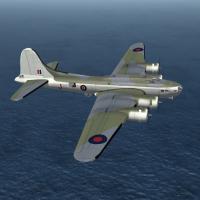
219 downloads
SF2 WW2 ETO RAF Coastal Command Fortress IIA Pak 5/10/2014 -- Something for the WW2 ETO players -- = For SF2 ONLY, Full-5 Merged (Reccomended/Preferred) = **Note: Having any SF2 series game is HIGHLY reccomended, as this mod references the stock destroyed An-12. Also, due to modifications to various inis, this mod will probably -NOT- work in 06/08 level 1stGen game installs. This has not/cannot be tested by me. SF2NA is REQUIRED as part of you game installs, as this aircraft uses several NA-specific mission tasking for it's Naval Search and so forth.** *This is a "Theatre Specific" & Nationalized release of Veltro2K's NEW!!! B-17E Flying Fortress Heavy Bomber. This package contains the Fortress IIA for RAF Coastal Command, in Europe =ONLY=.* There is 1 skins/decal set in this pack: No. 220 Squadon, RAF Coastal Command, as based in Northern UK and Northern Ireland, for North Sea and Atlantic patrols. The Skin is in jpg format. The serials ARE historically correct for the aircraft, but should be considered 'generic' in nature, as they represent no specific aircraft in a particular squadron. All markings are decals. All lighting is historically correct. Damage textures are in DDS format. It should be noted, this mod is for use -ONLY- in an ETO-centric mods folder; research seems to poin to these aircraft having only been used over the Atlantic. In this case, RAF Fortress IIAs were replaced by Liberator GR.V/VI/VII in 1944. When in-game, you'll see: Fortress IIA (V2K) on the aircraft selection. While no other E models exist, this is simply done as a convenience. As always, fairly easy to follow, yet detailed install instructions are included. PLEASE read them!!! PLEASE read the "Notes" section for other important notations. Happy Landings!! Wrench Kevin Stein -
YAH!!! THAT'S the skin we need! Check NDiki's Mustang IV pak for a buttload of premade decals and such
-
stay with decals for the code letters and national insignia as much a possible. It de-complicates things. The only thing you want to paint on are the "specifics" -- like ID bands, Invasion stripes (and use start dates in the texture set inis, so you'll need at least 2 of each squadron -- one with, one without. Don't forget, for the most part, even the 'under stripes' were gone by November/December 44) The only thing the template WON'T have is the actual metal skin, as I suck at NM texturing.
-
Bribe Congress??
-
nope, on the left side since WW2
-
Something fun for you all to spend the weekend reading! Remember like the B and C, the D was built in Inglewood, CA, and the K in Dallas, TX Other than that, same aircraft. Enjoy!! And speaking of the new test FM, I'd change the WEP start throttle position to WEPThrottle=0.95 might make it "last" longer. 0.99 would be better, but I don't think it'd allow that. The section in the manual on WEP is informative.
-
Limping for Home (you can't see it on this pic, but there's now panel and rivet lines under amariani's skin. Should have the full templates done next week)
-
well, at least it's working now! not all the weapons are available for loading on each aircraft. The ODS weapons pack has a lot of stuff, for Coalition and Iragi forces. You should be able to copy that entire weapons folder over, with no issues. It's at the 08 level. You can even add the Hornets if you want. You can always use the "Community Weapons Pack" http://combatace.com/files/file/7791-weapons-pack-252-by-the-wosfp1-community/ It's a HUGE compilation, and unfortunately, you'll have to install the entire thing. Another disadvantage of the 1stGen Weapons system (ala the Game Engine). But that pack IS valid for the 08 patch level. With that pack, you should be able to add just about any aircraft available for for the game (meaning: add-on, 3rd party aircraft). IF you choose that route, rename your existing /Weapons folder to "hide" it from the game engine (or move it to a storage folder)
