


Wrench
-
Posts
28,331 -
Joined
-
Last visited
-
Days Won
189
Content Type
Profiles
Forums
Gallery
Downloads
Store
Everything posted by Wrench
-

160 downloads
SF2 WW2 CBI RAF Mohawk Mk.IV 2/5/2014 -- Something for the CBI players -- = For SF2, Full-4/5 Merged (Reccomended/Preferred) = *There is a possibility that this mod will =MAY= work in SF/Wo* 1stGen game installs; However, due to the excessive modifications made to fit them into the SF2 environment, not all things will work. End Users do so at their own risk.* **Notex2: These aircraft should =ONLY= be used in a seperate CBI-centric mods folder to prevent them from showing up where, historically, they shouldn't. The Aircraft/GroundObject sets for CBI are substantially different from the Central or SouthWest Pacific areas.** This pack contains modifications/reskin/redecaling/etc of Wolf257's P-36 aircraft, and create a nation-specific version for use in the China-Burma-India Theatre by the RAF. This pak contains a skin for: No. 5 Squadron, RAF As seen in the Assam & Imphal Valleys, and Eastern Bengal in late 1941 thru 1942 (end of service approx 1944). It is finished in standard Temperate Day Scheme, with full color markings. A new (semi) compliant SF2 FM was cobbled together. As has become expected, the FM is NOT perfect, and needs further fine-tuning by Experts. New "box art" style hangar screen, New DDS damage textures, New (AvHistory) Engine sound, and a new 20# RAF bomb. The skin remains in BMP format, and decal randomization is set to TRUE. As is usual, all lighting is 100% historically correct. Serial numbers are also historicaly correct for th Mohawk II/III/IV, but should be considered "generic" in nature, as they represent no particular aircraft with the unit depicted. All markings are decals, making it easier for other skinners to replicate the other Mohawk units in the CBI. When in-game, you'll see Mohawk IV (W) on the aircraft selection drop down menu. The "W" is for "Wolf". This is done as a 'just in case' Raven is working on a newer version (which I believe to be the case, maybe?). As always, fairly easy to follow, highly detailed install instructions are included. So, please read them. Happy Hunting! Wrench Kevin Stein- 1 review
-
- 1
-

-
you seem to be missing the required screenshot I'd suggest you get one uploaded as soon as possible also, might want to have the announcement in English as well.
-
in case you hadn't noticed, it's back up. according to TK's post on FB, maintence and/or security issues repaired
-
sure it's the fuel tanks and not the stock 3W pit1?? Known shadow ropes with those for at least 3 years. Reported to TK and never fixed, other than by extracting the pit1.ini, and turning the shadow off (hence, it's inclusion in everyone of my terrain mods. copy/paste it from one of mine, and see what happens)
-
Could be why I've never seen it ... I just stock objects! (or stary's prebuilt TODs)
-
I've never heard of a 'shapetype' entry for any textureset. can you post the statements??
-
couldn't be more obvious ... this one
-
HDs should be ok if it's just the board or cpu here's hoping!!
-
has anyone even thought of doing the metric conversion on the ranges??? thusly.... avionics ini --- data ini's DetectSystem statements.... people, you need to READ the inis!! it's a no brainer! give it a try and see what happens; at worst, you return it to stock
-
Moved to the correct Forum watch WHERE you post .. the original was in the forum for problems with the SITE -- CombatAce itself. For specific game problems, you must post in the correct forum now, with luck, someone will SEE and answer your questions!
-
Mohawks of the Assam
-
I assumed he was asking about Deuces old 'Range' and probably the Red Range terrains. I have a new tileset, based off the IME/Desert conversions I did for the 'modern' North Africa/Eastern Med. should make the final tweeks, and upload them
-
check the data and avionics ini... they still call out the old 3-ring statements. change this line from the data inis, DetectSystem section: HasRWR=FALSE and either comment out or delete the RWR statement from the avionics ini. easy peasy
-
same one, and with 1 minute of editing the data ini, works just fine
-
you'd have to start with a fresh DEM, and rebuild the entire map now, I've heard that somehow, one can expand the map; most likely in the TE - tell it its now 1500km x (assuming -oh! that word! - it's 1000km x) but there'd still be extensive retiling, and every target area will get displaced by x number of KM, and have to be reset iirc, Column5 did something like many years ago, but I don't remember the actual outcome edit: NorthCape Is already 2000k, so ....
-
me likes that bridge!! how long is it? how many pieces? could come in handy all over the place!! love the cavalry!! (now I have the theme from 'Lawrence of Arabia' stuck in my head!!! LOL!) If you need different port tiles with desert naming, I should have a bunch around here someplace (some even for the "corner" ie: SC25 type) with breakwaters and ship (turning) basins
-
remember, can't share their stuff. Therefore, it's better to simply forget they exist. OTH, if someone MAKES new static aircraft, you just treat them like any other terrain object (re: ww2 terrains -- plenty in there, although most are not used anymore). One must make sure, however, their placements don't conflict with game-generated parked birds. you can convert aircraft to ground objects, but they tend to look really bad. as they're 'world center' is based upon having landing gear extended. In other words, they rest on their bellies on the ground (see OTC+ cuba map -- the Beagles on the ground. looks terrible!!) the game WILL automatically generate parked aircraft. You can always extract the relevant airfield inis, and UP the parkingchance= percentage (I use 85% for all) and yes, there's a 114 around here somewhere --- check the Veltro's SF2 Soviet Transport/AWAC Remod Pak
-
there's not enough 'sea room' for CV zones the map edges would need at least a 250km expansion (500 would be better, as Hawkeyes radiate 200km -more of less- from the CVBGs)
-
both you get the best of both worlds!!
-
there is no real TFR in game, there's a set 'clearence' spec in the avionics ini. But there is a call for it, only in avi 60, iirc this from the 08 level A-7B: obviously, in meters
-
SF2 WW2 CBI Hurricane IIC (Trop) Skin & Tweeks Pak
Wrench replied to Wrench's topic in File Announcements
ya know, I never noticed! (well, I'm bass-akwards and upside down most of the time anyway!!) same fix for all the pits, right?? thanks!! edit: doh! "fix all" should have told me. it's late, and I've been staring at terrain tiles too long tonight.. -
Here, Here!!!
-
View File SF2 WW2 CBI Hurricane IIC (Trop) Skin & Tweeks Pak SF2 WW2 CBI Hurricane IIC (Trop) Skin & Tweeks Pak 1/24/2014 -- Something for the WW2 CBI players -- = For SF2 ONLY, Full-5 Merged (Reccomended/Preferred) = *Note: this pak MAY be usable in 1stGen SF/Wo* game installs. However, some features (decal randomization and others) will =NOT= be functional. Use in 1stGens has not, and cannot be, tested by me.* **Note x2: this mod is designed for use =ONLY= in a WW2 CBI-Centric mods folder. Some Theatre specific changes have been effected, and should =ONLY= be used in the CBI!!!** This is =NOT= the full aircraft; you'll be adding all this stuff to the original (ok, Ver.4). It's available at the following URL: http://combatace.com/files/file/13254-hurricane-mkiic/ Some mods, tweeks, and 2 new skin/decal sets for Raven's Hurricane IIC Trop, as seen in India and Burma during WW2. Included are 2 skins for: No. 135 Squadron, RAF No. 2 Squadron "Winged Arrows", Royal Indian Air Force (RIAF) The squadron patch will be seen as the paint chip for each skin on the Loadout screen. Neither unit carried Squadron codes, and both make use of a pool of plane-in- group letters and serial numbers. The serials should be considered 'generic' in nature, as they represent no particular aircraft with these units, but ARE correct for the variant depicted. Skins remain in their bmp format, and as both units were painted alike, resides in the MAIN aircraft folder. This will NOT interfere with other skins you may have, residing in their individual folders Several new inis are included; Main Data (with some small tweeks) Loadout (again, with small tweeks) A new-ish, SF2 version of the original uploads 44 gal drop tank (with pylon), creates a new, seperate version of this weapon. It will NOT conflict with any others, and is designed for use on THIS aircraft. No other weapons or guns are indluded; you should have them already. The AvHistory Merlin engine sound is included, as is a new SF2 style hangar screen. Canopy Opens/Closes via the Standard Animation Keystroke , Shift/0. All markings are decals, and Decal Randomization is TRUE. The skins have been run through the template (thank you Raven for that!), and have had a layer of dirt and 'clouds' added for weathering. As always, fairly easy to follow, yet detailed install instructions are included. PLEASE read them!! Good Hunting!! Wrench Kevin Stein Submitter Wrench Submitted 02/02/2014 Category Hurricane
-
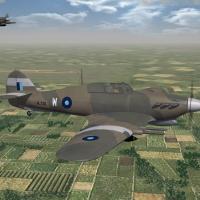
59 downloads
SF2 WW2 CBI Hurricane IIC (Trop) Skin & Tweeks Pak 1/24/2014 -- Something for the WW2 CBI players -- = For SF2 ONLY, Full-5 Merged (Reccomended/Preferred) = *Note: this pak MAY be usable in 1stGen SF/Wo* game installs. However, some features (decal randomization and others) will =NOT= be functional. Use in 1stGens has not, and cannot be, tested by me.* **Note x2: this mod is designed for use =ONLY= in a WW2 CBI-Centric mods folder. Some Theatre specific changes have been effected, and should =ONLY= be used in the CBI!!!** This is =NOT= the full aircraft; you'll be adding all this stuff to the original (ok, Ver.4). It's available at the following URL: http://combatace.com/files/file/13254-hurricane-mkiic/ Some mods, tweeks, and 2 new skin/decal sets for Raven's Hurricane IIC Trop, as seen in India and Burma during WW2. Included are 2 skins for: No. 135 Squadron, RAF No. 2 Squadron "Winged Arrows", Royal Indian Air Force (RIAF) The squadron patch will be seen as the paint chip for each skin on the Loadout screen. Neither unit carried Squadron codes, and both make use of a pool of plane-in- group letters and serial numbers. The serials should be considered 'generic' in nature, as they represent no particular aircraft with these units, but ARE correct for the variant depicted. Skins remain in their bmp format, and as both units were painted alike, resides in the MAIN aircraft folder. This will NOT interfere with other skins you may have, residing in their individual folders Several new inis are included; Main Data (with some small tweeks) Loadout (again, with small tweeks) A new-ish, SF2 version of the original uploads 44 gal drop tank (with pylon), creates a new, seperate version of this weapon. It will NOT conflict with any others, and is designed for use on THIS aircraft. No other weapons or guns are indluded; you should have them already. The AvHistory Merlin engine sound is included, as is a new SF2 style hangar screen. Canopy Opens/Closes via the Standard Animation Keystroke , Shift/0. All markings are decals, and Decal Randomization is TRUE. The skins have been run through the template (thank you Raven for that!), and have had a layer of dirt and 'clouds' added for weathering. As always, fairly easy to follow, yet detailed install instructions are included. PLEASE read them!! Good Hunting!! Wrench Kevin Stein -
some of that is dictated by the damn mountains and hills ... I truly dislike have to repaint the height field (which happens no matter what, due to the nature of the Real World terrains) But I will try and twerk them a bit. OTH, many actually are pretty much that straight n/s, especially in Burma. Don't even think about the Mekong!! (SG series, cause it so damn wide, almost all the way to the eastern Himalayas-- bloody nightmare!) I'm really beginning to HATE the tile system!!! edit: new PM3,with additional fields -- with extra special help from Steve this is still just the base, internal framework, so to speak. Once I get everything placed, THEN I can back and start filling in the cities and such with their target objects. oi vey!