
Wrench
-
Posts
28,314 -
Joined
-
Last visited
-
Days Won
187
Content Type
Profiles
Forums
Gallery
Downloads
Store
Everything posted by Wrench
-
Ok, you all are going to laugh at me ... I just discovered Russo's 109F-4s happily residing in the download section. I says to myself "Hey, Kev, you don't have them. Its Russ's stuff, and will replace the old Wolf birds, expecially when one is a Trop, with the correct dust filter you need for Africa!!" So I get them. As expected, they are excellent. But with one weird thing ... not one of the 3 aircraft in the package (and there are some GREAT, too BTW), has a loadout ini, because they don't have any hard points. Like the centerline, for the 300l tank, or even a bomb. So, opinions, please. Should I rig up mount, maybe using the ETC50 rack via fakepilot? or what??? All my books show the F with centerline mounts thanks! The planes are too good to not have them upgraded and/or repaired
-
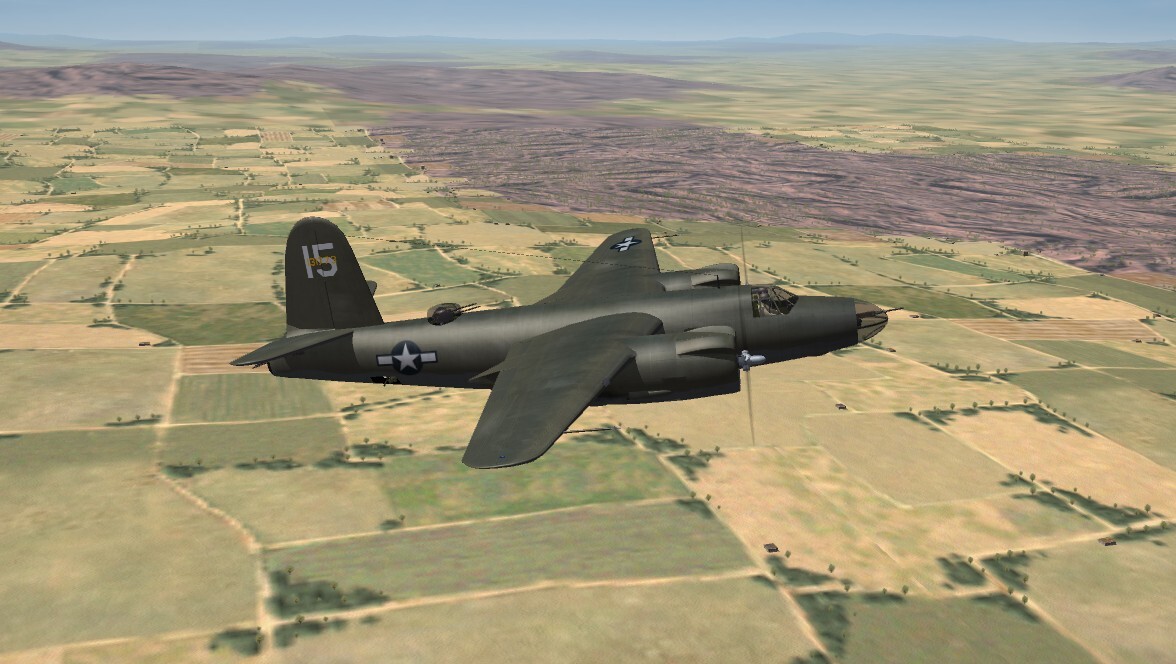
As if you all are surprised ... it's not a hard job to import the RS B-26 into the ETO. Just a few little mods to the skin, use of decals I had in stock from Veltro's. Converted to jpg (12.9 megs skin maps? Seriously???) FM needs work, and some other things. Ready when ever (most likely after Tunisia is done) 34th BS, 17BG 12thAF
-
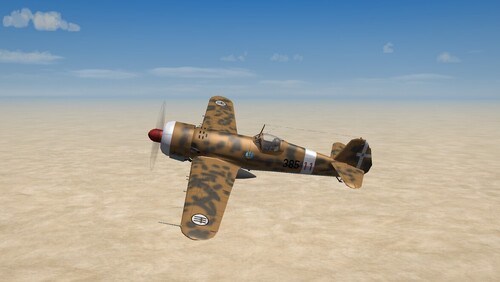
View File SF2 IAR-80, Regia Aeronautica, WW2 MTO SF2 IAR-80, Regia Aeronautica, WW2 MTO 9/2/2026 -For SF2 =ONLY= (Full 5 Merged Recommended) This is a mod of Pasko's IAR-80 for (a sorta) What If use by the WW2 Regia Aeronautica (Italian Air Force). Due to the "unavailability" of most of the RA Fighters and Fighter Bombers, I took it upon myself to give those SF2 WW2 players SOMETHING to have in their Hangars. See the "Notes" for what I hope THIS replaces in the RA stable The aircraft is finished in a somewhat "standard-ish" RA/LW North African camouflage pattern, but carries the usual Italian markings. The skin "represents" 20 Squadrilla, based in Libya circa early 1941. For those wishing to make more or new skins, the NEW Home Grown (tm) Templates are available. (I'd like to see the one with the green squiggles -- I tried, and failed badly! <gr>) The skin maps are in JPG format. They have been resized up to 2048x. Decal randomization is TRUE. In an unusual twist for me, instead of decals for the National Markings (tm), these are painted on. Excepting the fasces, which is a decal. You will have 18 individual plane-is-squadron numbers (yes, I know the RA usually used only 15) The canopy opens with the Standard Animation Keystroke (tm), Shift/0 (zero). . Everything is included: WW2 bombs, pilot figures and so forth. You'll also be adding a 'new' sound, so have your SoundList ini. extracted, or be ready to extract it and add the new sound's data. Full instructions are below, in the "To Install" section On the Aircraft Selection Drop Down Screen you'll see: IAR 80I "Astore" (RA) The "RA" is of course, Regia Aeronautica. I've given it the name "Astore" or "Goshawk". As is always recommended, unzip to a temp folder or your desktop to give easy access to the rest of this readme for it's install instructions. PLEASE read them, before installing!!! Please read the Notes section for any other useless bits of information, the change log. For historical purposes, Pasko's original read me from 2005 is included. Please also take note of changes in the Standard Disclaimer in the "Legal BS" section at the bottom. Happy Landings! Wrench Kevin Stein Submitter Wrench Submitted 09/12/2026 Category Other Origin
- 1 reply
-
- 2
-

-
Version 1.0.0
23 downloads
SF2 IAR-80, Regia Aeronautica, WW2 MTO 9/2/2026 -For SF2 =ONLY= (Full 5 Merged Recommended) This is a mod of Pasko's IAR-80 for (a sorta) What If use by the WW2 Regia Aeronautica (Italian Air Force). Due to the "unavailability" of most of the RA Fighters and Fighter Bombers, I took it upon myself to give those SF2 WW2 players SOMETHING to have in their Hangars. See the "Notes" for what I hope THIS replaces in the RA stable The aircraft is finished in a somewhat "standard-ish" RA/LW North African camouflage pattern, but carries the usual Italian markings. The skin "represents" 20 Squadrilla, based in Libya circa early 1941. For those wishing to make more or new skins, the NEW Home Grown (tm) Templates are available. (I'd like to see the one with the green squiggles -- I tried, and failed badly! <gr>) The skin maps are in JPG format. They have been resized up to 2048x. Decal randomization is TRUE. In an unusual twist for me, instead of decals for the National Markings (tm), these are painted on. Excepting the fasces, which is a decal. You will have 18 individual plane-is-squadron numbers (yes, I know the RA usually used only 15) The canopy opens with the Standard Animation Keystroke (tm), Shift/0 (zero). . Everything is included: WW2 bombs, pilot figures and so forth. You'll also be adding a 'new' sound, so have your SoundList ini. extracted, or be ready to extract it and add the new sound's data. Full instructions are below, in the "To Install" section On the Aircraft Selection Drop Down Screen you'll see: IAR 80I "Astore" (RA) The "RA" is of course, Regia Aeronautica. I've given it the name "Astore" or "Goshawk". As is always recommended, unzip to a temp folder or your desktop to give easy access to the rest of this readme for it's install instructions. PLEASE read them, before installing!!! Please read the Notes section for any other useless bits of information, the change log. For historical purposes, Pasko's original read me from 2005 is included. Please also take note of changes in the Standard Disclaimer in the "Legal BS" section at the bottom. Happy Landings! Wrench Kevin Stein -
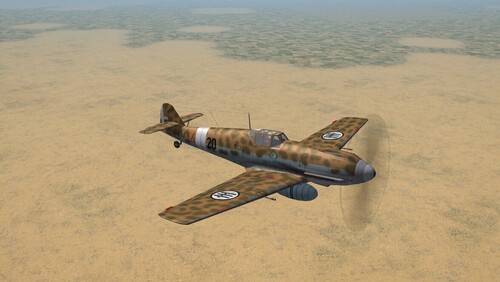
View File SF2 Bf-109E-7, "Colibri" Regia Aeronautica, WW2 MTO SF2 Bf-109E-7, "Colibri" Regia Aeronautica, WW2 MTO 9/2/2026 -For SF2 =ONLY= (Full 5 Merged Recommended) This is a mod of RussoUKs Bf-109E-7 'Jabo' for a (sorta) What If use by the WW2 Regia Aeronautica (Italian Air Force). Due to the "unavailability" of pretty much most of the RA Fighters and Fighter Bombers, I took it upon myself to give those SF2 WW2 players SOMETHING to have in their Hangars. As the RA did eventually have 109s in the inventory, this takes place just a bit earlier. See the "Notes" for what I hope THIS replaces in the RA stable. The aircraft is finished in a somewhat "standard" Luftwaffe North African camouflage pattern, but carries the usual Italian markings. The skin "represents" 20 Squadrilla, based in Libya circa early 1941 The skin map is in JPG format. Decal randomization is TRUE. In an unusual twist for me, instead of decals for the National Markings (tm), these are painted on. Excepting the fasces, which is a decal. The canopy opens with the Standard Animation Keystroke (tm), Shift/0 (zero). . Everything is included: WW2 bombs, pilot figures and so forth. As this is a Jabo, it includes the ETC-50 MER, and 50 kilo cluster bombs. You should have the guns already, but just in case, I've included them. You'll also be adding a 'new' sound, so have your SoundList ini extracted, or be ready to extract it and add the new sound's data. Full instructions are below, in the "To Install" section On the Aircraft Selection Drop Down Screen you'll see: Bf-109E-7 "Colibri" (RA) The "RA" is of course, Regia Aeronautica. I've given it the name "Colibri" or "Hummingbrid" due to the kind of buzzing sound the Daimler-Benz V12s make. And 109s could be pretty nimble in the hands of good pilot. As is always recommended, unzip to a temp folder or your desktop to give easy access to the rest of this readme for it's install instructions. PLEASE read them, before installing!!! Please read the Notes section for any other useless bits of information, the change log, Please also take note of changes in the Standard Disclaimer in the "Legal BS" section at the bottom. Happy Landings! Wrench Kevin Stein (I've placed this here in the standard Bf-109 section, even though it should be considered a "What If...", but if I put it there, no one could/would/should find it) Submitter Wrench Submitted 09/12/2026 Category BF-109
-
Version 1.0.0
25 downloads
SF2 Bf-109E-7, "Colibri" Regia Aeronautica, WW2 MTO 9/2/2026 -For SF2 =ONLY= (Full 5 Merged Recommended) This is a mod of RussoUKs Bf-109E-7 'Jabo' for a (sorta) What If use by the WW2 Regia Aeronautica (Italian Air Force). Due to the "unavailability" of pretty much most of the RA Fighters and Fighter Bombers, I took it upon myself to give those SF2 WW2 players SOMETHING to have in their Hangars. As the RA did eventually have 109s in the inventory, this takes place just a bit earlier. See the "Notes" for what I hope THIS replaces in the RA stable. The aircraft is finished in a somewhat "standard" Luftwaffe North African camouflage pattern, but carries the usual Italian markings. The skin "represents" 20 Squadrilla, based in Libya circa early 1941 The skin map is in JPG format. Decal randomization is TRUE. In an unusual twist for me, instead of decals for the National Markings (tm), these are painted on. Excepting the fasces, which is a decal. The canopy opens with the Standard Animation Keystroke (tm), Shift/0 (zero). . Everything is included: WW2 bombs, pilot figures and so forth. As this is a Jabo, it includes the ETC-50 MER, and 50 kilo cluster bombs. You should have the guns already, but just in case, I've included them. You'll also be adding a 'new' sound, so have your SoundList ini extracted, or be ready to extract it and add the new sound's data. Full instructions are below, in the "To Install" section On the Aircraft Selection Drop Down Screen you'll see: Bf-109E-7 "Colibri" (RA) The "RA" is of course, Regia Aeronautica. I've given it the name "Colibri" or "Hummingbrid" due to the kind of buzzing sound the Daimler-Benz V12s make. And 109s could be pretty nimble in the hands of good pilot. As is always recommended, unzip to a temp folder or your desktop to give easy access to the rest of this readme for it's install instructions. PLEASE read them, before installing!!! Please read the Notes section for any other useless bits of information, the change log, Please also take note of changes in the Standard Disclaimer in the "Legal BS" section at the bottom. Happy Landings! Wrench Kevin Stein (I've placed this here in the standard Bf-109 section, even though it should be considered a "What If...", but if I put it there, no one could/would/should find it) -
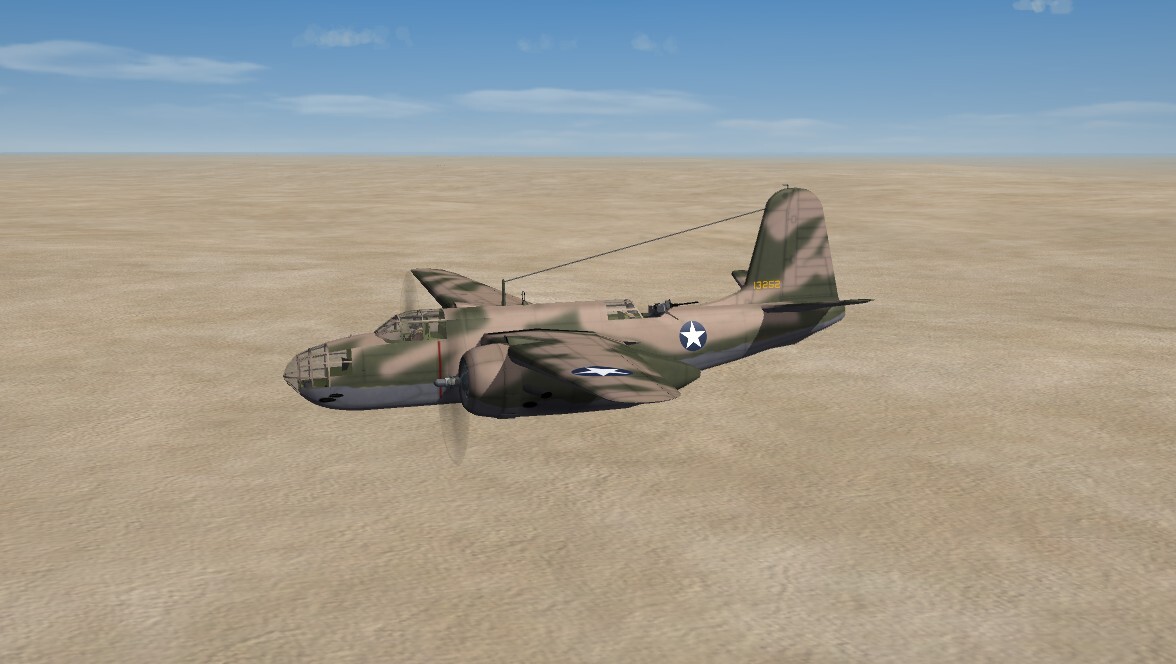
View File SF2 A-20G Havoc, ETO Package (Beta Plus) SF2 A-20G Havoc, ETO Package (Beta Plus) 8/25/2026 -For SF2 =ONLY= (Full/5 Merged Recommended) Coyote Aerospace and Angelp are proud to release a NEW World War 2 aircraft! This package contains the Douglas A-20G as used by the 9th USAAF from 1942 and on,. There are NO skin sets herein used in the Pacific. Those will be in a separate, so labeled package (as soon as I finish them!!) As there are skins for 2 European Theaters, (ETO & MTO), you End Users (tm) will have to do the moving to each appropriate Mod Folder yourselves. I'm doing it this way, simply because I'm to lazy to split them into 2 separate downloads <grin> The package includes the following skins: = USAAF Western Europe (ETO) 645th BS, 410th BG (7X) 646th BS, 410th BG (8U) (Invasion Striped <6/44) = USAAF North Africa/Southern Europe (Med/Italy) 84th BS, 47th BG (MTO) <2/43 I chose the 410th BG, as they used their Havocs from late 43 until the war's end. They had started converting to A-26, but never fully converted by May 45. The squadrons of the 47th BG used their Havocs (of varying models) from their 1942 arrival in theatre until the end of the War. All skin maps are in JPG format. All markings are decals, excepting the painted on squadron tail stripes, and decal randomization is TRUE. As these are 'new' rebuilds, these aircraft replace IN TOTAL those no longer readily available from 'the other place', all decals from those mods of mine have been reused and refreshed for SF2 usage. As such, where available, the original read me for each is included with the relevant skin folders along with a screenshot of the original bird. Serial numbers are historically correct for all skins; however, they are to be considered 'generic', not representing specific aircraft in each squadron. The 2 ETO skins share the same pool of serial numbers. The MTO unit (84th BS) gets it own set of serials. The pilot's entrance hatch opens with the Standard Animation Keystroke (tm), Shift/0 (zero). . My original 'Box Art' Hangar Screen has been revamped for SF2 usage; it's in a kind of 'wide-ish-screen'. Everything is included: WW2 bombs, pilot figures and so forth. You'll also be adding a 'new' sound, so have your SoundList ini extracted, or be ready to extract it and add the new sound's data. Full instructions are in below, in the "To Install" section. It should be noted, this same engine sound will be used on ALL versions of the Boston/Havoc that are still in the hangar. On the Aircraft Selection Drop Down Screen you'll see: A-20G Havoc (CA)(ETO) The 'CA' of course, is for Coyote Aerospace. ETO, is duh! European Theatre of Operations. The 84th Skin is already tagged the Med*. As is always recommended, unzip to a temp folder or your desktop to give easy access to the rest of this readme for it's install instructions. PLEASE read them, before installing!!! Please read the Notes section for any other useless bits of information, the change log, Please also take note of changes in the Standard Disclaimer in the "Legal BS" section at the bottom. Happy Landings! Wrench Kevin Stein *(strictly speaking, anything above North Africa could probably be considered Europe, so MTO is by definition, ETO-adjacent. ) Submitter Wrench Submitted 09/10/2026 Category Other
-
- 1
-

-

Version 1.0.0
27 downloads
SF2 A-20G Havoc, ETO Package (Beta Plus) 8/25/2026 -For SF2 =ONLY= (Full/5 Merged Recommended) Coyote Aerospace and Angelp are proud to release a NEW World War 2 aircraft! This package contains the Douglas A-20G as used by the 9th USAAF from 1942 and on,. There are NO skin sets herein used in the Pacific. Those will be in a separate, so labeled package (as soon as I finish them!!) As there are skins for 2 European Theaters, (ETO & MTO), you End Users (tm) will have to do the moving to each appropriate Mod Folder yourselves. I'm doing it this way, simply because I'm to lazy to split them into 2 separate downloads <grin> The package includes the following skins: = USAAF Western Europe (ETO) 645th BS, 410th BG (7X) 646th BS, 410th BG (8U) (Invasion Striped <6/44) = USAAF North Africa/Southern Europe (Med/Italy) 84th BS, 47th BG (MTO) <2/43 I chose the 410th BG, as they used their Havocs from late 43 until the war's end. They had started converting to A-26, but never fully converted by May 45. The squadrons of the 47th BG used their Havocs (of varying models) from their 1942 arrival in theatre until the end of the War. All skin maps are in JPG format. All markings are decals, excepting the painted on squadron tail stripes, and decal randomization is TRUE. As these are 'new' rebuilds, these aircraft replace IN TOTAL those no longer readily available from 'the other place', all decals from those mods of mine have been reused and refreshed for SF2 usage. As such, where available, the original read me for each is included with the relevant skin folders along with a screenshot of the original bird. Serial numbers are historically correct for all skins; however, they are to be considered 'generic', not representing specific aircraft in each squadron. The 2 ETO skins share the same pool of serial numbers. The MTO unit (84th BS) gets it own set of serials. The pilot's entrance hatch opens with the Standard Animation Keystroke (tm), Shift/0 (zero). . My original 'Box Art' Hangar Screen has been revamped for SF2 usage; it's in a kind of 'wide-ish-screen'. Everything is included: WW2 bombs, pilot figures and so forth. You'll also be adding a 'new' sound, so have your SoundList ini extracted, or be ready to extract it and add the new sound's data. Full instructions are in below, in the "To Install" section. It should be noted, this same engine sound will be used on ALL versions of the Boston/Havoc that are still in the hangar. On the Aircraft Selection Drop Down Screen you'll see: A-20G Havoc (CA)(ETO) The 'CA' of course, is for Coyote Aerospace. ETO, is duh! European Theatre of Operations. The 84th Skin is already tagged the Med*. As is always recommended, unzip to a temp folder or your desktop to give easy access to the rest of this readme for it's install instructions. PLEASE read them, before installing!!! Please read the Notes section for any other useless bits of information, the change log, Please also take note of changes in the Standard Disclaimer in the "Legal BS" section at the bottom. Happy Landings! Wrench Kevin Stein *(strictly speaking, anything above North Africa could probably be considered Europe, so MTO is by definition, ETO-adjacent. ) -
.
-
those are the Isreal ME tiles. Since the city and farm tiles are such pieces of shit on IME, i'm using the Desert tiles for those. I know it's not quite European, even for the southern parts, but better than that IME crap. I mean, really?? the farm and city tiles are rotated 45 deg off center, and just make it more work than it's worth to put items to blow up in them. OTH, the 'wine dark sea' tiles from IME look very good in the Med. This way using those tile, everything will match from the Morocco/Tunisian border all the way to Jordan (Tunsia, Western Desert, Isreal2 (ww2), IsarelME (ww2)* *although that one kept it's crap tiles, but I added nearly 100 more to fix the region to how it geographically should have been.
-
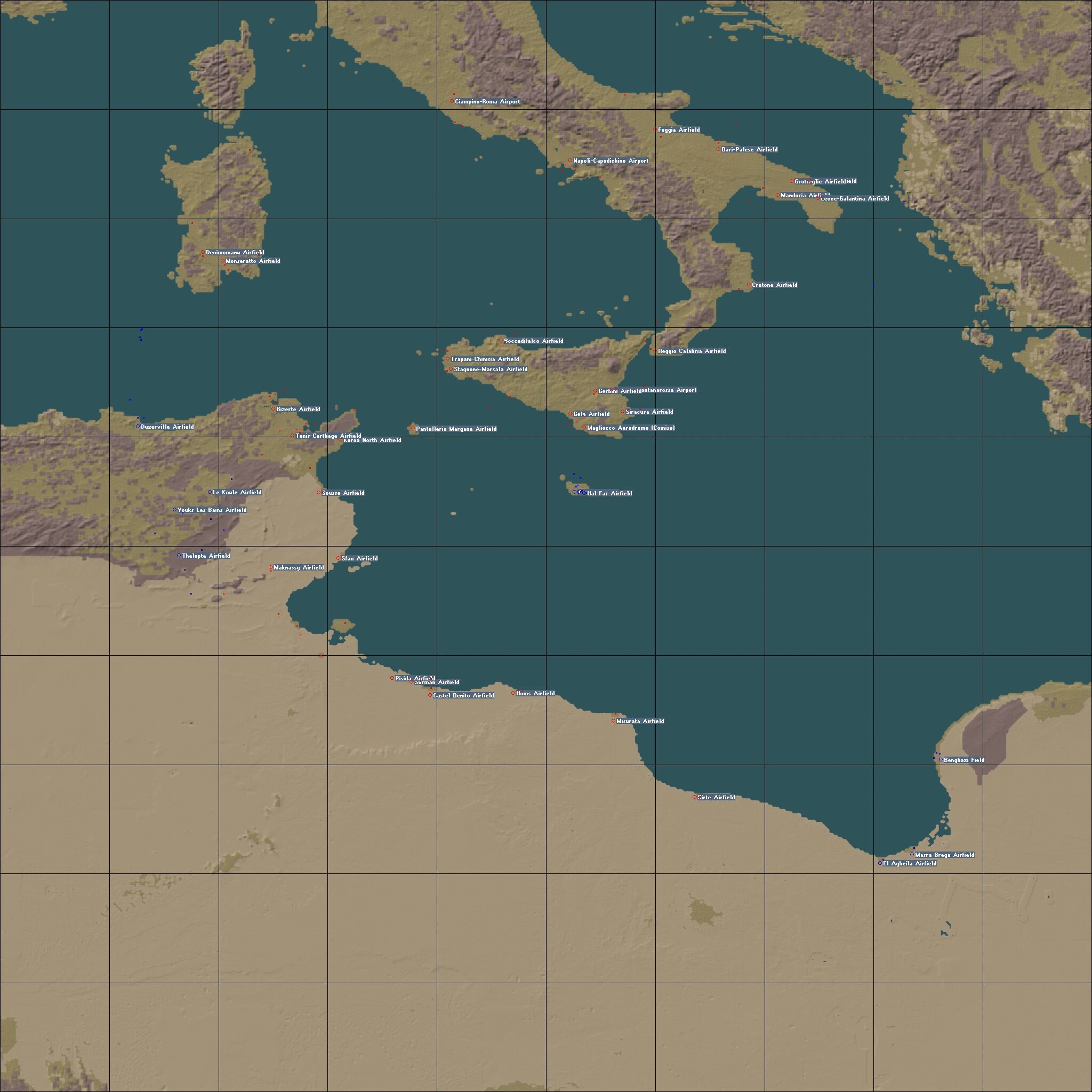
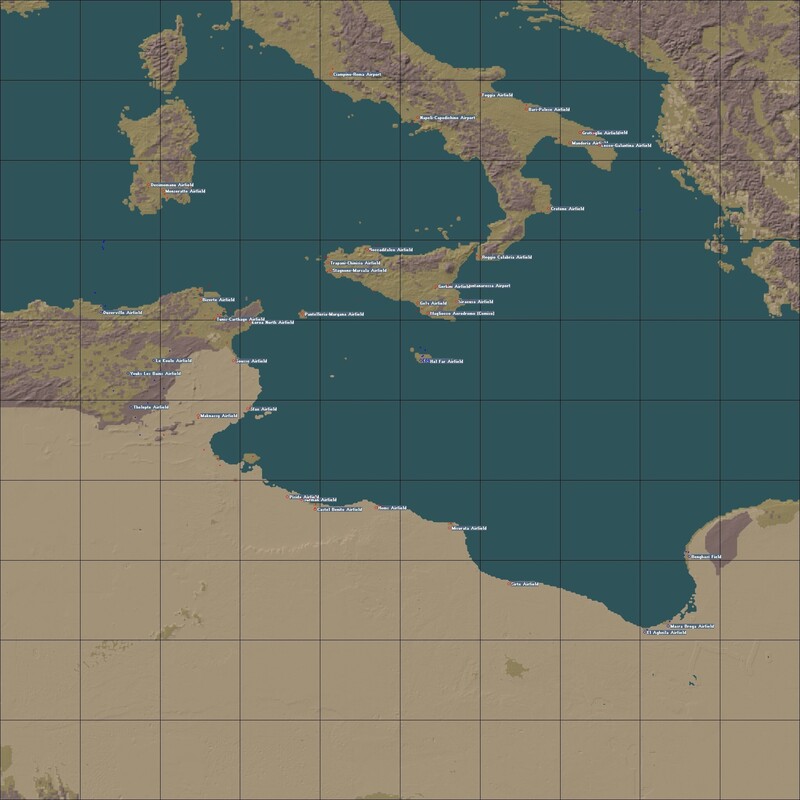
OK, looking the WW2 Tunisia map last night. Now I know another of the reasons I stopped working on it 10 years ago... Every single one of the 123 target areas need to be stripped out and COMPLETELY rebuild from the bedrock up. Airbases being the easiest, what with so many usable via copy and paste. But all the actual cities ... I'd love to redo Benghazi (now in Allied hands) to match the tile from Western Desert ... if I could only find the TE!!! anyway, here's a planning map so you know what the region covers
-
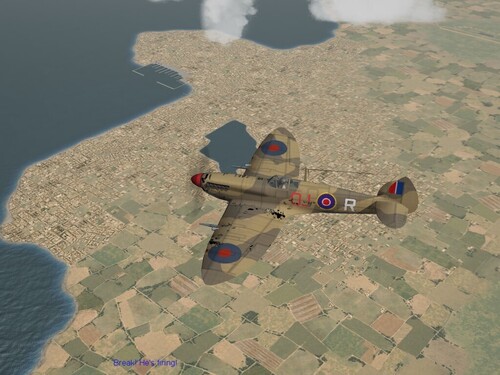
View File SF2 WW2 North Africa (Western Desert) Terrain (MTO) SF2 WW2 North Africa (Western Desert) Terrain (MTO) 9/7/2026 !For Use In An MTO Centric Mods Folder Only! What started out as a simple targets upgrade (in 2017!!), and turned into a major rework of Edward's "North Africa" or Western Desert Terrain for WW2. As you can expect, the targets have been greatly 'enhanced', with many additions. The visuals (ie: the eye candy) has been enhanced by these revamped target areas. This will allow single mission and campaign builders more latitude in their creation of missions and campaigns. It also has the side effect of enhancing in-game generated single mission play, too! The map has been almost completely retiled, excepting for city and farm tiles, in the IsrealME style. This will allow it to 'match' the WW2 Palestine, and WW2 IsrealME terrains already available at Combat Ace. The Upcoming Tunisia terrain also carries this same IME tiling. This is a COMPLETE terrain, designed to REPLACE the original version in it's entirety. All necessary parts are included; tiles, inis, LOTS of new terrain items. Also, as expected, there are a VERY large number of Easter Eggs on this map. See if you can find them! Geophysical Disclaimer: some rivers and other water features may not follow their Real Life (tm) courses, be placed in their Real Life (tm) locations, look as they should in Real Life (tm) or exist at all. Several cities and other physical features and target areas will also fall into that classification. Some target areas (cities, etc.) exist only as named places, even if they might have had strategic or tactical values (most don't!). And So Forth (tm). For those wondering, the map covers from the center of the Gulf of Sirte in the west, east to the middle of Saini, north to Albania, and south the vast emptiness of the desert. (sorry, I forgot to add Hamunaptra). This package also contains the Ground Objects and Guns needed for WW2 usage. These items will also be needed for when the "Tunisia" terrain is rereleased for American and other Allies to work in. This has all the ships, trucks, tanks and other vehicles needed for the WW2 Desert War Experience. It is NOT necessary to remove all the "modern" post-WW2 items from your /GroundObjects folder. There are many in here that ARE stock items, edited, repainted and repurposed for the 2nd World War. When installing, just allow the overwrite. Their data inis and user lists will prevent them from appearing in the year spread for Med Operations in WW2 (1940-1945). The other part of this package are Guns. Lots and Lots of Guns. American, British, Italian, German, Japanese and probably Modern Ones too. As they're only used when Modern Items (tm) appear, and they take up so little space, you get everything! At No Extra Charge! As is always recommended, unzip to a temp folder or your desktop to give easy access to the rest of this readme for it's install instructions. PLEASE read them, before installing!!! Please read the Notes section for any other useless bits of information, the change log and stuff. Please also take note of changes in the Standard Disclaimer in the "Legal BS" section at the bottom. Happy Landings and Good Hunting! Wrench Kevin Stein Submitter Wrench Submitted 09/07/2026 Category Full Terrains
-
Version 1.0.0
41 downloads
SF2 WW2 North Africa (Western Desert) Terrain (MTO) 9/7/2026 !For Use In An MTO Centric Mods Folder Only! What started out as a simple targets upgrade (in 2017!!), and turned into a major rework of Edward's "North Africa" or Western Desert Terrain for WW2. As you can expect, the targets have been greatly 'enhanced', with many additions. The visuals (ie: the eye candy) has been enhanced by these revamped target areas. This will allow single mission and campaign builders more latitude in their creation of missions and campaigns. It also has the side effect of enhancing in-game generated single mission play, too! The map has been almost completely retiled, excepting for city and farm tiles, in the IsrealME style. This will allow it to 'match' the WW2 Palestine, and WW2 IsrealME terrains already available at Combat Ace. The Upcoming Tunisia terrain also carries this same IME tiling. This is a COMPLETE terrain, designed to REPLACE the original version in it's entirety. All necessary parts are included; tiles, inis, LOTS of new terrain items. Also, as expected, there are a VERY large number of Easter Eggs on this map. See if you can find them! Geophysical Disclaimer: some rivers and other water features may not follow their Real Life (tm) courses, be placed in their Real Life (tm) locations, look as they should in Real Life (tm) or exist at all. Several cities and other physical features and target areas will also fall into that classification. Some target areas (cities, etc.) exist only as named places, even if they might have had strategic or tactical values (most don't!). And So Forth (tm). For those wondering, the map covers from the center of the Gulf of Sirte in the west, east to the middle of Saini, north to Albania, and south the vast emptiness of the desert. (sorry, I forgot to add Hamunaptra). This package also contains the Ground Objects and Guns needed for WW2 usage. These items will also be needed for when the "Tunisia" terrain is rereleased for American and other Allies to work in. This has all the ships, trucks, tanks and other vehicles needed for the WW2 Desert War Experience. It is NOT necessary to remove all the "modern" post-WW2 items from your /GroundObjects folder. There are many in here that ARE stock items, edited, repainted and repurposed for the 2nd World War. When installing, just allow the overwrite. Their data inis and user lists will prevent them from appearing in the year spread for Med Operations in WW2 (1940-1945). The other part of this package are Guns. Lots and Lots of Guns. American, British, Italian, German, Japanese and probably Modern Ones too. As they're only used when Modern Items (tm) appear, and they take up so little space, you get everything! At No Extra Charge! As is always recommended, unzip to a temp folder or your desktop to give easy access to the rest of this readme for it's install instructions. PLEASE read them, before installing!!! Please read the Notes section for any other useless bits of information, the change log and stuff. Please also take note of changes in the Standard Disclaimer in the "Legal BS" section at the bottom. Happy Landings and Good Hunting! Wrench Kevin Stein- 1 review
-
- 10
-
-
indeed, swarm attacks. think Kamikazes around Okinawa. and that's BEFORE any kind of SAM!!!
-
well, they did say 'things are tough all over'.
-
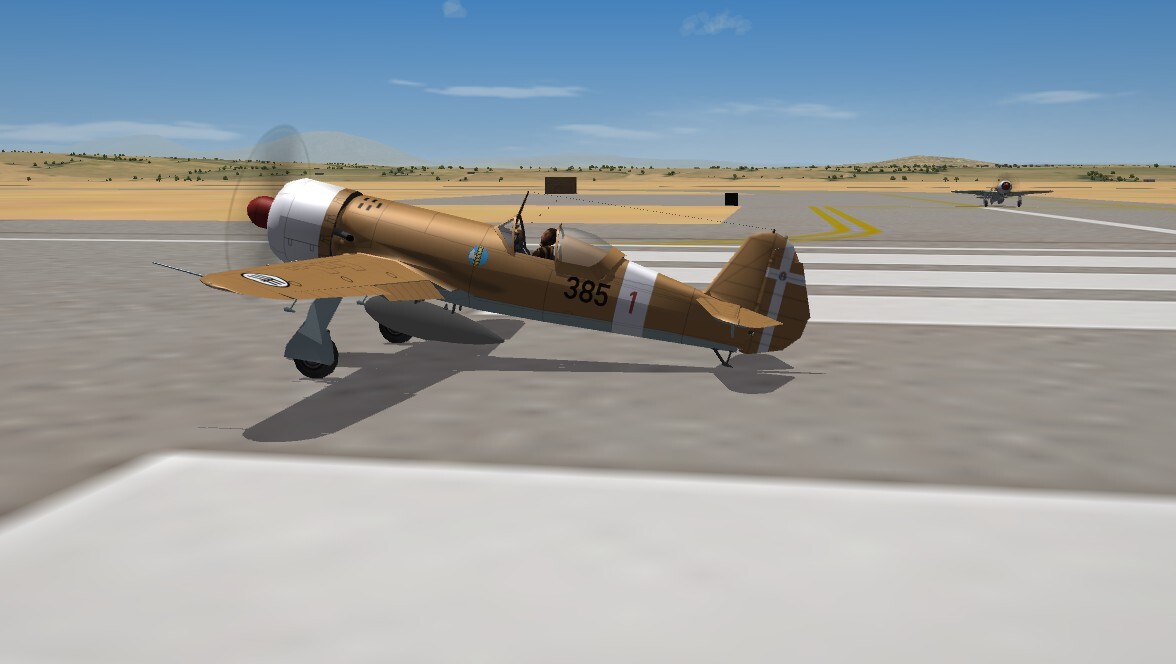
as you can tell, this isn't quite done yet .. but is moving along well. Using pasko's IAR-80 to REPLACE some of the unavailable Regia Aeronautica birds (Mc-200, Ba-65, Re-2000). At any rate, I'd like an opinion on the tail cross. I think it's too high on the rudder. Every picture I've seen of RA birds, the cross extends the full height; if that's the case, it's a simple matter to move the layer in the (new home-grown) template. In other good news, the Western Desert rebuild in complete! Just final testing of the movement routes, and trying to figure out the ground objects. What is likely to happen is 2 uploads -- the terrain, and the Ground Objects and Guns needed for the Axis and Allied forces. NOTHING from 'the other place' will be included. It's all been weeded out. (hence the need for replacement RA aircraft and such like) Then, it's Westward to Tunisia (post-Torch)!!!!
-
THIS is Excellent Advice (tm). Given the state of gaming, and the proliferation of, well, theft, This Is The Way
-
Not for right now, I thinks. If I do, you'll be my first call!!
-
that was a good film. netflix also has a very good documentary on the retirement of the MiG-21s too. Actualy, several war movies from India that look pretty good.
-
Nice touch using "Nightmare at 20000 Feet"!!!!
-
well, don't misplace them ... I know there's some IJAAF/IJN birds we could use (even with importing from RS -- some of them need a lot of ini work)
-
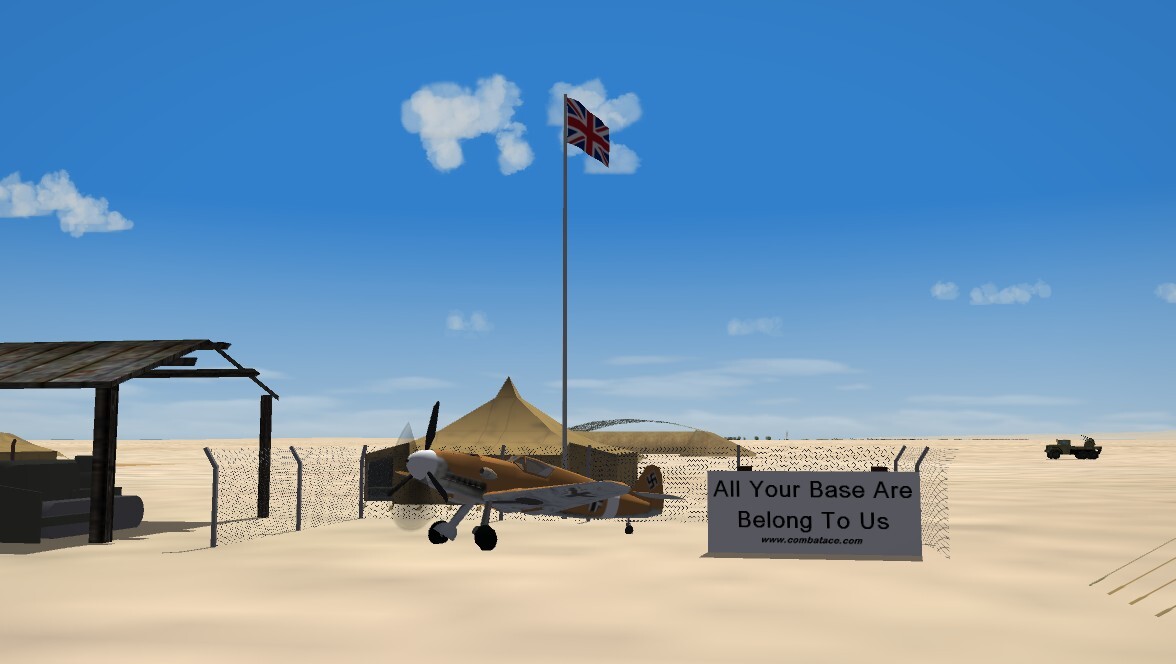
What shall this be captioned? Rule Britannia? Adding insult to injury? Finders Keepers???
-
Greeetings to our new members! Yes, you can mod the game to fly the Red Air side; there's a post in the SF2 Knowledge BAse on "how to" IIRC, there are some compaigns around in the downloads section
-
Time to think about investing in EMP guns, maybe???
-
well, it doesn't QUITE look like the old Revell 1/72 A-20 box art, but its "close enough for gobermend work"