
Jump to content

GKABS

MODERATOR
  • Posts

    3,948
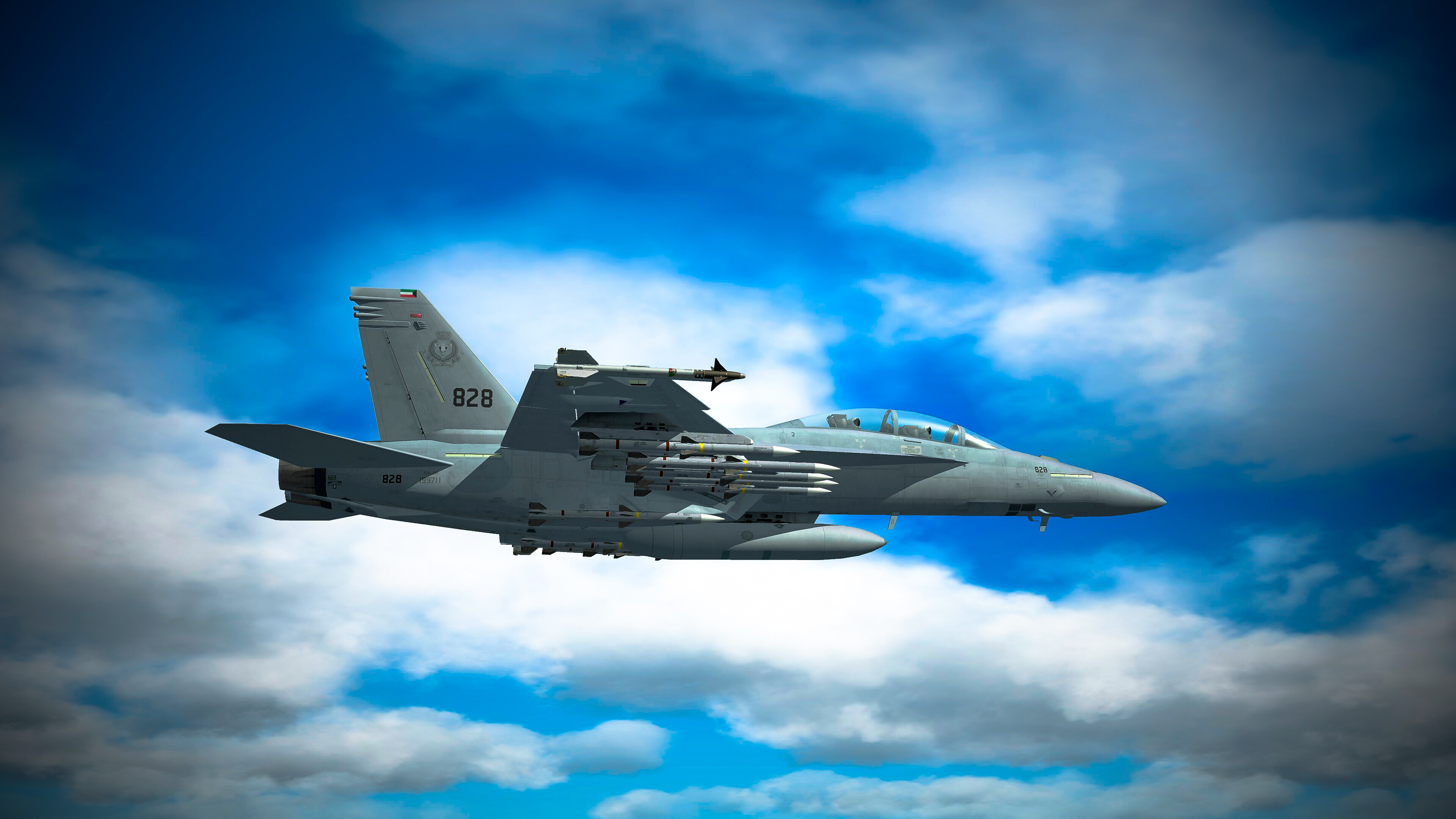
  • Joined

  • Last visited

  • Days Won

    254

Other groups

MODDER PLATINUM MEMBER

GKABS last won the day on February 6

GKABS had the most liked content!

About GKABS

Recent Profile Visitors

49,069 profile views

GKABS's Achievements

Proficient

Proficient (10/14)

  • Well Followed Rare
  • Conversation Starter Rare
  • Dedicated Rare
  • Very Popular Rare
  • First Post Rare

Recent Badges

9.7k

Reputation

  1. That totally outshines the big bin, haha! But really this is outstanding.
  2. You joined on January 24th, and today is the 7th, which means it has been 14 or 15 days depending on the server and the time zone. So just be patient.
  3. I've begun gathering information and photos of the F-105 Thunderchief. I'd appreciate any assistance you can offer, gentlemen.
  4. I have just uploaded the F/A-18E and F models after making the necessary fixes and updates to the files. Please redownload and delete the old ones, especially the weapons under the weapons folder, before copying.
  5. View File E/A-18G Growler Super Hornet Hi there, and I appreciate you taking the time to download my work! - https://gkabs.net - https://gulfknights.net What’s included in this package: E/A-18G Growler Super Hornet with 4 skins, 1 fictional What if. Here are the enhancements I've made to the beta in 3ds Max: - New ejection seat. - New pilot model. - New refueling probe. - New towed decoy. - New AoA added to the front landing gear, corresponding with the cockpit AoA. - Included pilot ladder and engine cover, and removed 'remove before flight' tags. - Implemented 2 LODs: 001, 002, 003, and 004. - New BRU-55 dual bomb rack. - New LAU-127 Rail, LAU-115C Rail, LAU-115C+2 Rail, LAU-117 Rail, and LAU-118A Rail. - New fuel tank. - 5 skins for the Super Hornet. - Canopy can be opened with: Shift+9. - Wingfold function: Shift+7. - For air refueling, use: Shift+6. - To deploy the towed decoy: Shift+5. All files come with the necessary Strike Fighters 2 Series game file (.LOD) and textures. (These have been tested and only work for SF2.) Installation instructions: Just copy the files to their respective folders. If you're adding to the SoundList (and need to include the WAV sound), go to the Flight directory and update the XXX to the right number. For example: [SoundList] SoundFileXXX=Rafale_Flaps [Rafale_Flaps] Priority=NORMAL 3DSound=FALSE FrequencyControl=TRUE NumBuffers=1 Looped=TRUE If you require further assistance, I recommend checking the Knowledge Base here: - https://combatace.com/forums/forum/268-thirdwire-strike-fighters-2-series-knowledge-base/ Version 1.0 LICENSE: You’re free to use this model and everything with it for personal, non-commercial use in Strike Fighters 1 and 2. If you wish to use it for any other purpose, please contact me for permission at gkabs@gkabs.net. I would like to extend my gratitude to the following people, in no particular order: - Snapper 21, thank you so much for getting me the file and paying for it. - Cliff7600 for collaborating closely with me to refine the model and test its performance, and for making the data file and FM. - Soulfreak for initiating this project. - ravenclaw_007 for designing all the impressive weapons. - Coupi for adjusting the hitbox, adding the refueling probe visibility from the cockpit, and reworking some cockpit data, working on the weapons loadout. - Compufat for developing the Kuwait skin, US and Australian textures, and the fuel tank skin, decals, and testing the model. - Pilots: GKABS. If I’ve missed anyone, please let me know! Special thanks to Third Wire for creating this incredible game, and to the amazing community at https://combatace.com for their support and contributions. Software used: - 3ds Max 2009 - UVLayout v2 Pro - Substance Painter - Adobe Photoshop - Mixamo If you need help, feel free to reach out to me at gkabs@gkabs.net or visit gulfknights.net. Submitter GKABS Submitted 02/06/2026 Category F-18  
      • 1
      • Thanks
  6. Version 1.0.0

    38 downloads

    Hi there, and I appreciate you taking the time to download my work! - https://gkabs.net - https://gulfknights.net What’s included in this package: E/A-18G Growler Super Hornet with 4 skins, 1 fictional What if. Here are the enhancements I've made to the beta in 3ds Max: - New ejection seat. - New pilot model. - New refueling probe. - New towed decoy. - New AoA added to the front landing gear, corresponding with the cockpit AoA. - Included pilot ladder and engine cover, and removed 'remove before flight' tags. - Implemented 2 LODs: 001, 002, 003, and 004. - New BRU-55 dual bomb rack. - New LAU-127 Rail, LAU-115C Rail, LAU-115C+2 Rail, LAU-117 Rail, and LAU-118A Rail. - New fuel tank. - 5 skins for the Super Hornet. - Canopy can be opened with: Shift+9. - Wingfold function: Shift+7. - For air refueling, use: Shift+6. - To deploy the towed decoy: Shift+5. All files come with the necessary Strike Fighters 2 Series game file (.LOD) and textures. (These have been tested and only work for SF2.) Installation instructions: Just copy the files to their respective folders. If you're adding to the SoundList (and need to include the WAV sound), go to the Flight directory and update the XXX to the right number. For example: [SoundList] SoundFileXXX=Rafale_Flaps [Rafale_Flaps] Priority=NORMAL 3DSound=FALSE FrequencyControl=TRUE NumBuffers=1 Looped=TRUE If you require further assistance, I recommend checking the Knowledge Base here: - https://combatace.com/forums/forum/268-thirdwire-strike-fighters-2-series-knowledge-base/ Version 1.0 LICENSE: You’re free to use this model and everything with it for personal, non-commercial use in Strike Fighters 1 and 2. If you wish to use it for any other purpose, please contact me for permission at gkabs@gkabs.net. I would like to extend my gratitude to the following people, in no particular order: - Snapper 21, thank you so much for getting me the file and paying for it. - Cliff7600 for collaborating closely with me to refine the model and test its performance, and for making the data file and FM. - Soulfreak for initiating this project. - ravenclaw_007 for designing all the impressive weapons. - Coupi for adjusting the hitbox, adding the refueling probe visibility from the cockpit, and reworking some cockpit data, working on the weapons loadout. - Compufat for developing the Kuwait skin, US and Australian textures, and the fuel tank skin, decals, and testing the model. - Pilots: GKABS. If I’ve missed anyone, please let me know! Special thanks to Third Wire for creating this incredible game, and to the amazing community at https://combatace.com for their support and contributions. Software used: - 3ds Max 2009 - UVLayout v2 Pro - Substance Painter - Adobe Photoshop - Mixamo If you need help, feel free to reach out to me at gkabs@gkabs.net or visit gulfknights.net.
  7. I truly hope that things improve for everyone in the near future. What else can I say? This is life, and it’s exactly that struggle that makes it worth the daily fight, knowing that better days are ahead. It’s an ongoing challenge, and that’s what motivates us to keep moving forward.
  8. Exceptional job! We truly appreciate the time and effort you've dedicated, especially for including us in it.
  9. Don't worry, it was meant to be, and it's working again at least.
  10. Thanks so much for your support and assistance! I rolled back my PC to a backup from four days ago, and 3D Max is functioning again. However, the gray screen issue is another matter. To address it, I deleted all the entries in the Quad menus found under Customize/Quads, which disabled the right-click feature. This actually works out well for me since I don’t really use the quad menu with right-clicking; I’ve always preferred using keyboard shortcuts.
  11. I just tried that, but 3D Max won’t launch after the installing the Service Pack, . I’m currently restoring my last backup, so I’m really hoping it returns to how it was! It should take around four hours before I know if it was successful . I really appreciate all your support and for being there when I needed assistance! PS. It's all from windows 11
  12. Hi there, it's me once more. I'm reaching out to ask for your assistance with my old 3ds Max 2009. I'm facing an issue where every time I right-click to access the quad menu, it brings up a frozen gray box that only disappears when I exit the program. I'd like to find a way to disable the right-click for the quad menu, but I'm not sure how to do that. I've looked everywhere in my 3ds Max, but I can't seem to locate the setting. Any help would be greatly appreciated, and I've attached a screenshot for reference.
×
×
  • Create New...

Important Information

By using this site, you agree to our Terms of Use, Privacy Policy, and We have placed cookies on your device to help make this website better. You can adjust your cookie settings, otherwise we'll assume you're okay to continue..