
Wrench
-
Posts
28,310 -
Joined
-
Last visited
-
Days Won
187
Content Type
Profiles
Forums
Gallery
Downloads
Store
Everything posted by Wrench
-
Version 1.0.0
26 downloads
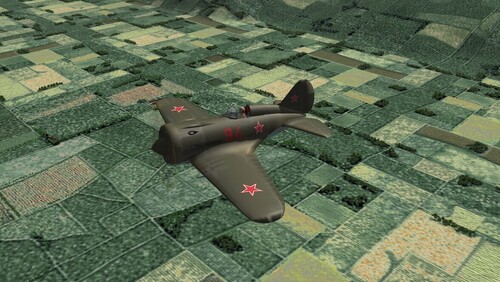
SF2 Polikarpov I-16 'Rata' Upgrade Package 8/25/2026 -For SF2 =ONLY= (Full/5 Merged Recommended) This contains a full SF2 upgrade package for Wolf257's Polikarpov I-16 'Rata'. I've collected all the skins (i hope!) available, or new skins made to replace the original lo rez bmps. Many changes on this old bird have been implemented, see the "Notes" section for the Change List. The package includes the following skins: 254 IAP, VVS (a somewhat generic skin) 71 IAP Leningrad '41 (Camo) 4th GvIAP Baltic Fleet (1942?) 21st Squadron, Chinese Nationalist AF (1937) 1st Squadron, Republican AF <1937 (Spain) When possible, and available, the original author's read me and image are included in their skin folder. All skins are in jpg format, at 2048x, and all markings are decals. Decal randomization is TRUE. Some skins got all new decals, some use stock 3W Soviet Bort numbers. The Chinese and Spanish numbers ARE 100% historically correct. On the Aircraft Selection Drop Down Screen you'll see: I-16-10 "Rata" (W) The W is obviously for Wolf257. I don't think there's another Rata, but ???? Everything is included: WW2 bombs, pilot figures and so forth. You'll also be adding a 'new' sound, so have your SoundList ini extracted, or be ready to extract it and add the new sound's data. Full instructions are in below, in the "To Install" section. My original 'Box Art' Hangar Screen has been revamped for SF2 usage; it's in a kind of 'wide-ish-screen'. A BRAND NEW!!! Loading screen was created for this mod as well!! As is always recommended, unzip to a temp folder or your desktop to give easy access to the rest of this readme for it's install instructions. PLEASE read them, before installing!!! Please read the Notes section for any other useless bits of information, the change log, Please also take note of changes in the Standard Disclaimer in the "Legal BS" section at the bottom. Also, a reminder this is a VERY old model (2005) and will have some flaws. Happy Landings! Wrench Kevin Stein- 1 review
-
- 6
-

-

-
View File SF2 Polikarpov I-16 'Rata' Upgrade Package SF2 Polikarpov I-16 'Rata' Upgrade Package 8/25/2026 -For SF2 =ONLY= (Full/5 Merged Recommended) This contains a full SF2 upgrade package for Wolf257's Polikarpov I-16 'Rata'. I've collected all the skins (i hope!) available, or new skins made to replace the original lo rez bmps. Many changes on this old bird have been implemented, see the "Notes" section for the Change List. The package includes the following skins: 254 IAP, VVS (a somewhat generic skin) 71 IAP Leningrad '41 (Camo) 4th GvIAP Baltic Fleet (1942?) 21st Squadron, Chinese Nationalist AF (1937) 1st Squadron, Republican AF <1937 (Spain) When possible, and available, the original author's read me and image are included in their skin folder. All skins are in jpg format, at 2048x, and all markings are decals. Decal randomization is TRUE. Some skins got all new decals, some use stock 3W Soviet Bort numbers. The Chinese and Spanish numbers ARE 100% historically correct. On the Aircraft Selection Drop Down Screen you'll see: I-16-10 "Rata" (W) The W is obviously for Wolf257. I don't think there's another Rata, but ???? Everything is included: WW2 bombs, pilot figures and so forth. You'll also be adding a 'new' sound, so have your SoundList ini extracted, or be ready to extract it and add the new sound's data. Full instructions are in below, in the "To Install" section. My original 'Box Art' Hangar Screen has been revamped for SF2 usage; it's in a kind of 'wide-ish-screen'. A BRAND NEW!!! Loading screen was created for this mod as well!! As is always recommended, unzip to a temp folder or your desktop to give easy access to the rest of this readme for it's install instructions. PLEASE read them, before installing!!! Please read the Notes section for any other useless bits of information, the change log, Please also take note of changes in the Standard Disclaimer in the "Legal BS" section at the bottom. Also, a reminder this is a VERY old model (2005) and will have some flaws. Happy Landings! Wrench Kevin Stein Submitter Wrench Submitted 10/11/2026 Category Soviet Origin
-
- 3
-
-
-
I'm working furrisley <gr> it finalize the I-16 Rata upgrade package. That I'd forgotten about ... within the next 24 hours it'll be up
-
I can see by some of the responses that some of you have guessed what city that is. Unfortunately, while we have the carriers, we don't have the birds needed for The Raid. On the other hand, there ARE plenty of Easter Eggs to keep you busy looking for ...

-
I've got the finish the western Med. Not even half way through, although all the airbases are done. Did you know that every European city has MASSIVE amounts of railways??? And someone (guess who) has to build them!!!!???!!!!! OTH, I could release the MTO versions of YAP Rising Sun's B-26 Marauder and P-38J. Just need to write readmes and make sure it's ok with Ralph.
-
IIRC, the major difference is the Falcon source code was released by the authors. Unfortunately, that's never going to happen with TK. Over the last 18 or so years, this very thing has been discussed endlessly. He's never going to release it. Sorry to say for all of us, especially the modders that can really use some additional features.
-
Isn't that called copywrite violation???
-
Thinking about a Gaming PC, need advice.
Wrench replied to malibu43's topic in Hardware/Software Chat
not bad!!! I think you made a good choice!! Setting things up is always such a PIA!!!! Enjoy your new toy!!! -
Well, I try to get things as right a possible, given the limitations of the terrain engine. As for Spain, if I got things wrong, Stratos would yell at me!!!
-
You CANNOT compare DCS to the SF2 series. I wish people would stop fucking doing that. You can use the simple red square, or you can go into the main ini of every single aircraft in your mod folders, and change the visible distance statements --- You can comment out the other 4 lods, and change lod 1 to use the 10000 meter range. Lod 1 always has the highest detail. Do let us know what it does to the frame rates. Inquiring minds want to know!!
-
yeah, DO NOT mix SF1 and SF2 data inis. 1stGen units are missing a shit load of aero statements, even on the AI only birds. Until Yakarov & Co get their's finished, just add the cockpit as outlined in KB, and fly.
-
Fix for CCIP impact marker showing outside HUD
Wrench replied to malibu43's topic in General Discussion
TK programming. all gunsights wander off the glass, since Day 1. I don't remember if there is a fix, maybe somebody else might??? -
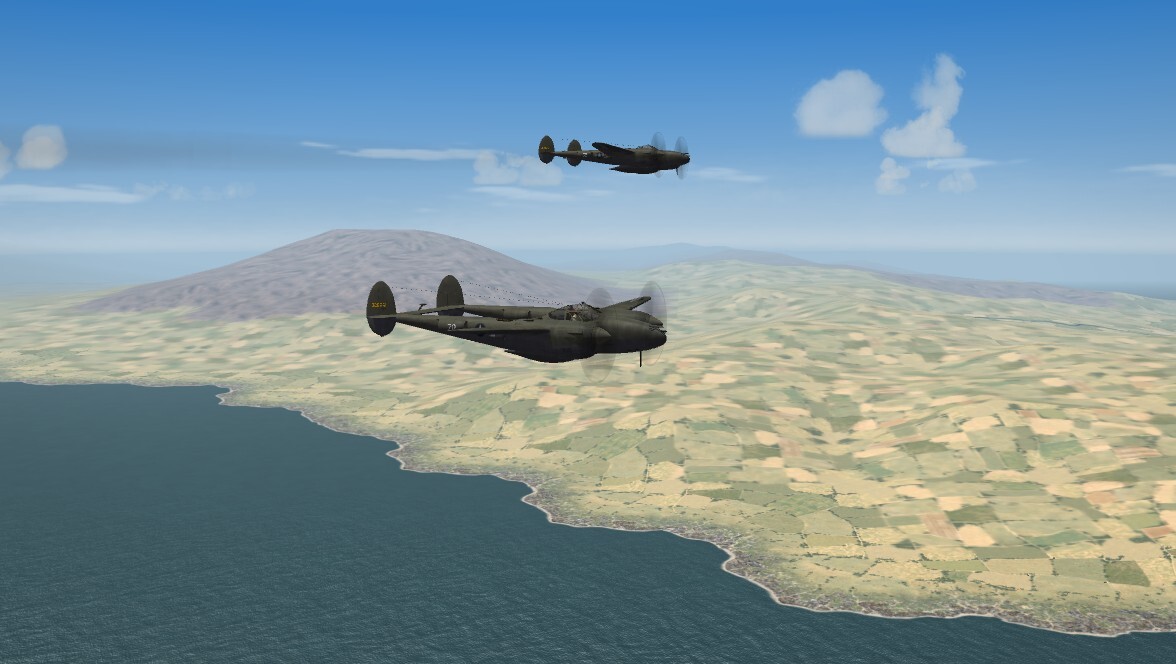
Lightning over Etna
-
Again, that's not a bad idea -- it's the 'buying in bulk' like for Costco or Sam's Club here in the States. My reccomendataion, spend the extra 3 dollars, and take a slower, more relaxed pace. This also reduces 'brain fry', as you're not pushing too hard. as to a mod, how about my Iberian Penninsula terrain? (shamless plug, I know!!!) And the needed ground objects: You're on your own for aircraft, but there is a good number available
-
Every time I hear (or see) He.59, I see the action sequences near the end of "Action In The North Atlantic". That was the first time I realized the Luftwaffe was still using biplane floatplanes for recon and anti shipping Pretty damn good miniature work for 1943!
- 57 replies
-
- 2
-
-
- hand tiling
- hfd editing
- (and 3 more)
-
Or even better, interact with the community. What a thought!!
-
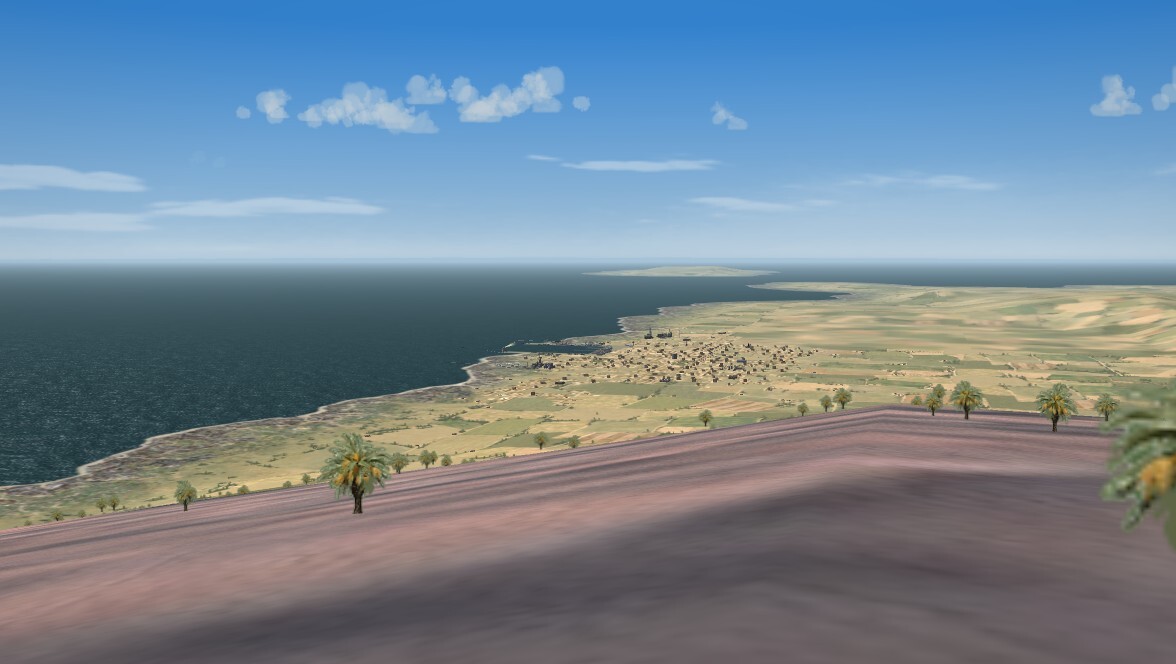
(placing it here, because it IS for WW2) The view of Naples from atop Mount Vesuvius is pretty awesome!!! (now, if i could just get the 'vents' to smoke ... )
-
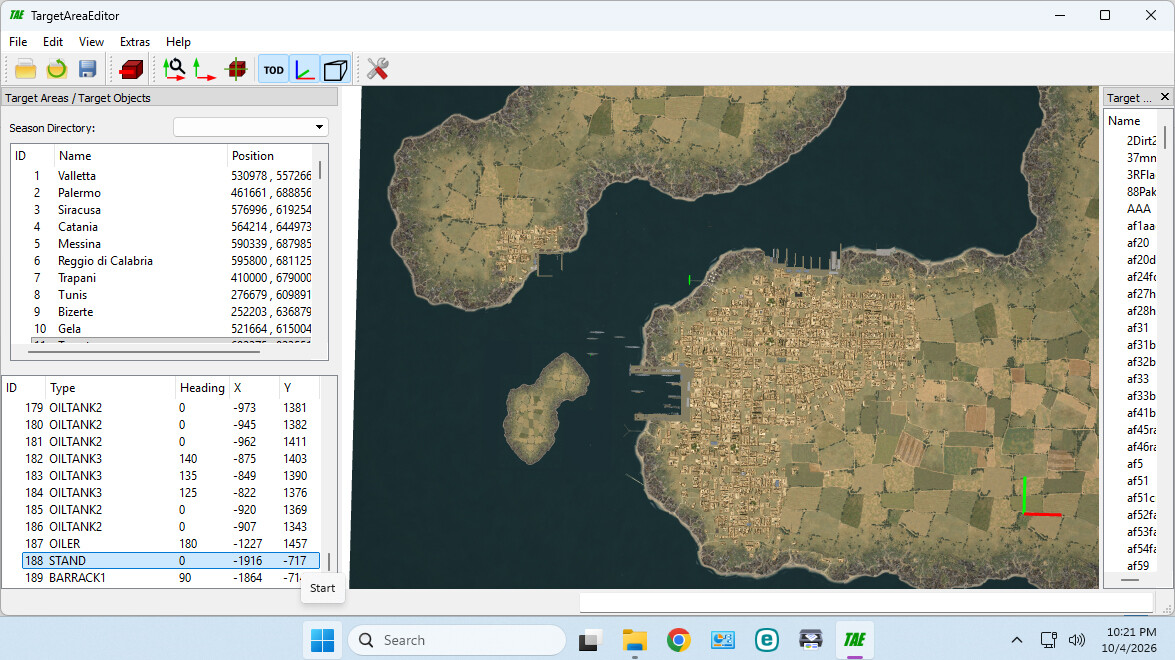
four and a half days ... ,no, make that 5. this is the end of the 5th day working on just the ONE city. Tried this 5 time now, moving adjusting - got to 200 items placed, and had to throw them all out 3 times. That's 600 lines in the targets ini for those counting. Made 6 new tiles (most not being used, of course!) Hours and hours of research. Finding detailed period correct maps. Photos of before and after ... And still can't get the fucking tiles right. There are some serious issues with the 3w tile system. As if we didn't know that for the last 20 years .... This is the best I think that can be done. When this terrain is finished, I hope you all enjoy it. Acutaly you are ORDERED to enjoy it!!
-
That's why that call it 'free camera'. You're free to wander around The World, not constrained by the location of your airplane. Does nobody actually READ the Options screen options for controls??? Or make an effort to locate and read the game's manual?? SF1 and SF2 are the same, so reading the SF1 give you LOTs of info. I'd hate to quote Ripley here (scene from Aliens after her return to Earth. you all know the one)
-
Well, pretty much what Gepard said. You'd need to use the shitty TE to create the TOD. OTH, like he also said, taking an existed TOD, renaming to match the tile, and then using Mue's TOD Editor, works very well. I've already done that!!! With Mue's Tool, you just simply grab the items, and move them around, enmass or individually
-
F6
-
Getting 'working water' is not a new thing. I did it 2009 with the WW1 Palestine map, using the stock Desert tiles from SF. It probably should get the full SF2 "ter*****" upgrade, but I don't spend a lot of time in 1910s (gr). Not only do you need the proper tga, you also need the _hm.bmp that goes with them with gives the water it's surface. As [Texture027] Filename=SEA2CITY50.TGA HasWater=1 HeightMap=SEA2CITY50_hm.BMP HeightMapScale=2.000000 Color=0.525215,0.487890,0.391703 SolidObjectTexture=terobject_buildings1.BMP AlphaObjectTexture=terobject_trees1.TGA and those height maps need to match the land/sea transition. This includes rivers, river ends (mouth or whatever) The tgas, seem to have the proper "speckling" to give the illusion of wave action. But you're probably gonna need to add the shader statements, as I'd bet money they're already IN FE2, as it uses much of the SF2 engine. It's NOT as easy as you're making it sound, even though you did get it working, there's WAY more to it.
-
View File SF2 Reggiane Re.2005 Sagittario Package (by Veltro2k) SF2 Reggiane Re.2005 Sagittario Package (by Veltro2k) 9/23/2026 -For SF2 =ONLY= (Full/5 Merged Recommended) This is a release of Veltro2K's Reggiane Re.2005 'Sagittario' fighter for the Italian Air Force (Regia Aeronautica) of WW2. For some unknown reason, it seems to never been released for either SF1 or SF2. This will give the WW2 MTO players another, albeit short lived, aircraft for Axis usage. Be advised, there are some issues with the physical model, and therefore it is released in "as is" state. It is unlikely that another one will ever be made, so we must make due with what we have. See the "Notes" section for more specific details. Please note, if you DO have this aircraft, you MUST back up the entire mod, aircraft and decal folders especially, as THIS mod replaces it in total. The package includes the following skins 362 Squadrillia, 22 Groupo, Regia Aeronautica, as used in Central Italy before the Armistice "Luftdienst Kommando Italien" (<1944) Luftwaffe, after 10/43 Aeronautica Nazionale Repubblicana (<10/43) (aka - ANR, no unit specified) All the skins remain in their 'dark green/gray' paint scheme.Almost all markings are decals, and decal randomization is TRUE. In RA fashion, you have 15 plane-in-group numbers for the RA and ANR, and 20 for the Luftwaffe. The skins remain in bmp format at 1024x. Take note that the 'ANR' skin has been assigned 'Nazi Germany' as it's nation. This is because I didn't create that enemy nation. You End Users (tm) are of course, free to do so. You'll also be adding a 'new' sound, so have your SoundList ini extracted, or be ready to extract it and add the new sound's data. Full instructions are in below, in the "To Install" section. The Guns are included for those that don't have the WW2 Gun Objects. If you do, just allow the Overwrite? when installing. On the Aircraft Selection Drop Down Screen you'll see: Re.2005 Sagittario (v2k) The "(V2K)" is for Veltro2k, the model builder. As is always recommended, unzip to a temp folder or your desktop to give easy access to the rest of this readme for it's install instructions. PLEASE read them, before installing!!! Please read the Notes section for any other useless bits of information, the change log, Please also take note of changes in the Standard Disclaimer in the "Legal BS" section at the bottom. Happy Landings! Wrench Kevin Stein Submitter Wrench Submitted 10/01/2026 Category Italian Origin
-
- 1
-
-

Version 1.0.0
32 downloads
SF2 Reggiane Re.2005 Sagittario Package (by Veltro2k) 9/23/2026 -For SF2 =ONLY= (Full/5 Merged Recommended) This is a release of Veltro2K's Reggiane Re.2005 'Sagittario' fighter for the Italian Air Force (Regia Aeronautica) of WW2. For some unknown reason, it seems to never been released for either SF1 or SF2. This will give the WW2 MTO players another, albeit short lived, aircraft for Axis usage. Be advised, there are some issues with the physical model, and therefore it is released in "as is" state. It is unlikely that another one will ever be made, so we must make due with what we have. See the "Notes" section for more specific details. Please note, if you DO have this aircraft, you MUST back up the entire mod, aircraft and decal folders especially, as THIS mod replaces it in total. The package includes the following skins 362 Squadrillia, 22 Groupo, Regia Aeronautica, as used in Central Italy before the Armistice "Luftdienst Kommando Italien" (<1944) Luftwaffe, after 10/43 Aeronautica Nazionale Repubblicana (<10/43) (aka - ANR, no unit specified) All the skins remain in their 'dark green/gray' paint scheme.Almost all markings are decals, and decal randomization is TRUE. In RA fashion, you have 15 plane-in-group numbers for the RA and ANR, and 20 for the Luftwaffe. The skins remain in bmp format at 1024x. Take note that the 'ANR' skin has been assigned 'Nazi Germany' as it's nation. This is because I didn't create that enemy nation. You End Users (tm) are of course, free to do so. You'll also be adding a 'new' sound, so have your SoundList ini extracted, or be ready to extract it and add the new sound's data. Full instructions are in below, in the "To Install" section. The Guns are included for those that don't have the WW2 Gun Objects. If you do, just allow the Overwrite? when installing. On the Aircraft Selection Drop Down Screen you'll see: Re.2005 Sagittario (v2k) The "(V2K)" is for Veltro2k, the model builder. As is always recommended, unzip to a temp folder or your desktop to give easy access to the rest of this readme for it's install instructions. PLEASE read them, before installing!!! Please read the Notes section for any other useless bits of information, the change log, Please also take note of changes in the Standard Disclaimer in the "Legal BS" section at the bottom. Happy Landings! Wrench Kevin Stein -
well, worked some of the FM issues out. It's not perfect, but better than it was. I also decieded to do a Luftwaffe and ANR skin. The ANR will be tagged for "Nazi Germany", so as not to need a new nation; cause you'd need 2 -- one on the Axis side (ANR) and the Allies side (Italian Co-Belligerent Air Force Aviazione Cobelligerante Italiana, or ACI) IIRC, there are some ACI skins around here someplace... Tactical numbers for both the ANR and LW are 'best guess', as I couldn't find enough info in my books or the net on what color(s) they might have been!