


Wrench
-
Posts
28,328 -
Joined
-
Last visited
-
Days Won
188
Content Type
Profiles
Forums
Gallery
Downloads
Store
Everything posted by Wrench
-
just renumber the *nameofaircraft*.ini (aka 'the main ini') with the skin you want most as number 001. will automatically be used by your entire flight
-
yes, works the same as SF2
-
just in case you all were wondering where it went!!
-
thanks for resizing! when you have eyes like mine... I agree with Antares, it looks like a defective tga. What aircraft is it, what cockpit does it use? I guess the next step is to look at each hud tga in the cockpit folder, and see if the alpha channels are "hard edged" and not bleeding over. Othat than that ????
-
lack of texture memory? (btw, next time try posting full rez images. those are REALLY too small to see what's happening)
-
templates for the Corsair II have been available for over a year.... ===============
-
experimental city-river tile (GC-RivS). because sometimes, the city ISN'T on both sides of the river...
-
nearly done with the first one (standard Mk V. still have to finish the Trop and LF versions)
-
moved to a more appropriate forum
-
Tigershark http://combatace.com/topic/77759-f-20af-20b-tigershark-remod-pak/
-
decals don't work on glass anymore. don't remember when it got broke, but sometime in early SF2 release.. Had one on the rear window for the F6F-3, turning it into a -5, and one of the Indian Fishbeds used it on the real glass. Even my 'stand in' Birdcage Corsair (made from Wolf's -1A). don't work no more
-
Wow. I'm honored beyond belief; I guess it's for guys like PCPilot that keep us doing what we do.
- 1 reply
-
- 1
-

-
whoops!! my mistake! the instructions are NOT in the KB for some reason, but in the WW2 forum below!!! http://combatace.com/topic/74835-creating-the-eratheatre-specific-ww2-install/ follow them, but don't remove the "modern stuff". the relevant sections are on copying and renaming the exe to create a theatre specific mods folder
-
it's designed as a STAND ALONE install create a new one, following the steps in KB
-
nope all new downloads are patched at the most current level. download and install
-
View File SF2 WW2 CBI P-40K-5 Skins & Tweeks Pak SF2 WW2 CBI P-40K-5 Skin & Tweeks Pak 11/14/2013 -- Something for the WW2 PTO players -- = For SF2 ONLY, Full-5 Merged (Reccomended/Preferred) = *Note: this pak MAY be usable in 1stGen SF/Wo* game installs. However, some features (decal randomization) will =NOT= be functional. Use in 1stGens has not, and cannot be, tested by me.* **Note x2: this mod is designed for use =ONLY= in a WW2 CBI-Centric mods folder. Some Theatre specific changes have been effected, and should =ONLY= be used in the CBI!!!** This is =NOT= the full aircraft; you'll be adding all this stuff to the original. Some mods, tweeks, and 2 new skin/decal sets for Raven's P-40K-5-CU Warhawk, is seen in China durning WW2. Included are 2 skins for the 23rd FG, aka "Flying Tigers" 74th Fighter Squadron, in late 42 (star-and-ball) 75th Fighter Squadron, in late 43 (star-and-bar) The squadron patch (ww2 versions!) will be seen as the paint chip for each skin on the Loadout screen. Skins remain in their bmp format. New DDS damage textures (usable on all Raven's Warhawk/Kittyhawk in SF2 only) are included! Several new inis are included; main Data Loadout Userlist The data ini makes use of my "kit-bashed" FM, that while (semi) SF2-compliant, still needs fine tuning by an Expert. At least now, it won't mush into the ground and explode. You are advised to back up your original inis, and full instructions are in the "To Install" section. The DF Loop antenna has been added via the 'fake pilot' method Canopy Opens/Closes via the Standard Animation Keystroke , Shift/0. All markings are decals, and Decal Randomization is TRUE. There are no nose arts. Also, via the use of my (patent pending) fake SqTail decal, the squadron name display is now active on the Loadout Screen (74th only). No weapons are included, except SF2 Versions of the new bombs (for those that haven't converted them yet). New SF-2 compliant "Box Art" style Hangar and Loading screens are included, too. The skins have been run through the template (thank you Raven for that!), and have had a layer of dirt and 'clouds' added for weathering. As always, fairly easy to follow, yet detailed install instructions are included. PLEASE read them!! Good Hunting!! Wrench Kevin Stein Submitter Wrench Submitted 12/07/2013 Category P-40
-
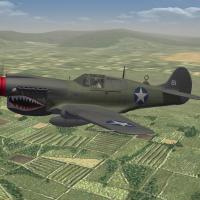
84 downloads
SF2 WW2 CBI P-40K-5 Skin & Tweeks Pak 11/14/2013 -- Something for the WW2 PTO players -- = For SF2 ONLY, Full-5 Merged (Reccomended/Preferred) = *Note: this pak MAY be usable in 1stGen SF/Wo* game installs. However, some features (decal randomization) will =NOT= be functional. Use in 1stGens has not, and cannot be, tested by me.* **Note x2: this mod is designed for use =ONLY= in a WW2 CBI-Centric mods folder. Some Theatre specific changes have been effected, and should =ONLY= be used in the CBI!!!** This is =NOT= the full aircraft; you'll be adding all this stuff to the original. Some mods, tweeks, and 2 new skin/decal sets for Raven's P-40K-5-CU Warhawk, is seen in China durning WW2. Included are 2 skins for the 23rd FG, aka "Flying Tigers" 74th Fighter Squadron, in late 42 (star-and-ball) 75th Fighter Squadron, in late 43 (star-and-bar) The squadron patch (ww2 versions!) will be seen as the paint chip for each skin on the Loadout screen. Skins remain in their bmp format. New DDS damage textures (usable on all Raven's Warhawk/Kittyhawk in SF2 only) are included! Several new inis are included; main Data Loadout Userlist The data ini makes use of my "kit-bashed" FM, that while (semi) SF2-compliant, still needs fine tuning by an Expert. At least now, it won't mush into the ground and explode. You are advised to back up your original inis, and full instructions are in the "To Install" section. The DF Loop antenna has been added via the 'fake pilot' method Canopy Opens/Closes via the Standard Animation Keystroke , Shift/0. All markings are decals, and Decal Randomization is TRUE. There are no nose arts. Also, via the use of my (patent pending) fake SqTail decal, the squadron name display is now active on the Loadout Screen (74th only). No weapons are included, except SF2 Versions of the new bombs (for those that haven't converted them yet). New SF-2 compliant "Box Art" style Hangar and Loading screens are included, too. The skins have been run through the template (thank you Raven for that!), and have had a layer of dirt and 'clouds' added for weathering. As always, fairly easy to follow, yet detailed install instructions are included. PLEASE read them!! Good Hunting!! Wrench Kevin Stein -
good thing you're not working on WW2 China... you know how many frakking rivers there are in China!!!???? you can see what I mentioned (I think in another thread here), about 'painted' edges for the tiles. Everything comes out perfectly aligned Canton region, pearl river estuary. grass fields, paddies, airfields etc
-
do you have of the original cats? (VietnamSEA, GermeanyCE??) It works the same with them, too. Maybe even IsraelME -- all the terrain object buildings and such are resident in ALL the Original 4 Terrains
-
red shirt (ok, blouse) means she's Security. Not to worry, some "monster of the week" will take care of her (take that ANY way you want!!! ) and you can tell that hot rod is Ford.... broke down in the middle of a dry lake bed. Typical. Even then they were crap!! (yes, I'm a GM person!)
-
OT-I want to bomb Gestapo Headquarters...
Wrench replied to Hauksbee's topic in WOFF UE/PE - General Discussion
well, if you're an SF2 WW2 player, such a terrain will be available early next year -
shouldn't be that hard... a simple matter of dropping (painting) a circle, doing a bevel/emboss to raise it, some shadowing (maybe a drop shadow?), and painting in the tga section, leaving a part of the rim dry (black in the alpha) remember, though, most 'river' sections are about 50 pixels wide (on a 512x512 tile) so careful placement will be necessary
-
actually, those are T-33s
-
are the rails painted on the tile? If so, you may need to paint their section fully black in the alpha or, leave as is, to represent a bridge that's already been "dropped" (that look really COOL too, btw!!)
-
Stephan, if you have SF1 (1stGEn), you can use it's desert cat, placed in the main core installs /Terrains folder. To bring it up to FE2/SF2 standards is fairly simple. You'll need to extract the data ini and make the changes for the DX10 shader statements. And of course, have a /Desert sub-folder for the edited inis in you FE/FE2 install