mue
-
Posts
419 -
Joined
-
Last visited
-
Days Won
8
Content Type
Profiles
Forums
Gallery
Downloads
Store
Everything posted by mue
-
Is by any chance your saved games folder in a different place than the default location (c:\Users\<your username>\Saved Games)? North Atlantic will create the mod folder here, but (because of a bug?) the other games will create their mod folders in the default saved games folder location.
-
Yes, you first have to load objects (*.obj, *.3ds or *.lod) into the TOD editor with File->Object Manager->Load Objects... . Then you can place those object with RMB -> Add or by pressing 'A' onto a TOD. As a 'workaround' to use 'stock' TOD objects you can load a TOD with 'stock' objects, select an object and save this object with RMP -> Save Object. Then you can later load that object as described above.
-
The info box in the corner shows KIAS. If you enable debug output with DisplayDebug=true in HUDDATA.INI, then you get a lot of additional infos, including KTAS. You can circle with ALT-D through the various display modes. I assume that TK implemented a model of the standard atmosphere that gives the air density at any given altitude and from there IAS is calculated.
- 1 reply
-
- 4
-

-
- air density
- ias
- (and 1 more)
-
You can also try to increase the Cldc coefficient (Roll moment due to control surface deflection). That coefficient is usually in the [LeftAileron] and [RightAileron] sections.
-
If anyone experience the same problem as Sundowner did (TODEditor freezing after opening/saving some TOD files): I uploaded a minor update (version 0.1.2) of the TODEditor. It now uses the native Windows file dialog. That should fix the freezing issue.
-
I haven't experienced any problems on my system yet. What graphic card do you have? Does it always happen after editing 3-4 TODs? When does the freeze happen: after loading, after saving or while editing?
-
I can relate to that: https://combatace.com/forums/topic/93840-strike-fighters-2-meets-flightgear/ I'm still working on and off on this project/experiment: currently working an a script that automatically converts SF2 flight models into the FlighGear (JSBSim) flight models.
- 69 replies
-
- 3
-
-

-
- strike fighters
- strike fighters 2
- (and 1 more)
-
I'm still not sure what do you want to achieve or what do you expect? Where do the input parameter coming from?
-
Your numbers are consistent regarding the drag force equation. Therefore I think one or more of your input parameters are wrong. Since you want to calculate air density I assume the other parameter are the input. What seems odd with your input parameters is a drag force of 34 kN on an area of 0.46 cm^2 (=0.000046 m^2).
- 8 replies
-
- 1
-
-
- air density
- air density in strike fighters 2
- (and 3 more)
-
I too have difficulties to understand what he is actually doing. But what I noticed is, that in one of his posts he provides a google drive download link to a (I assume pirated) full version of Strike Fighter 2.
-
It's already there: View->Show Pivot Points of Selected Nodes (or via the icon in the toolbar) Regarding adding edititing functionalities: I don't plan to implement any of that.
-
Is there any way to increase visibility range/distance ?
mue replied to muhammad's topic in General Discussion
No problem. Sometimes it's not easy to even know the proper keywords to search for. For your problem it would be e.g. "draw distance". Sometimes I use Google to search in combatace.com, e.g. with "draw distance site:combatace.com". I remember I already wrote something about extending the drawing distance: TL;DR in options.ini set ObjectsFade=false and in flightengine.ini increase DetailMeshSize If you want the fading effect (now for longer distances) re-added then apply the shader mod from the above post. TL;DR To extend the draw distances of target objects (e.g. airbases, ...) you must for each object in <terrain>_types.ini increase MaxVisibleDist and in <targetobject>.ini increase (LOD) Distance -
In Grief and Sadness...Our Greatest Loss...GodSpeed Marty.
mue replied to swambast's topic in CombatACE News
RIP NIELS. My condolences to the family and loved ones. -
Apply Scale to all objects before exporting the model.
-
What Cat are A-4B cockpit textures in?
mue replied to dtmdragon's topic in Mods & Skinning Discussion
BTW, @Menrva already posted that info in his post above. -
What Cat are A-4B cockpit textures in?
mue replied to dtmdragon's topic in Mods & Skinning Discussion
With my CATExtractor you can search for files in all CAT and DLC files at once without open every CAT/DLC file separately: https://combatace.com/forums/topic/98056-stock-decals-and-insignias-extrection/?do=findComment&comment=803209 -
Thanking 'Logan4'(F-5E, another unfinished work, since 2020)
mue replied to ace888's topic in Mods & Skinning Discussion
Thank you guys for the compliments. It means a lot to me that some programs and tools I wrote are appreciated by you modders. But back to topic: I second that too. Logan4 helped me a lot by providing me with numerous specific LOD file examples, so that I could investigate the LOD file format in more detail and was eventually able to create the LOD exporter plugin for blender. -
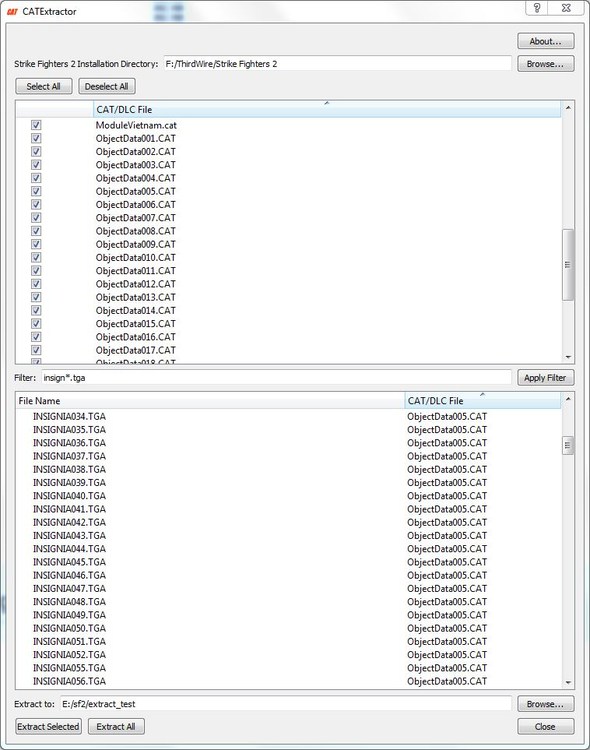
With the CATExtractor from Mue's Toolbox you can search for files (in all CAT and DLC files at once) by applying a filter, e.g. "insign*tga":
-
The "Saved Games" folder is one of the Special Folders in Windows: https://en.wikipedia.org/wiki/Special_folder. It's default location is %USERPROFILE%\Saved Games, but it can be changed by the user: https://www.windowscentral.com/how-move-default-user-folders-new-drive-windows-10. I assume in your case that the Special Folder "Saved Games" is located in C:\Saved Games. And SF2NA creates the mod folder there. Unfortunately all other SF2 games (SF2 Europe, SF2 Vietnam, ...) seem to use an incorrect implementation of how to retrieve the location of the Saved Games folder. They always use the default location %USERPROFILE%\Saved Games.
-
The *.ini files will not be created automatically in the SF2 install directory (at least it didn't do that on my system). You have to create a copy manually. Just as the install instructions for the Korea mod you already quoted say: 5. Mod specific .ini configs a. In your SF2 installation directory where all the game .exe resides, make a copy of StrikeFighters2 Israel.ini (or any other similar ini) and rename it StrikeFighters2 Korea.ini. ....
-
That aren't shadows. The "darkening" is caused by (diffuse) lighting: The more a part of the object faces the light source (in the LODViewer the light is at eye position) the brighter is becomes, and vice versa. The LODViewer GUI hasn't an option to enable/disable lighting (yet). But as a workaround you can adapt the fragment shader diff_decal.frag in the LODViewer's shaders directory to decrease or disable the diffuse lighting. The attached shader completely disables the diffuse lighting. HTH. diff_decal.frag
-
The export with decals option only disables vertex sharing (this is (sometimes?) needed to prevent decal bleeding). But that of course increases the vertex count. I think there is a vertex limit per mesh. Maybe you hit that limit here?
-
Thanks @Menrva for digging this up. It's an interesting nice project. Quotes from the project's website and gitlab: and I totally can relate to both. Although I would replace Janes Fighters Anthology with SF2
-
I assume you mean TOD objects: In the TODEditor you can save a selected object with right mouse button -> Save Object as *.obj or *.3ds files (saving as *.lod file doesn't work (yet)). Afterwards you can load the object with File->Object Manager...->Load Object and place it on a (new) TOD. But note: the texture coordinates (texture mapping) of the object were not changed. That means the texture of the object must be located on the new texture (atlas) at the same position as on the original texture (atlas). Alternatively the texture mapping of the object (*.obj or *.3ds file) can be changed/adapted with a 3D modeler program, i.e. blender or 3D Max.
-
Yes, your file seems corrupted. What games incl. patch level (e.g. SF2 Vietnam Jul 2013, SF2 Europe Jul 2013 , ...) have you installed? What tool have you used to extract the files (the official TW extractor or the extractor from Mues Toolbox)? Try to reextract the file. Maybe your file got corrupted by opening and saving the file with an editor.