


MigBuster
-
Posts
9,165 -
Joined
-
Last visited
-
Days Won
27
Content Type
Profiles
Forums
Gallery
Downloads
Store
Everything posted by MigBuster
-
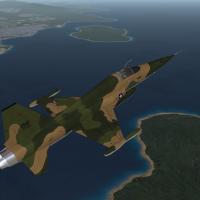
286 downloads
USAF Vietnam Skoshi (Small) Tiger Project skin 2 for the Mirage Factory F-5C Freedom Fighter.(1024x1024) Between 1965 and 1967 a single USAF squadron flew over 9000 sorties with the then new F-5C to evaluate its combat viability. The 3 phase Skoshi Tiger project included Combat Air Patrol and strike missions over North Vietnam - and ground attack/support missions over South Vietnam, Cambodia and Laos. New Camo scheme Higher res Fuel tank skins included Press the button below to download this skin and save it to your Desktop. Only tested in WoV but should also work in WoE/SFG/SFP1 at least Many thanks to the Mirage Factory for the fantastic F-5C model. Released under CombatAce Fair-Use terms. Visit the URL below for more info. http://forum.combatace.com/index.php?showtopic=26131 -
View File F-5C USAF Skoshi Tiger skin USAF Vietnam Skoshi (Small) Tiger Project skin 2 for the Mirage Factory F-5C Freedom Fighter.(1024x1024) Between 1965 and 1967 a single USAF squadron flew over 9000 sorties with the then new F-5C to evaluate its combat viability. The 3 phase Skoshi Tiger project included Combat Air Patrol and strike missions over North Vietnam - and ground attack/support missions over South Vietnam, Cambodia and Laos. New Camo scheme Higher res Fuel tank skins included Press the button below to download this skin and save it to your Desktop. Only tested in WoV but should also work in WoE/SFG/SFP1 at least Many thanks to the Mirage Factory for the fantastic F-5C model. Released under CombatAce Fair-Use terms. Visit the URL below for more info. http://forum.combatace.com/index.php?showtopic=26131 Submitter MigBuster Submitted 08/02/2008 Category F-5 Freedom Fighter Skins
-
Sounds like you are using the wrong version of the weapons editor to save the file The version of WOV you are running will determine the version you need - so what version of WOV are you running? btw this is in the wrong forum
-
lol Well with an existing jet in the skin there is a file called Decals.ini - open that up and you will see [Decal001] MeshName=vertical_stabilizer DecalLevel=1 DecalFacing=LEFT FilenameFormat=A7TailL Position=-4.9,2.21 Rotation=0.0 Scale=4.5 DecalMaxLOD=4 [Decal002] etc Should be obvious where the decal goes via the Mesh name - you will see that the rotation , position and scale can be changed very accurately. An easy way to get positions is to skin a plane that already has a complete decals ini. If the original skinner hasnt used decals - then you may have to use trial and error - sometimes even changing the size or position can cause them to disapear or cause decal leak and other weird things.
-
wow - Havnt seen that for years - think I taped most of them first time around - around 1990 I think. Never saw much of Rob Newman again did we.
-
Also depends on which program you use - if I was to write a how to it would be based on G.I.M.P because its free, open source and there are lots of tutorials on the web for the basics. However I will tell you that it will take a 100th of the time to actually do the decal though than it will to write a how-to - and even then people may still not get it. :close_tema: disclaimer: requests for tedious How-Tos are not on my list at the mo.
-
I have quite a few B/W photos and colour plates but nothing with much really close up detail - not any more detail then they already have I imagine.
-
I must admit I thought the later Nam era missiles such as the AIM-9J would be much better - but for example out of 31 attempted launches in 1972 of the AIM-9J - only 4 scored kills - 23 missed and 4 stayed on the rail. Yes there are various reasons - such as ripple firing/ combat stress and firing out of parameters (range/ pulling too many Gs etc) but I can see why TK has perhaps given the missile that performance - he does (claim) to put in a lot of research into these things.
-
So which missiles do you need help with in particular?
-
yaaaay - long live c5!
-
But you can download files under 1MB okay? I suspect its something to do with you having a basic account - although im not sure what a basic account is now limited to tbh. Subscription is now in force to keep the site going - only found out recently we were funded by a single person all this time :)
-
Not a bad review - complains about useless missiles like all other newbies though - needs to learn how to use them more like!
-
Has this been brought up because everyone is still wondering which jet to put in Topgun 2 Theres a lot of affection for the F-14 it seems - and it would be great to be in the 80s again in some ways when it and others were in their prime. But no its 2008 - the missiles are too flippin good and the latest version of my beloved F-16 is called the QF-16
-
The cockpit is not for AF but will work with RV RV will work over AF - but was designed to work over the original F4 - so if you hav the original still use that Oveure was over Unger, and Unger was under Dunne
-
I only upgraded my top gun from VHS to normal DVD about 4 months ago - cost £2 (4$) just getting so old btw
-
ffs - chill out!!!! This site has mainly 3rd Wire series players - if people read and dont reply they obviously cant answer your question - and no one is obliged to answer you anyway.
-
http://www.funnyordie.com/videos/8afa50b440
-
It has never worked from day 1 AFAIK - was never implemented into SF:P1 or any of the others. Some of the 3rd party Mig-25s have chutes - but these auto deploy as part of the actual model I think
-
Still hoping for some news on Lead Pursuits next sim - I would expect upto date A-A combat with a DX10 engine - and possibly the focus on the FA-18E/F - and if its like Falcon you can fly an F-22 etc with unrealistic flight model if you like blah
-
Looks very nice