


Wrench
-
Posts
27,957 -
Joined
-
Last visited
-
Days Won
160
Content Type
Profiles
Forums
Gallery
Downloads
Store
Everything posted by Wrench
-
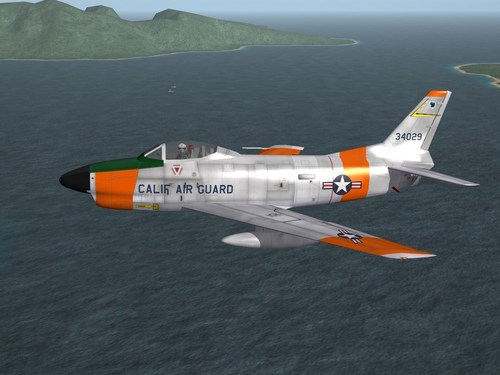
Version 1.0.0
199 downloads
SF2 F-86L "Lima" Sabre Dog Revamp Pack 6/9/2020 "Quarantine Approved - Essential Mods" = For SF2 (Any & All) = This package is designed to replace the original F-86L from the pack available from the folowing URL: https://combatace.com/files/file/10286-sf2-f-86dl-v10/ by suhjake from 2009 It is =NOT= necessary to have the original mod pack, as this =WILL= replace it in total. Everything reusable from that pack will be included with this. If you do have the original installed, you will probably wish to remove, move, or delete it. Overwriting may cause conflicts. As the Lima's were mostly used by USAF Air National Guard units, that is what's covered here. The following units are depicted herein: 146th FIS PA ANG (57-60) 190th FIS ID ANG (59-64) 194th FIS, CA ANG (58-64) 199th FIS, HI ANG (58-61) 3550th CCTW, Moody AFB, GA (late 50s/early 60s) 3555th CCTW, Perin AFB, TX (late 50s/early/60s) and a USAF Silver (Generic) -a blank skin for other skinners to use. It does have the 'day glo' panels on the wings, fuselage and tail. As only the 194th is listed in the stock squadron list ini, it uses a level=1 decal to activate the displayed squadron name on the Loading/Skin selection screen. All of the Original Skins (PA ANG, 3550 & 3555 CCTWs) have been completely redone, although they remain in bmp format. All other skins are brand new for this package. 26 all new serial and buzz numbers, where used, have been created. While correct for this aircraft; all numbers are from the late-production Ds that were converted to Ls, they should be considered 'generic' in nature. State name identifiers and squadron markings are decals. Decal randomization is TRUE for all skins. All weapons, pilots, etc are included. A backup copy of the original Data ini is already provided, as this new one has many modifications and adjustments. As always, fairly easy to follow, detailed install instructions are included. So, please read them .... they can be accessed after unzipperizing. Please follow the 'usual instructions' Happy Landing! Wrench Kevin Stein -
View File SF2 F-86L "Lima" Sabre Dog Revamp Pack SF2 F-86L "Lima" Sabre Dog Revamp Pack 6/9/2020 "Quarantine Approved - Essential Mods" = For SF2 (Any & All) = This package is designed to replace the original F-86L from the pack available from the folowing URL: https://combatace.com/files/file/10286-sf2-f-86dl-v10/ by suhjake from 2009 It is =NOT= necessary to have the original mod pack, as this =WILL= replace it in total. Everything reusable from that pack will be included with this. If you do have the original installed, you will probably wish to remove, move, or delete it. Overwriting may cause conflicts. As the Lima's were mostly used by USAF Air National Guard units, that is what's covered here. The following units are depicted herein: 146th FIS PA ANG (57-60) 190th FIS ID ANG (59-64) 194th FIS, CA ANG (58-64) 199th FIS, HI ANG (58-61) 3550th CCTW, Moody AFB, GA (late 50s/early 60s) 3555th CCTW, Perin AFB, TX (late 50s/early/60s) and a USAF Silver (Generic) -a blank skin for other skinners to use. It does have the 'day glo' panels on the wings, fuselage and tail. As only the 194th is listed in the stock squadron list ini, it uses a level=1 decal to activate the displayed squadron name on the Loading/Skin selection screen. All of the Original Skins (PA ANG, 3550 & 3555 CCTWs) have been completely redone, although they remain in bmp format. All other skins are brand new for this package. 26 all new serial and buzz numbers, where used, have been created. While correct for this aircraft; all numbers are from the late-production Ds that were converted to Ls, they should be considered 'generic' in nature. State name identifiers and squadron markings are decals. Decal randomization is TRUE for all skins. All weapons, pilots, etc are included. A backup copy of the original Data ini is already provided, as this new one has many modifications and adjustments. As always, fairly easy to follow, detailed install instructions are included. So, please read them .... they can be accessed after unzipperizing. Please follow the 'usual instructions' Happy Landing! Wrench Kevin Stein Submitter Wrench Submitted 06/12/2020 Category F-86
-
- 2
-

-
There are multi-national speech packs in the downloads section.
-
The work has just begun .... muuuuahahahahahahhaaaaa <-------evil laugh
-
mods enabled ONLY means you can add things. this is the most recent weapons editor, alos available in our handy-dandy downloads section. make a new folder in your Saved Games folder, I called my Utilities, and execute from there. You WILL have to set the paths on editor startup and yes ALL weaons go in the /Objects/Weapons folder. You can move/copy that entire folder around into all or none your seperate game's mods folder. That how most of us do it. There are tutorials in the SF1 & SF2 Knowledge Bases. Very well covered. SF2_WeaponsEditor_setup_Apr2012.exe
-
what about 2 skids, like on the X-Wing or Y-Wing? You could put a set of rollers at the bottom of the skid, like on a Viper (original BSG series) or something like the proposed Gemini landing skids with the para-wing
-
in the DetectSystem section ala F-117: [DetectSystem] VisualBlindArc=5L,6,7L VisualRestrictedArc=5,7 MaxVisibleDistance=1000.0 HasRWR=TRUE RWRMinFreq=1.0 RWRMaxFreq=20.0 RWRCanDetectCW=TRUE BaseRCSModifier=0.0000005 HeatSignatureModifier=0.0010
-
You dont need to have the weapons data ini anywhere in the game, ever. The weapons editor reads from the cat file, THEN from any sub-folders in the /Weapons folder. the WE is no longer really needed, as ALL weapons are in seperate folders with the relevant main ini, data ini, lods and skin maps within. It can all be edited by hand with notepad in the weapons data ini. Maybe if you explained WHAT you're trying to do ... we can be of more assistance. Other than taking forever and a day to open the WE works fine. Are you using the right version? Should be April 2012
-
remember ANY effect from 1stGens are missing the shader statments. Which is why they don't work.
-
of course!! I haven't been reading the ODS forum for a couple of days, so I might have missed it
-
yes, it's the single sheet skin texture. The good thing is, if I make an Army or whatever version, simple hex editing and renaming the MAIN skin (fuselag1, fuselag2, etc) and renaming the lod to match (HRS -seen above, CH-19 for USArmy, etc), all the interior bits remain the same. I don't know why this is true, but the H-19 is my favorite helicopter. Maybe from all those old movies (and don't forget, they used to get Prof. Challenger to the plateau to discover his dinosaurs!!) or my Dad used to take me to the western end of Santa Monica Airport as a kid (1960s) to watch the US Mail chopper pick up it's load of letter.
-
oh, hell yes this is getting pinned!! DONE!!
-
I"m sure it's one of the many (myriad?) things that got fucked over the years with the various patches. I don't think it works in SF2 anymore. Maybe something missing from a dll??? Menrva might know??? Sad, because I liked the 1stGen hangar noises
-
yes, when each unique one is placed WITHIN that skin sub-folder. Been there, done that! Got the t-shirt!!!
-
for statics, you've NO idea how hard it is to find a good one!!! And dopey me dosen' t have them all extracted from the pre-lock object cats. Most, but not all
-
well, something's wrong. I, and others, have been doing it that way since 2003. It's never failed and yes ... [AircraftData] AircraftFullName=F-15A Eagle (3W) AircraftShortName=F-15 AircraftDataFile=F-15A_data.ini LoadoutFile=F-15A_loadout.ini UserList=F-15A_UserList.ini CockpitDataFile=F-15A_cockpit.ini LoadoutImage=F-15A_loadout.TGA HangarScreen=F-15A_hangar.JPG <<<---------THIS LINE LoadingScreen=F-15A_Loading.JPG <<<-------and this line AvionicsDLL=Avionics70.dll AvionicsDataFilename=F-15A_avionics.ini
-
I"d trust Frenchie with ANYTHING for RCN/RCAF/CF stuff! He's knows his stuff!! -- Did a little personal renaming; with different named lods and renamed skin and then a quick hex edit... for the static version (extended rotors), give me options for the various services. It's very over-mapped; meaning all the parts for the Player Flyable (tm) are used on this. Not a bit deal, as the file sizes are fairly small. I placed 2 at MCAS Kanehoe, and they look really good!! Of course, have to use the "inactiveyear=" switch on the _targets ini, but that's NO big deal (for me!! <gr>) could use a silver Air Force skin, but no big deal! looking good Russ!! Thanks!!
-
Drop all your graphic setting to as low as possible, turn off mirrors, turn off shadows. It'll look like shit, but it might be playable. Good luck with your treatments!!!
-
you just name it what you want, place the jpg/bmp INSIDE the aircraft folder, and do a rename in the aircraft's main ini. Remember how the game engine LOOKS for files --- folders, then cats. Folder always takes precedence. You've NEVER ever had to use a whole pathway -- all the back to 2003. Believe me, I know. I cut my teeth making hangar and loading screens in the early 2000s. That's how I got started modding these games Hangar and loading screens are the easiest things to do in this game.
-
Those of us the know, already know how. but, it would look like this: called it "Suk100" , as we have an Su-100 tank for a long time. This removes ANY possibility of confusing the game engine (which is fucked up enough in places) the destroyed model is a 'best fit'; unfortunately, you'd need to extract the destroyed lod from the object cat, and place it into the terrain folder to make sure it works. Just referencing it, sometimes don't work.
-
they're a nightmare to build -- the seaplane ramps aren't that hard, just use the large concrete slabs. It's the lack of proper sized hangers (REALLY LARGE) to place nearby. I know, I've tried!!!
-
Awesome! and they sit levei on the ground?? But I"ll check 'em out for sure!! thanks Russ!!
-
View File SF2 F-86D Sabre Dog Revamp Pack SF2 F-86D Sarbre Dog Revamp Pack 5/19/2020 "Quarantine Approved - Essential Mods" = For SF2 (Any & All) = This package is designed to replace the original F-86D/L pack available from the folowing URL: https://combatace.com/files/file/10286-sf2-f-86dl-v10/ by suhjake from 2009 It is NOT necessary to have the original mod pack, as this WILL replace it in total. Everything reusable from that pack will be included with this. On a side note, the F-86L "Lima" Sabre will be covered in a a seperate release. Even though the folder is named "F-86D-45" it represents =ALL= production blocks of the Sabre Dog, for those users included in the mod package. The following units are depicted herein: 101st Hikotai (56-68) - JASDF 16th FIS (51-59) - PACAF, Misawa Japan 37th FIS (53-58) - Ethan Allen AFB, VT 97th FIS (51-55) - Wright-Patterson AFB, OH 431st FIS "Red Devils" (55-58) - Wheelus AFB, Lybia 469th FIS (53-58) - McGhee Tyson AFB, TN 520th FIS (54-55) - Geiger Field, Spokane WA 146th FIS Pa ANG (57-60) -they used the F-86L congruently with the F-86D and a USAF Silver (Generic) -a blank skin for other skinners to use. All of the Original Skins have been completely redone, although they remain in bmp format. Several of the orignal decals have been reused, but modified from level 2 to level 0 (tail squadron markings). 26 all new serial and buzz numbers have been created. The 101 Hikotai and the 97th FIS & 431st do NOT use this same pool of numbers. They needed they're own for reasons that will become apparent during game play. The 431st is the ONLY unit in the pack that is listed on the stick squadronlist ini, and is tagged accordingly. Most marking are decals; in some cases wing and squadron marking had to be painted on due to mesh issues (tail). Decal randomization is TRUE for all skins. On the individual number lists, any number marked with a star (*) is 100% correct for that unit. All weapons, pilots, etc are included. A backup copy of the original Data ini is already provided, as the new one has many modifications and adjustments. As always, fairly easy to follow, detailed install instructions are included. So, please read them .... they can be accessed after unzipperizing. Please follow the 'usual instructions' Happy Landing! Wrench Kevin Stein Submitter Wrench Submitted 06/08/2020 Category F-86
-
- 3
-

-
-
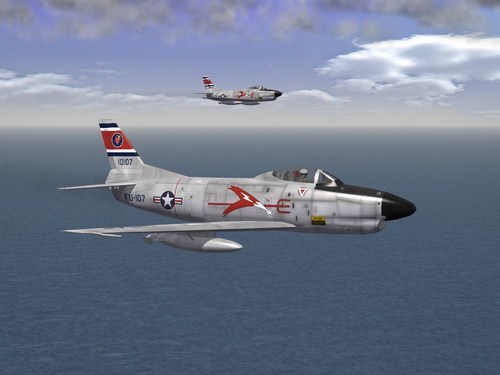
Version 1.0.0
355 downloads
SF2 F-86D Sarbre Dog Revamp Pack 5/19/2020 "Quarantine Approved - Essential Mods" = For SF2 (Any & All) = This package is designed to replace the original F-86D/L pack available from the folowing URL: https://combatace.com/files/file/10286-sf2-f-86dl-v10/ by suhjake from 2009 It is NOT necessary to have the original mod pack, as this WILL replace it in total. Everything reusable from that pack will be included with this. On a side note, the F-86L "Lima" Sabre will be covered in a a seperate release. Even though the folder is named "F-86D-45" it represents =ALL= production blocks of the Sabre Dog, for those users included in the mod package. The following units are depicted herein: 101st Hikotai (56-68) - JASDF 16th FIS (51-59) - PACAF, Misawa Japan 37th FIS (53-58) - Ethan Allen AFB, VT 97th FIS (51-55) - Wright-Patterson AFB, OH 431st FIS "Red Devils" (55-58) - Wheelus AFB, Lybia 469th FIS (53-58) - McGhee Tyson AFB, TN 520th FIS (54-55) - Geiger Field, Spokane WA 146th FIS Pa ANG (57-60) -they used the F-86L congruently with the F-86D and a USAF Silver (Generic) -a blank skin for other skinners to use. All of the Original Skins have been completely redone, although they remain in bmp format. Several of the orignal decals have been reused, but modified from level 2 to level 0 (tail squadron markings). 26 all new serial and buzz numbers have been created. The 101 Hikotai and the 97th FIS & 431st do NOT use this same pool of numbers. They needed they're own for reasons that will become apparent during game play. The 431st is the ONLY unit in the pack that is listed on the stick squadronlist ini, and is tagged accordingly. Most marking are decals; in some cases wing and squadron marking had to be painted on due to mesh issues (tail). Decal randomization is TRUE for all skins. On the individual number lists, any number marked with a star (*) is 100% correct for that unit. All weapons, pilots, etc are included. A backup copy of the original Data ini is already provided, as the new one has many modifications and adjustments. As always, fairly easy to follow, detailed install instructions are included. So, please read them .... they can be accessed after unzipperizing. Please follow the 'usual instructions' Happy Landing! Wrench Kevin Stein- 1 review
-
- 6
-
-
