


Wrench
-
Posts
27,957 -
Joined
-
Last visited
-
Days Won
160
Content Type
Profiles
Forums
Gallery
Downloads
Store
Everything posted by Wrench
-
Help new aircraft load untill 90% and the game crash
Wrench replied to BasBoss's topic in General Discussion
the answer is ALWAYS uninstall and start fresh we've seen that version cause problems before... so it's questionable version. -
i'd go with the 'open space' version, even if it's not historically correct. It's easier to work with when targeting
-
yes, PLEASE don't use dds skins!!! We've been going around and changing those models that do/did back to jpg via hex editing. thank you Russ!! that Dak is REALLY looking good, too!
-
and if it's the KNOWN pirated one .... I shouldn't have to finish this sentence
-
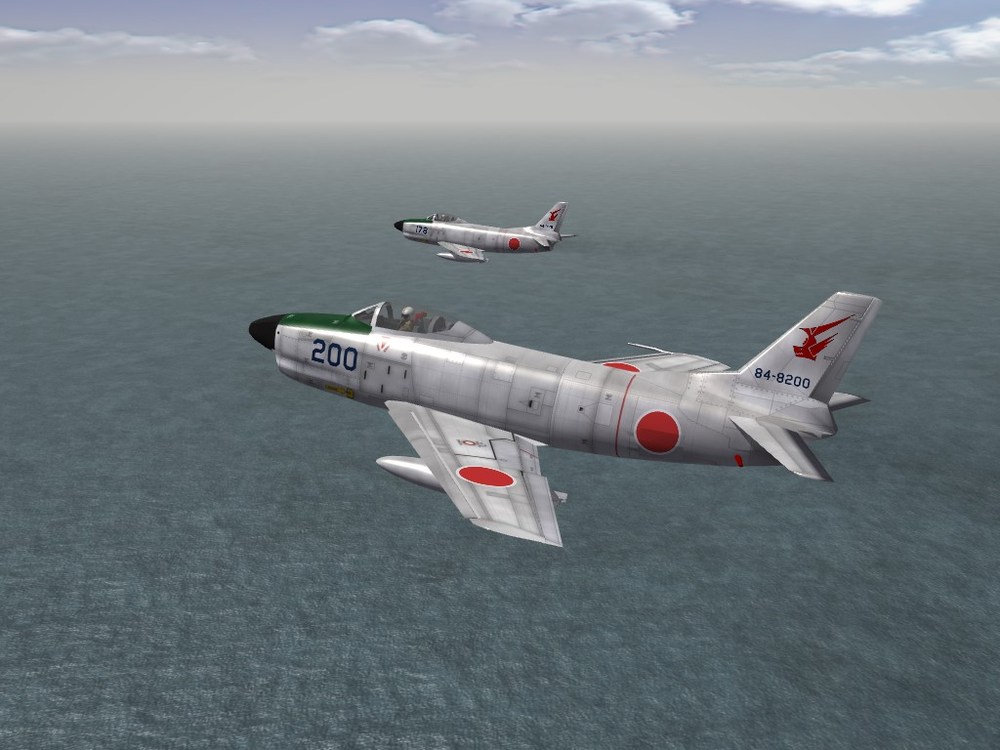
All Out Fighters Attack!!! Hunting Rodan...
-
Indeed, that should be mentioned. If so, I can edit the announcement and add it with no problems!
-
Memorial Day - And Remembering Pearl Harbor
Wrench replied to swambast's topic in Mods & Skinning Discussion
That's far more than I could have ever hoped to see, let alone ask for -
"all the better to see the rain" love the airfields. how are you getting around the 3W need for specific airfield inis, with respect to taxi, take-off and landing positions? Did you have to build custom inis for each airfield?
-
you think that's bad? I've been calling it "C-19". Maybe we can transport this shit outta here!!
-
that is one of the WORST shadow bugs I've ever seen!!! I didn't know about Notepad. I've been using a hex editor to open lods since the early 2000s!! Ya learn something everyday!
- 9 replies
-
- 1
-

-
- hal tejas mod for strike fighters-1
- strike fighters-1
- (and 4 more)
-
No weapons avaible for add-on aircraft, please help.
Wrench replied to osmanfirat's topic in General Discussion
A thought occurred to me this afternoon: You didn't, by chance, install the game to the DEFAULT location on a Windows 7 or later machine? If so, you'll have to MOVE the entire game folder the ROOT of the C drive (ie: C:/WoE) 1stGen games, by default install the the C:/ProgramFilesx86 location. That's a protected region in Win7 and later. Which means you can't make ANY CHANGES OF ANY KIND -- INCLUDING ADDING SKINS, WEAPONS AND NEW AIRCRAFT. So, move the entire folder, make a new shortcut, and see what happens. This is covered somewhere in the Knowledge Base, iirc. If that doesn't work, then you're boned and will probably have to evolve to SF2 -
SF2 F-15A Eagle, (3W) Hawaii Air National Guard Skin Pack
Wrench replied to Wrench's topic in File Announcements
Still trying to get more than the one (incorrectly) marked image of their F-86Es. Along with the T-Bolt, and the Deuce in the works, that'll "complete the set" btw, I'll to borrow you painting skill set to tweek the Hawaii_water.bmp. Just a little -
View File SF2 F-15A Eagle, (3W) Hawaii Air National Guard Skin Pack SF2 F-15A Eagle, Hawaii Air National Guard Skin Pack 5/19/2020 = For SF2 (Any & All, Full-5 Merged Preferred) = *You must have the STOCK F-15A in you hanger to make use of this mod!!* This is a reskinning of the stock (3rd Wire) F-15A Eagle as used by the 199th TFS, 154 TFW of the Hawaiian Air National Gurad from 1987 to 2010, when they were replaced by F-22 Raptors. (It should be noted, F-15Cs were also used, alongside their older siblings). This mod uses the stock skin, with various decals. All markings are decals, especially the squadron and nose zaps. I was unable to run down historical serial numbers, so 26 stock 3W decals are (re) used. Decal randomization is TRUE. When in-game, on the "select skin" drop down, you'll see: 199th TFS, HI ANG (87-09) This will assist you in selecting the skin. As always, fairly easy to follow, detailed install instructions are included. So, please read them .... they can be accessed after unzippering. Please follow the 'usual instructions' Happy Landing! Wrench Kevin Stein Submitter Wrench Submitted 05/21/2020 Category F-15
-
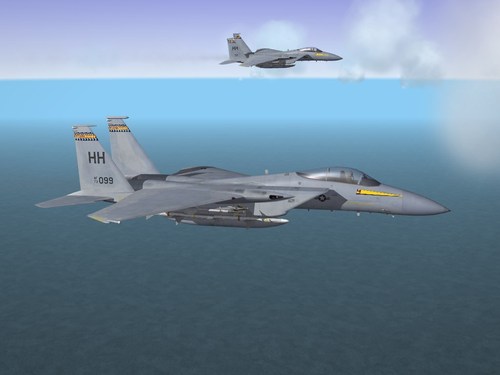
Version 1.0.0
72 downloads
SF2 F-15A Eagle, Hawaii Air National Guard Skin Pack 5/19/2020 = For SF2 (Any & All, Full-5 Merged Preferred) = *You must have the STOCK F-15A in you hanger to make use of this mod!!* This is a reskinning of the stock (3rd Wire) F-15A Eagle as used by the 199th TFS, 154 TFW of the Hawaiian Air National Gurad from 1987 to 2010, when they were replaced by F-22 Raptors. (It should be noted, F-15Cs were also used, alongside their older siblings). This mod uses the stock skin, with various decals. All markings are decals, especially the squadron and nose zaps. I was unable to run down historical serial numbers, so 26 stock 3W decals are (re) used. Decal randomization is TRUE. When in-game, on the "select skin" drop down, you'll see: 199th TFS, HI ANG (87-09) This will assist you in selecting the skin. As always, fairly easy to follow, detailed install instructions are included. So, please read them .... they can be accessed after unzippering. Please follow the 'usual instructions' Happy Landing! Wrench Kevin Stein -
bet it's a unicode lod... they don't work in 1stGens, and the game engine can't "see" them.
-
No weapons avaible for add-on aircraft, please help.
Wrench replied to osmanfirat's topic in General Discussion
I can almost be the Steam version has some "missing" internal components. We've seen this before. But there's absolutely no fucking reason why a pre-built weapons pack, WITH the appropriate weaponsdata.ini and weaponsdata.dat files shouldn't work. Unless installed improperly or a base game install that trashed. Sorry, I'm out of ideas. Good Luck -
No weapons avaible for add-on aircraft, please help.
Wrench replied to osmanfirat's topic in General Discussion
any thought to just simply downloading and installing one of many pre-built weapons packs available?? Just a thought... -
in theory, and has been done in the past, you can release everything but the LOD. I did it for his Banshee's, updating the skins to take decals and with a new FM Totally up to you, brudda!
-
This is what I am going to work on next
Wrench replied to GKABS's topic in Mods & Skinning Discussion
May I humbly request, at you leisure, some "airfield support" vehicles and construction equipment? We have a dozer, grader and steam roller, but dump trucks, cranes, etc. Also some of the different vehicle (baggage carts, tractors, semi-trucks and trailers) Stuff that's not in the Airfield Development kit in the download section. Or whatever you think might be "interestering eye candy". Low poly would be best, not super detailed -
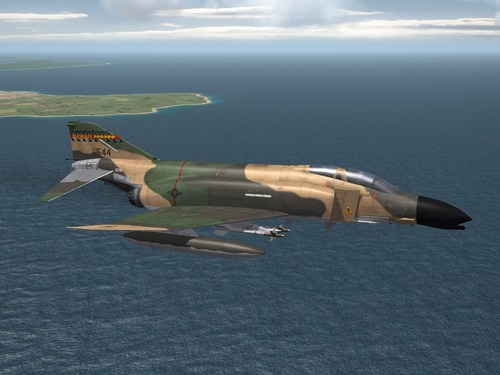
Version 1.0.0
89 downloads
SF2 F-4C_67 Phantom II, Hawaii Air National Gurad Skin Pack 5/15/2020 = For SF2 (Any & All, Full-5 Merged Prefered) = *You must have the F-4C_67 in you hanger to make use of this mod!!* This is a reskinning of the stock F-4C_67 as used by the 199th TFS, 154 W of the Hawaiian Air National Gurad from 1976-1987, when they were replaced by F-15A Eagles. A modified version of the stock skin, with added 'slimers' is used, along with 26 100% historical serial numbers. All markings are decals, and decal randomization is TRUE. The skin is the "standard" 3-tone SEA style. Also included are modified _data and _loadout inis, giving a landing light and Player Controlable (tm) canopy. The loadout ini has the (often missing) wing tanks added to all mission statements. The canopy operates with the Standard Animation Keystroke (tm) Shift/0 (zero). When in-game, on the "select skin" drop down, you'll see: 199th TFS, HI ANG (76-87) This will assist you in selecting the skin. As always, fairly easy to follow, detailed install instructions are included. So, please read them .... they can be accessed after unzippering. Happy Landings! Kevin "Wrench" Stein -
View File SF2 F-4C-67 Phantom II, Hawaii ANG SF2 F-4C_67 Phantom II, Hawaii Air National Gurad Skin Pack 5/15/2020 = For SF2 (Any & All, Full-5 Merged Prefered) = *You must have the F-4C_67 in you hanger to make use of this mod!!* This is a reskinning of the stock F-4C_67 as used by the 199th TFS, 154 W of the Hawaiian Air National Gurad from 1976-1987, when they were replaced by F-15A Eagles. A modified version of the stock skin, with added 'slimers' is used, along with 26 100% historical serial numbers. All markings are decals, and decal randomization is TRUE. The skin is the "standard" 3-tone SEA style. Also included are modified _data and _loadout inis, giving a landing light and Player Controlable (tm) canopy. The loadout ini has the (often missing) wing tanks added to all mission statements. The canopy operates with the Standard Animation Keystroke (tm) Shift/0 (zero). When in-game, on the "select skin" drop down, you'll see: 199th TFS, HI ANG (76-87) This will assist you in selecting the skin. As always, fairly easy to follow, detailed install instructions are included. So, please read them .... they can be accessed after unzippering. Happy Landings! Kevin "Wrench" Stein Submitter Wrench Submitted 05/19/2020 Category F-4
-
Well, to convert them, you'd need missionaries to preach at them for whatever religion you want them to convert to. Hopefully, circumcisions won't be necessary. Or human sacrifices. AND, they would really want to change. --------- But yeah, once the model is exported to the final LOD, nope. Can't go back. There are, however, plenty of free models all across the net for the taking. Most will require SEVERE reworking to bring them to SF2, but it's doable (just ask Cocas, and Russ, and Swam.....)
-
Did you make a Korea specific mods folder? Perhaps, give that a try
-
Gepard is going to be SO happy!!! You'e done a good thing, sir!!
-
whatever your choice, it'll be worth the wait. were these ever equipped with radar, like the C-47? Ya kniw, Yagi "H" antenna on the sides of the nose? I know on those that were, the navigator had the scope at his station, aft of the pilots


