Stary
-
Posts
8,500 -
Joined
-
Last visited
-
Days Won
100
Content Type
Profiles
Forums
Gallery
Downloads
Store
Everything posted by Stary
-
I can't recollect but I think I was messing with inclination indeed
-
What Ianh75 says, Avionics.ini file hold all the well, avionics related data, including both radar data (ranges, modes, display etc) and HUD related informations -but knowing what exactly you want to achieve would help the avionics experts (not me!) help you
-
Jonathan, let'em be, they're Yanks, what do they know about history
-
sadly, repaint water parts of ALL water tiles
-
so Wings Over Flanders Fields has been released... 59.99$? As owner of OFF+Expansion pfft, not interested (but Korea sim on CFS3 engine would be a nice addition for me)
-

Green Hell 3.5 w/ SF2V Expansion Pack
Stary replied to eburger68's topic in Mission & Campaign Building Discussion
Thank you Eric! Especially for water colour, something I did not like since day one of making this set yet missed opportunities to fix it -
SupGen you're right it might be old Series1 leftover taht aside I think it has to do that on carrier flight a/c are placed much closer to each other than on runways, thus exagerrating the light effects coming from both afterburners and landing lights
-
I don't thikn so, bombs right now just "sink" and are removed from game environment followed by simple effect. Heck, there isn't even sound event attached to this
-
yes LightColor=X,Y,Z represent RGB palette colour of light where: X=red Y=green Z=blue so for example LightColor=1.0,0.0,0.0 would be pure bright red and LightColor=0.0,1.0,0.0 would be green (but for example LightColor=0.0,0.5,0.0 would be dark green, because we use only 0.5 of green colour space)
-
ok, as much as I avoid the DCS addons THIS I need to buy!
-
too strong afterburner effect lights and reaching too far away found those in particlesystem.ini (you might have to extract this file from FlightData.cat) [EmitterType031] Name=AfterburnerEmitter EmissionType=ORIENTED_EMITTER UpdateType=NON_MOVING MaxVisibleDistance=8000.000000 EmissionRate=0.001500 EmissionVolume=0.010000,0.010000,0.010000 EmissionVelocityTableType=CONSTANT EmissionVelocity=0.000000,-120.000000,0.000000 HasLightSource=TRUE LightColor=0.40,0.36,0.30 LightRange=5.0 LightSrcOffset=0.0,0.0,0.0 ParticleUpdateType=SIMPLE_POINT ParticleRenderType=SPRITE ParticleRandomOrientation=TRUE ParticleLifeTime=0.040000 ParticleLifeTimeDeviation=0.035000 ParticleWeight=0.00000 ParticleRandomness=0.010000 ParticleDragFactor=20.000000 ParticleInheritence=0.900000 ParticleColorTableType=TABLE ParticleColor[01].Time=0.000000 ParticleColor[01].Value=0.200000,0.200000,0.200000,0.020000 ParticleColor[02].Time=0.200000 ParticleColor[02].Value=0.150000,0.150000,0.150000,0.020000 ParticleColor[03].Time=0.700000 ParticleColor[03].Value=0.040000,0.040000,0.040000,0.012000 ParticleColor[04].Time=1.000000 ParticleColor[04].Value=0.000000,0.000000,0.000000,0.000000 ParticleSizeTableType=TABLE ParticleSize[01].Time=0.000000 ParticleSize[01].Value=0.450000 ParticleSize[02].Time=0.100000 ParticleSize[02].Value=0.520000 ParticleSize[03].Time=0.600000 ParticleSize[03].Value=0.500000 ParticleSize[04].Time=0.800000 ParticleSize[04].Value=0.350000 ParticleSize[05].Time=1.000000 ParticleSize[05].Value=0.000000 ParticleSizeDeviation=0.035000 TextureMaterial=AfterburnerMaterial [EmitterType032] Name=AfterburnerEmitter2 EmissionType=ORIENTED_EMITTER UpdateType=NON_MOVING MaxVisibleDistance=8000.000000 EmissionRate=0.001500 EmissionVolume=0.010000,0.010000,0.010000 EmissionVelocityTableType=CONSTANT EmissionVelocity=0.000000,-120.000000,0.000000 HasLightSource=TRUE LightColor=0.40,0.36,0.30 LightRange=5.0 LightSrcOffset=0.0,0.0,0.0 SubLightSourceX=TRUE SubLightSrcDist=0.5 ParticleUpdateType=SIMPLE_POINT ParticleRenderType=SPRITE ParticleRandomOrientation=TRUE ParticleLifeTime=0.040000 ParticleLifeTimeDeviation=0.035000 ParticleWeight=0.00000 ParticleRandomness=0.010000 ParticleDragFactor=20.000000 ParticleInheritence=0.900000 ParticleColorTableType=TABLE ParticleColor[01].Time=0.000000 ParticleColor[01].Value=0.200000,0.200000,0.200000,0.020000 ParticleColor[02].Time=0.200000 ParticleColor[02].Value=0.150000,0.150000,0.150000,0.020000 ParticleColor[03].Time=0.700000 ParticleColor[03].Value=0.040000,0.040000,0.040000,0.012000 ParticleColor[04].Time=1.000000 ParticleColor[04].Value=0.000000,0.000000,0.000000,0.000000 ParticleSizeTableType=TABLE ParticleSize[01].Time=0.000000 ParticleSize[01].Value=0.450000 ParticleSize[02].Time=0.100000 ParticleSize[02].Value=0.520000 ParticleSize[03].Time=0.600000 ParticleSize[03].Value=0.500000 ParticleSize[04].Time=0.800000 ParticleSize[04].Value=0.350000 ParticleSize[05].Time=1.000000 ParticleSize[05].Value=0.000000 ParticleSizeDeviation=0.035000 TextureMaterial=AfterburnerMaterial the above are examples for stock afterburner effects, might be more in the particlesystem.ini file (AND some stock planes have custom effects in effect folder IIRC!) many 3rd party aircraft have their own custom afterburner effects stored in mod installation\effects folder, but the same entries control the colour (intensity, RGB percentage values) and range (falloff, in meters) of the light attached to effect Snailman is right, the landing light might be the cause too
-
SF2: Vietnam Air & Ground War Expansion 2.0 help please
Stary replied to Jarhead0331's topic in Mods & Skinning Discussion
Eric, would you be interested in decreased lights ranges for various flak effects? I set them in my Expansion install lower cause right now to me they cause too bright light too far away -
as stated those are stand-in cockpits I made for fun but then Flogger decided we'll put them into ths pack BUT making those I sort-of-tried-to-duplicate real existing cockpits layout for Foxbat 25K one is a close call (albeit black)
-
Stay strong Erik! Keeping my fingers crossed for you!
-
care to elaborate further?
-
T-33 or P-80 my ass No one noticed she clearly is a commie! Red shirt is a straight giveaway. Someone rat her to McCarthy! FFS! she's spying our advanced jet fighters in Nevada!
-
.
-
and just as I was searching for higher res than FB one. Thanks!
-
Stephen, check your terrain's _data.ini and look for these lines: [solidObjectTextureMaterial] EffectShaderName=terSolidObject.fx DepthBufferCheck=TRUE DepthBufferWrite=TRUE RenderedInOrder=FALSE AlphaTestEnabled=FALSE CullMode=CLOCKWISE LightEnabled=TRUE SpecularEnabled=FALSE EmissiveEnabled=FALSE FogEnabled=TRUE AmbientColor=1.000000,1.000000,1.000000,1.000000 DiffuseColor=1.000000,1.000000,1.000000,1.000000 ZBufferOffset=0.000000 BlendOp=ONE NumTextureStages=1 TextureStage[01].TextureName= TextureStage[01].MipMap=TRUE TextureStage[01].FilterEnabled=TRUE TextureStage[01].StageColorOp=TEXTURE_MODULATE_DIFFUSE TextureStage[01].StageAlphaOp=NO_OP [AlphaObjectTextureMaterial] EffectShaderName=terAlphaObject.fx DepthBufferCheck=TRUE DepthBufferWrite=FALSE RenderedInOrder=TRUE AlphaTestEnabled=TRUE CullMode=NO_CULL LightEnabled=TRUE SpecularEnabled=FALSE EmissiveEnabled=FALSE FogEnabled=TRUE AmbientColor=1.000000,1.000000,1.000000,1.000000 DiffuseColor=1.000000,1.000000,1.000000,1.000000 ZBufferOffset=2.0 BlendOp=BLEND_SRC_ALPHA NumTextureStages=1 TextureStage[01].TextureName= TextureStage[01].MipMap=TRUE TextureStage[01].FilterEnabled=TRUE TextureStage[01].StageColorOp=TEXTURE_MODULATE_DIFFUSE TextureStage[01].StageAlphaOp=TEXTURE_BLEND_TEXTURE_ALPHA marked in red are my settings that work ok in various SF2 titles be warned that still alot of alpha-type objects (usually -trees) will render in wrong order but that's the engine's fault and we have to deal with it
-
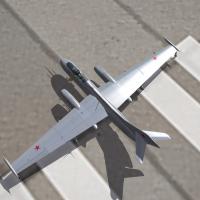 sadly all Yak-25 family cockpit are SF2 only
 -
main program installation folder, look for DLC subfolder, there these are latest CAT extractor (thirwirish one) can open them
-
yes, if that's not a problem apparently it isn't
-
just be aware that the cockpits from all Yak-25 series are "generic stand-in sovietized twin engine" cockpits I had in the workshop, slightly modified for Flogger23's projects hard to come by data for real 25s
-
buahahahahahahaha smoking girl I'd say