
-
Subscription required to download files
-
- 114 replies
- 5,373 views
-
-
Available Subscriptions
Strike Fighters 2 Series by Thirdwire
All SF2 Series Simulation Modifications and Add-Ons
Subcategories
- Aircraft Skins
- Add-On Aircraft
- Add-On Cockpits
- Weapon Mods / Skins
- Sound Mods
- Object Mods
- Add-On Ships
- Missions / Campaigns
- Maps / Terrain Mods
- Hangars / Loadouts / Menus
- Utilities / Editors
- Joystick Config Files
- SF2 Patches
- SF2 DAT Mods
-
 Notes:
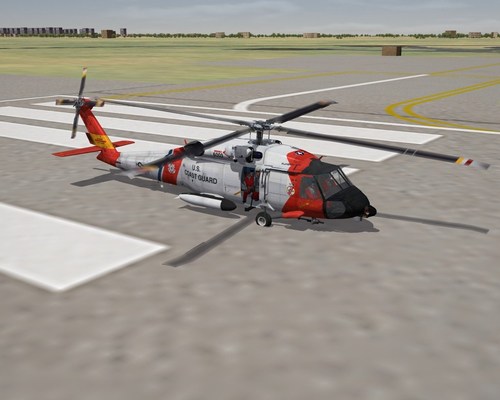
This is the final version of the Jayhawk, the definitive MH-60T. My previous versions of the HH-60T (note different name) can be re-named HH-60J if you wish to simulate earlier versions.
Not really an MH-60T Jayhawk, but of course a SH-60B Seahawk. It's the closest we have in SF so it will have to do.
MH-60T is the upgrade armed model of the HH-60J, it has a CAAS glass cockpit (the CAAS also used by various Navy and Army helicopters). With Zur's permission I have used a modded Osprey cockpit to simulate the CAAS (it's a close match).
The MH-60T is armed with the "Airborne Use of Force" pack. This consists of a M-240D MMG, and a semiauto .50CAL rifle - for fun I've made that into a .50CAL HMG so you can blow things up. SF is a combat sim after all.
New with this model is a proper winch of the type used by the Coast Guard, much thanks to Florian "AmokFloo" Schneider for the winch. Unfortunately as a "fake" pilot the winch is only for looks.
She is relatively easy to fly on "normal" mode, which SF helicopters are tuned for. You can hover, fly backwards and sideways, ascend verticaly etc. It takes some practice and skill but is definately doable.
Landing on Cutters should present no problems.
Installation:
Place the MH-60T folder into your Aircraft folder.
Place the Tank_Jayhawk & CGHeloGunnerR folders into your Weapons folder.
Place the CGHeloPilot1 & 2, CoastGuardWinch, JayA, JayA2, JayR, JayR2, JayS, JaySeat and JayW folders into your Pilots folder.
Place the Jayhawk wav file in your Sounds folder.
Place the two TADS files and the Loading wav file in your Flight folder.
Place the contents of the Decal folder into your Decal folder.
You will need to copy over the SH-60B LOD's from the SH-60B Seahawk mod. If you do not already have it, get it from the A-Team Skunkworks site.
Changelog for Version 3:
New Common Avionics Architecture System (CAAS) cockpit by David "Zur" Zurawski.
New Coast Guard Winch 3D model by Florian "Amokfloo" Schneider.
New, larger, Jayhawk Drop Tanks. Not exact but better.
More lights including MFD's for the external model.
FM uprated for the more powerful engines.
Set of decals for 20 birds from 5 different CGAS's.
.50CAL HMG added for fun.
New nose radar.
Various new antenna's.
Rear cabin seats added.
Credits:
David "Zur" Zurawski for the CAAS cockpit.
Florian "Amokfloo" Schneider for the Coast Guard Winch.
A-Team for SH-60B Seahawk Mod. Note my skin is best possible with current model limitations.
Wrench for Hangar/Loading Screens I used as a base.
Kesselbrut for Helo Pilots and Helo Gunner on which I based the Coast Guard pilots and gunner.
Mppd for the two ECM pods.
331KillerBee for the LAU-3 and TER2 which became the Jayhawk's nose radar and drop tank rails.
Anyone else I have missed, apologies.
Thanks to all.
By JimBeamer51,716 1 -
 Notes:
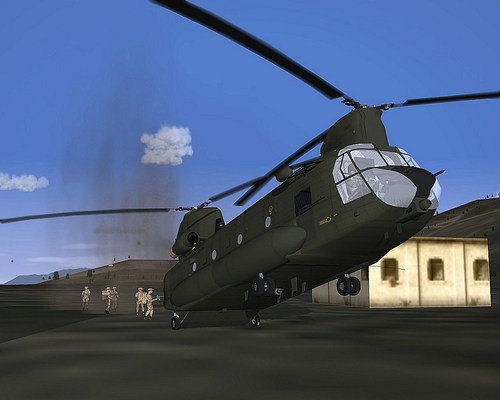
This is not actually a HC.5 Chinook, but a standard base model Chinook. It's the only one we have in SF2 so it will have to do.
A programme to upgrade 46 Chinook HC2, HC2A and HC3 helicopters was initiated in December 2008. Called Project Julius, it includes new digital flight deck avionics based on the Thales TopDeck avionics suite, comprising new multifunction displays, a digital moving map display and an electronic flight bag, installation of a nose-mounted FLIR detector, and upgrading the engines to the more powerful T55-714 standard. Upgraded HC2, HC2A and HC3 aircraft will be redesignated HC4, HC4A and HC5 respectively, and deliveries are expected to commence in 2011. The first conversion, a Chinook HC4, first flew on 9 December 2010.
Like the Hawks, she is relatively easy to fly on "normal" mode, which SF helicopters are tuned for. You can hover, fly backwards and sideways, ascend verticaly etc. It takes some practice and skill but is definately doable. Pinnacle landings are hard but can be done. You get what you put in, so if you practice you will be rewarded.
She is armed with a pair of player operated 7.62mm L7A2 MMG's.
SAS Troopers can be deployed from the rear of the bird. A nice feature is that they will "run" down the ramp and deploy onto the ground (using a "crater" effect). Be careful when selecting the SAS to deploy as many of the HC.5's parts are "fake" weapons and therefore can be "fired". SAS Troopers are used as IIRC they are the only British Forces that use the M4 Carbine.
The bird has a full set of lights, including landing lights and a searchlight which are activated/deactivated by the "G" landing gear key.
Included are two real Chinook wav files, you can pick which one you like. Listen to them IN GAME, as the game plays them correctly whereas the likes of Windows Media Player does not.
Another nice effect is that if your bird is destroyed a nice Chinook wreck will be your funeral pyre!
INSTALLATION:
Place the ChinookHC5 folder into your Aircraft folder.
Place the CH-47EA-Dam.bmp and MH-47G-Destroyed.LOD into your Aircraft folder.
Place the HC5Tank, HC5Winch, L7A2, RAFHeloGunner and SAS folders into your Weapons folder.
Place the 47Cargo, 47S, 47W2, HC5A, HC5A2, HC5CM, HC5F, HC5FLIR, HC5J, HC5M, HC5M2, HC5P, HC5RN, RAFHelopilot1 and RAFHelopilot2 folders into your Pilots folder.
Place the Chinook and Chinook4 wav files into your Sounds folder.
Place the two TADS files and the Loading wav file in your Flight folder.
And finally, place the contents of the Object folder (SASCrater001, UKForces and Wreckobject.ini) into your main Objects folder. These are the "craters" that will show the Troopers on the ground once deployed. NOTE: The new "crater" is WreckType009, if you already have a WreckType with this number, just paste mine in and rename them as required.
You will need to copy over the CH-147-R0g.LOD from the A-Team Chinook mod. If you do not already have it, get it from the A-Team Skunkworks site.
CREDITS (a LONG list of contributors):
A-Team for Chinook Mod. Note my skin is best possible with current model limitations. It is a generic RAF HC.5 Chinook.
Dave "Zur" Zurawski for the glass "Top Deck" cockpit. Thanks Dave for the permission.
My good friend Florian "AmokFloo" Schneider for the new SAS Trooper model and freight palette. Thanks buddy!
Thanks also to the following:
The BANIDOS TEAM for the most excellent damaged Chinook.
Kevin "Wrench" Stein for Hangar/Loading Screens I used as a base.
Daniel "Kesselbrut" Himmel for Helo Pilots and Helo Gunner on which I based the RAF pilots and gunner.
Dels for the C-130J tanks.
Ravenclaw_007 for the flare/chaff launchers.
Dmtdragon for the flare/chaff positions etc.
Tracker for the GRUA_Alouette.
331KillerBee for the L7A2 MMG, Ac-123K CBU, A4Q antenna, Flashbox, Mk7 Depth charge, LAU-32, and XM-8.
Anyone else I have missed, apologies.
Thanks to all.
By JimBeamer5672 4 -
 Notes:
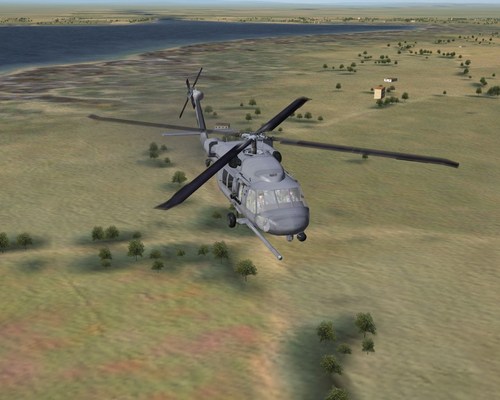
This is actually a HH-60G Pave Hawk. It's the actual bird (for a change!).
She has a pair of miniguns for your destructive pleasure.
As with all the Hawks, she is relatively easy to fly on "normal" mode, which SF helicopters are tuned for. You can hover, fly backwards and sideways, ascend verticaly etc. It takes some practice and skill but is definately doable. .
Installation:
Place the HH-60G folder into your Aircraft folder.
Place the 160HeloGunnerR and 160MiniGun into your Weapons folder.
Place the 160HeloPilot1 & 2 folders into your Pilots folder.
Place the MH60LDAP wav file into your Sounds folder.
Place the two TADS files and the Loading wav file in your Flight folder.
You will need to copy over the MH-60G LOD's from the MH-60G Pave Hawk mod. If you do not already have it, get it from the A-Team Skunkworks site.
Credits:
A-Team for MH-60G Pave Hawk Mod. Note my skin is best possible with current model limitations. It is a generic Pave Hawk from the 129th Rescue Squadron.
Kesselbrut for MH-60G Cockpit.
Wrench for Hangar/Loading Screens I used as a base.
Kesselbrut (? - they're the same model as in the pit, so I assume they're his)) for Helo Pilots and Helo Gunner on which I based the 160th pilots and gunner.
331KillerBee for the M134 Minigun.
Anyone else I have missed, apologies.
Thanks to all.
By JimBeamer5861 3 -
 Notes:
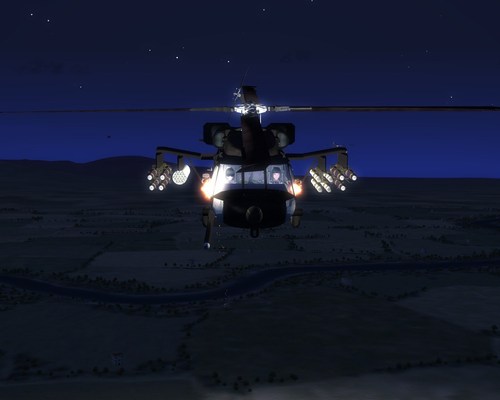
There are two helo's in this package. One is the DAP, and the other, well you'll just have to see.
Not really a MH-60L Direct Action Penetrator, but of course a MH-60G Pave Hawk. It's the closest we have in SF so it will have to do.
This bird packs an awesome punch: eight Hellfire's, four Stingers, a rocket pod and two 7.62mm Miniguns. Something for everyone!
As with all the Hawks, she is relatively easy to fly on "normal" mode, which SF helicopters are tuned for. You can hover, fly backwards and sideways, ascend verticaly etc. It takes some practice and skill but is definately doable. This bird is a bit heavier than the other Hawks so takes more skill to hover.
Installation:
Place the MH-60LDAP folder into your Aircraft folder.
Place the 160HeloGunnerR, 160MiniGun and Hellfire_PodN into your Weapons folder.
Place the 160HeloPilot1 & 2, and DAPR folders into your Pilots folder.
Place the MH60LDAP wav file into your Sounds folder.
Place the two TADS files and the Loading wav file in your Flight folder.
You will need to copy over the MH-60G LOD's from the MH-60G Pave Hawk mod. If you do not already have it, get it from the A-Team Skunkworks site.
Credits:
A-Team for MH-60G Pave Hawk Mod. Note my skin is best possible with current model limitations. It is a generic DAP from the 160th Special Operations Aviation Regiment.
Kesselbrut for MH-60G Cockpit.
Wrench for Hangar/Loading Screens I used as a base.
Kesselbrut (? - they're the same model as in the pit, so I assume they're his)) for Helo Pilots and Helo Gunner on which I based the 160th pilots and gunner.
331KillerBee for the LAU-3 which became the DAP's nose radar, and for the Hellfire Pod and M134 Minigun.
Anyone else I have missed, apologies.
Thanks to all.
By JimBeamer51,033 2 -
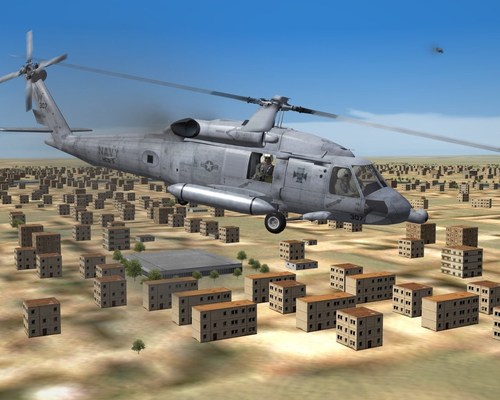 Not really a HH-60H Rescue Hawk, but of course a SH-60F Seahawk. It's the closest we have in SF so it will have to do.
She is relatively easy to fly on "normal" mode, which SF helicopters are tuned for. You can hover, fly backwards and sideways, ascend verticaly etc. It takes some practice and skill but is definately doable.
Installation:
Place the HH-60H folder into your Aircraft folder.
Place the AAQ16, RescueHawkMiniGun, RescueHawkTank and USNHeloGunnerR into your Weapons folder.
Place the USNHeloPilot1 & 2 folders into your Pilots folder. NOTE: For those with SF1 I have included the AAQ16 and USNHeloGunnerR as fake pilot objects. You will have to remove the ; from the data.ini file for them to work. They will look different from the SF2 version, but better than nothing.
You will not get the RescueHawkMiniGun to work in SF1 unless you edit the weaponsdata.ini file.
Place the RescueHawk wav file into your Sounds folder.
Place the two TADS files and the Loading wav file in your Flight folder.
Place the contents of the Decal folder into your Decal folder.
You will need to copy over the SH-60F LOD's from the SH-60F Seahawk mod. If you do not already have it, get it from the A-Team Skunkworks site.
Credits:
A-Team for SH-60F Seahawk Mod. Note my skin is best possible with current model limitations. It is HH-60H Rescue Hawk "307" from US Navy Helicopter Combat Support Squadron Five (HCS-5).
Kesselbrut for MH-60G Cockpit.
Wrench for Hangar/Loading Screens I used as a base.
Kesselbrut (? - they're the same model as in the pit, so I assume they're his)) for Helo Pilots and Helo Gunner on which I based the US Navy pilots and gunner.
331KillerBee for the LiteningIII pod and F-11F Tank which became the Rescue Hawk's nose FLIR and external tank.
Anyone else I have missed, apologies.
Thanks to all.
By JimBeamer5654 2 -
 Note: Version 2 is just the Jayhawk. The other "easter egg" helos are in the 1.0 file only.
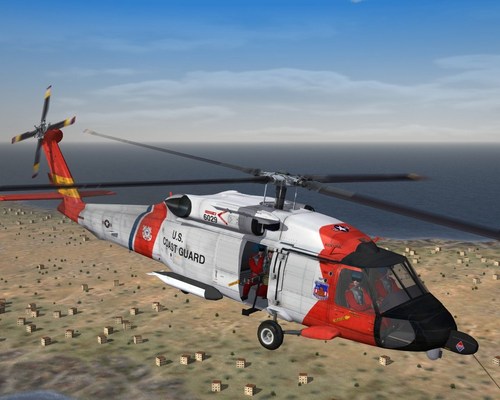
Not really a HH-60T Jayhawk, but of course a SH-60B Seahawk. It's the closest we have in SF so it will have to do.
HH-60T is the upgrade model of the HH-60J, it has a glass cockpit and weapons capability. I have used the MH-60 cockpit to simulate this.
She is relatively easy to fly on "normal" mode, which SF helicopters are tuned for. You can hover, fly backwards and sideways, ascend verticaly etc. It takes some practice and skill but is definately doable.
Installation:
Place the HH-60T folder into your Aircraft folder.
Place the Tank_Jayhawk & CGHeloGunnerR folders into your Weapons folder.
Place the CGHeloPilot1 & 2 folders into your Pilots folder.
Place the JayR folder into your Pilots folder.
Place the JayW folder into your Pilots folder.
Place the Jayhawk wav file in your Sounds folder.
Place the two TADS files and the Loading wav file in your Flight folder.
Place the contents of the Decal folder into your Decal folder.
You will need to copy over the SH-60B LOD's from the SH-60B Seahawk mod. If you do not already have it, get it from the A-Team Skunkworks site.
Credits:
A-Team for SH-60B Seahawk Mod. Note my skin is best possible with current model limitations. It is HH-60T Jayhawk "6029" from Coast Guard Air Station Kodiak. Alaska.
Kesselbrut for MH-60G Cockpit.
Wrench for Hangar/Loading Screens I used as a base.
Dels for drop tanks from his PC-9 Mod. Note these tanks are used as they were the largest possible that could be used and the helo would still hover. Anything bigger is too heavy.
Kesselbrut (? - they're the same model as in the pit, so I assume they're his)) for Helo Pilots and Helo Gunner on which I based the Coast Guard pilots and gunner.
331KillerBee for the LAU-3 and TER2 which became the Jayhawk's nose radar and winch housing.
Anyone else I have missed, apologies.
Thanks to all.
By JimBeamer5376 2 -
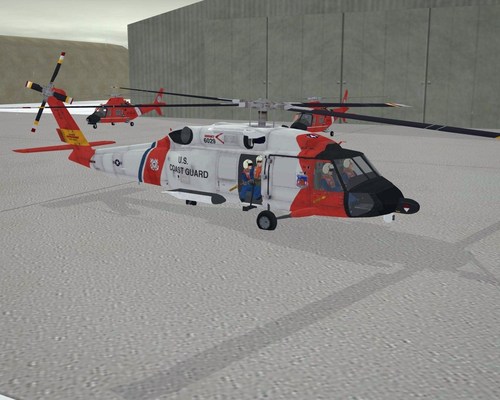 Not really a HH-60T Jayhawk, but of course a SH-60B Seahawk. It's the closest we have in SF so it will have to do.
HH-60T is the upgrade model of the HH-60J, it has a glass cockpit and weapons capability. I have used the MH-60 cockpit to simulate this.
She is relatively easy to fly on "normal" mode, which SF helicopters are tuned for. You can hover, fly backwards and sideways, ascend verticaly etc. It takes some practice and skill but is definately doable.
You will need to copy over the SH-60B LOD's from the SH-60B Seahawk mod. If you do not already have it, get it from the A-Team Skunkworks site.
Credits:
A-Team for SH-60B Seahawk Mod. Note my skin is best possible with current model limitations. It is HH-60T Jayhawk "6029" from Coast Guard Air Station Kodiak. Alaska.
Kesselbrut for MH-60G Cockpit.
Wrench for Hangar/Loading Screens I used as a base.
Dels for drop tanks from his PC-9 Mod. Note these tanks are used as they were the largest possible that could be used and the helo would still hover. Anything bigger is too heavy.
Kesselbrut (? - they're the same model as in the pit, so I assume they're his)) for Helo Pilots and Helo Gunner on which I based the Coast Guard pilots and gunner.
331KillerBee for the LAU-3 and TER2 which became the Jayhawk's nose radar and winch housing.
Anyone else I have missed, apologies.
Thanks to all.
By JimBeamer5332 5 -
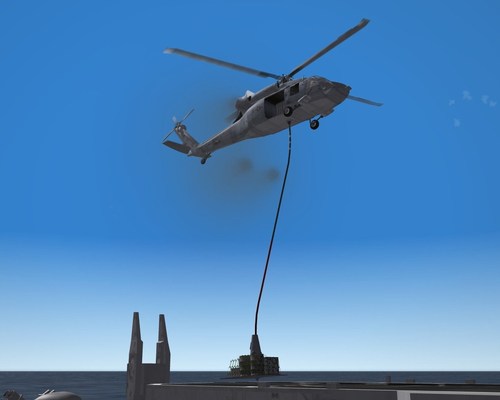 This is not actually a MH-60S KnightHawk, but a HH-60G Pave Hawk. It's the closest we have in SF2 so it will have to do. The MH-60S is based on the UH-60L Blackhawk, unlike the other USN helo's which are Seahawk based.
The KnightHawk peforms vertical replenishment, troop transport, and search and rescue, amongst other things. Although the KnightHawk has the usual minigun for your destructive pleasure, it is basically set up for vertrep. Non combat but very challenging.
Vertrep only works via the intricacies of sorcery. Actually, vertrep only works on land, as although the cargo palettes are "weapons" and can be "fired" anywhere, the will only show up on land as they become a "crater" when the hit the dirt. Craters, of course, do not show up on ships or the ocean.
You can still have lots of fun flying missions from ship to shore, and if you do not wish to have the cargo sling, for example, just de-select it in the Loadout screen.
As with all the Hawks, she is relatively easy to fly on "normal" mode, which SF helicopters are tuned for. You can hover, fly backwards and sideways, ascend verticaly etc. It takes some practice and skill but is definately doable.
She has the more powerful engines from the UH-60L so can hover with a full cargo load aboard.
INSTALLATION:
Place the MH-60S folder into your Aircraft folder. NOTE: You may have my fictional MH-60S "StealthHawk" in your Aircraft folder, rename or move it as this is the "real" MH-60S.
Place the 160MiniGun, Cargo, KHF, Sling1, Sling2 and USNHeloGunnerR folders into your Weapons folder.
Place the USNHeloPilot1 & 2 folders into your Pilots folder.
Place the MH60LDAP wav file into your Sounds folder.
Place the two TADS files and the Loading wav file in your Flight folder.
And finally, place the contents of the Object folder (cargo_03d, Dragchute, Frachtnetz, Frachtpalette, SlingLoad_03d, Storage and Wreckobject.ini) into your main Objects folder. These are the "craters" that will show the cargo palettes on the ground once released. NOTE: The new "craters" are WreckType006 and 007, if you already have WreckTypes with these numbers, just paste mine in and rename them as required.
You will need to copy over the MH-60G LOD's from the MH-60G Pave Hawk mod. If you do not already have it, get it from the A-Team Skunkworks site.
Credits:
A-Team for MH-60G Pave Hawk Mod. Note my skin is best possible with current model limitations. It is a generic KnightHawk from Helicopter Sea Combat Squadron Two-Six.
Kesselbrut for MH-60G Cockpit.
Wrench for Hangar/Loading Screens I used as a base.
Kesselbrut (? - they're the same model as in the pit, so I assume they're his)) for Helo Pilots and Helo Gunner on which I based the USN pilots and gunner.
AmokFloo for the Freight Palette.
331KillerBee for the M134 Minigun, Crate, Gris, and Douglas IFR pod.
Anyone else I have missed, apologies.
Thanks to all.
By JimBeamer5754 2
-
Download Statistics
14,453
Files12,699
Comments27,080
Reviews