Wrench
-
Posts
28,322 -
Joined
-
Last visited
-
Days Won
188
Content Type
Profiles
Forums
Gallery
Downloads
Store
Everything posted by Wrench
-
that's NOT an airplane issue, but one on the boat. Nothing to do with the Tomcat. Maybe complain about it to the ship builder?
-
Alternate TFD Terrain Tilemap editor/viewer
Wrench replied to gerwin's topic in Mods & Skinning Discussion
For some reason, I'd always thought you were on 10. NP! Works great in 7 for me. I'll get one of my setup to you over the next day or so -
Alternate TFD Terrain Tilemap editor/viewer
Wrench replied to gerwin's topic in Mods & Skinning Discussion
As a test, I can send you one of my full TE set ups, and see if you can get it work on your W10 machine. Just install (means: unzip and drop it as there's NO install program) to the C drive (ie: C:/Terrain Editors/*name of editor*). THEN you get the fun on figuring out it's workings -
Early 111s??? We could sure use a new H model (or whatever variant letter it is, for BoB and later!!)
-
Is anyone still interested in the Spanish Civil War?
Wrench replied to Stephen1918's topic in General Discussion
sure, why not?? (although my preferance is always Pacific War , like china?) -
Alternate TFD Terrain Tilemap editor/viewer
Wrench replied to gerwin's topic in Mods & Skinning Discussion
yes, we know!! I've always been curious as to WHY the TE's never worked for you Jordi. It should have no problems in 7 or 10 (but as I don't have or have access to 10, I can't really test this). It is, as we all know, one of the worst programs around ... but we make it work -
Alternate TFD Terrain Tilemap editor/viewer
Wrench replied to gerwin's topic in Mods & Skinning Discussion
actually, that's EXACTLY what you're doing. New TODs are always generated at the "Save" in the TE. -
Hey, it happens to all of us, eventually!!
-
I LIKE it!!!!
-
You know, if you'd have posted this in the SF2 Forums, INSTEAD of The Pub, the people that could help you might actually see it. So, it's been moved to the correct Forum, to try and give you the assistance you require. Remember, SF2 questions GO in the SF2 Forums!
-
View File SF2 Douglas RB-66C & WB-66D Destroyer Update Pak Douglas RB-66C & WB-66D Destroyer Update Pak 8/12/2019 = For SF2, Any & All = This package contains 2 of Bunyap's 1stGen aircraft brought up to a more SF2-ish standard. Also, they seemed to be missing from the SF2 downloads, and I thought it was time to bring them back. They are the: RB-66C Destroyer (Recon & ELINT) aircraft WB-66D Destroyer (Weather Recon, ELINT) aircraft The units/skins provided herein are: RB-66C: 42nd TRS, 10th TRW (USAFE) 19th TRS, 66th TRW (USAFE) WB-66D: 9th TRS, 363rd TRW (ConUS+) All markings are decals, excepting the 42nd tailfin flash. All serial and buzz number decals (30 for the RB & 36 for the WB) are 100% historicaly correct. They represent the full production runs for =BOTH= aircraft. The 2 skins for the RB use the same pool of decals. A new Hi-Rez replacement skins were created from HGBN's templates. The skins are in jpg format. As with the B-66 and EB-66, a highly modified cockpit is supplied to 'fit' within the visible model. As always, fairly easy to follow, yet detailed install instructions are included. Please read them! See "change List" in Notes for what's been modified/changed/adjusted. Happy Landings! Wrench Kevin Stein Submitter Wrench Submitted 08/16/2019 Category B-66
-
- 3
-

-

-
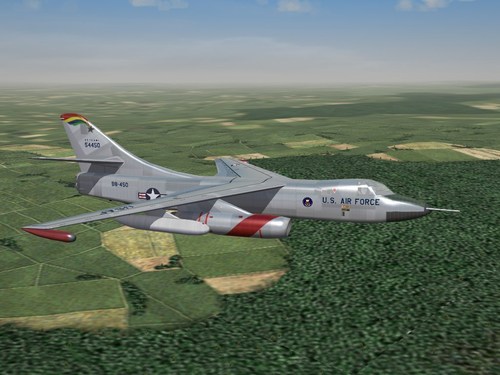
Version 1.0.0
255 downloads
Douglas RB-66C & WB-66D Destroyer Update Pak 8/12/2019 = For SF2, Any & All = This package contains 2 of Bunyap's 1stGen aircraft brought up to a more SF2-ish standard. Also, they seemed to be missing from the SF2 downloads, and I thought it was time to bring them back. They are the: RB-66C Destroyer (Recon & ELINT) aircraft WB-66D Destroyer (Weather Recon, ELINT) aircraft The units/skins provided herein are: RB-66C: 42nd TRS, 10th TRW (USAFE) 19th TRS, 66th TRW (USAFE) WB-66D: 9th TRS, 363rd TRW (ConUS+) All markings are decals, excepting the 42nd tailfin flash. All serial and buzz number decals (30 for the RB & 36 for the WB) are 100% historicaly correct. They represent the full production runs for =BOTH= aircraft. The 2 skins for the RB use the same pool of decals. A new Hi-Rez replacement skins were created from HGBN's templates. The skins are in jpg format. As with the B-66 and EB-66, a highly modified cockpit is supplied to 'fit' within the visible model. As always, fairly easy to follow, yet detailed install instructions are included. Please read them! See "change List" in Notes for what's been modified/changed/adjusted. Happy Landings! Wrench Kevin Stein -
that's one of the things I was looking at having on my next machine (please, gods, NOT for several years....) so, it's NOT a good thing??
-
I seem to have 2 in my /Weapons folder: AS-34 AS-34_2 this is the data ini fro the _2 the data ini is dated 4/21/2012. I don't know if this is the "latest" version (most likely it's not)
-
Always READ the Read Me. Also, get familiar with the game's file system (locations, folder structure, etc)
-
that would explain the Sabre and BAnshee pics on Instagram. pity, I don't have a seXBox controler, or windows 10. Be nice to have the Oraguan, Sabre, Panther and Banshee on our side of the screen
-
this discussion is most interesting!!! I remember 1stGEns, have to paint the HM.bmps all black to remove the upswelling of the coast lines. I know that fixed some oddities like ships sitting above the water. But I can't remember how far back that was ... age be creeping up on me brain!!
-
Why not just upload it here??? Just saying!!
-
I called that out when it was first released. Fully examined it when I got my copy of "their" PG mod. To make matters worse, the YAP PG terrain is completly stripped of ANYTHING usefull on land. Truly fucking pathetic. Better off using my version of Gepard's terrain; at least there stuff ALL OVER (both sides) to zap. Again, out of curisoity, what height specs are they using on their tiles? Showing one of the transitions below: [Texture002] Filename=sea2desert25.TGA HasWater=1 HeightMap=sea2desert25_hm.BMP HeightMapScale=2.000000 Color=0.505483,0.471180,0.410264 SolidObjectTexture=terobject_buildings1.BMP AlphaObjectTexture=terobject_trees1.TGA Long ago, we discovered that many (including some original 1stGen stock maps) have that set to 25!! You can try editing the data ini --MAKE A BACKUP COPY FIRST!!!!!-- do a "Search & Replace" and drop them down to 2 meters. (the above tile statements comes right out of the version I did.) I don't have access right off the bat to my YAP version, as it's archived on one of my external HDs, otherwise I'd cross check it. And I COMPLETLY agree about the TE in airfield flattening -- don't even think about using it near or on a mountain!! Screws up this horribly (the ANW map is a good example of that -- 7000 foot plateau with an airfield. fully expect to see Professor Challenger and dinosaurs on it!!)
-
just out of curiosity, which terrain of theirs is it?
-
hmm...this one wonders if the 'sky' tgas can be extracted, and placed directly INTO the terrain folder, after proper darkening. Same for the starfield tgas (and moon?) I know terrains can have their very own, seprate envirosys inis, within said terrain folder....
-
as they are already built in moving on...
-
your terrain HFD is fucked. the airfields need flattening, and that 's only possible in the 3W terrain editor. AND you'll need all the base info for that terrain, and/or build it yourself (texturelist ini, convert all tga to bmp, etc and so forth. not worth the effort for their stuff
-
tried reading the read me and following the instructions ???
-
actually, you can't. you can modifiy or tweek the existing ones. other than that you're stuck with what TK used. how to modify the exiting ones, NFI