
-
Subscription required to download files
-
- 114 replies
- 5,314 views
-
-
Available Subscriptions
Strike Fighters 2 Series by Thirdwire
All SF2 Series Simulation Modifications and Add-Ons
Subcategories
- Aircraft Skins
- Add-On Aircraft
- Add-On Cockpits
- Weapon Mods / Skins
- Sound Mods
- Object Mods
- Add-On Ships
- Missions / Campaigns
- Maps / Terrain Mods
- Hangars / Loadouts / Menus
- Utilities / Editors
- Joystick Config Files
- SF2 Patches
- SF2 DAT Mods
-
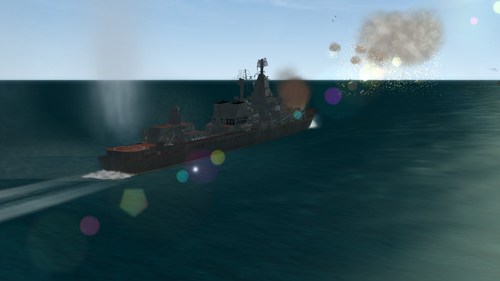 The effect was developed for a super-vanilla mod pack within our team and later become available to the generic SF2 games.
Please backup your file before your installation.
Installation:
Extract the relevant files to SF installation and SF mod folders, overwrite the file if needed.
Follow the instruction in the attached word document to get it work.
Uninstallation:
Overwrite files with backup you made.
By orsin75 0 -
 MiG-25PD cockpit by Centurion-1 with fixes
Notable fixes include:
- removed gunsight. 25 doesn't really need it, most of the footage shows 25s without gunsight
- fixed G-meter: added negative Gs and redid the layout to be more in line with the real thing
- original model actually had airspeed indicator and altimeter confused - this was corrected. Altimeter is above (shorter needle shows thousands, longer hundreds, plus analogue counter), airspeed indicator is below (likewise - shorter needle shows thousands, longer hundreds)
- fixed vertical velocity indicator. It wasn't working due to "values" being put in the wrong order (could be that it was working on older patches)
- fixed compass and course arrow. They were calling non-existing nodes
- added over-G and too much AoA lights above G-meter: not sure if realistic, but will do
- added afterburner light near nozzle indicator
- removed some lights and switch animations: they are cute, but very incorrect
- MiG-25PD version gets new radar layout taken from MiG-23 radar: it makes sense as PD radar "Sapphire-25" was developed from "Sapphire-23" on MiG-23
- can't do anything about warning lights and gear/flaps indicators not working - cockpit model just lacks any light nodes
- added some labels on instruments
---------------
Install: remove old cockpit folder, *cockpit and *avionics files, drop in new ones, rename accordingly.
Cockpit versions:
25P - for MiG-25P
25PD - for MiG-25PD/PDS
25PD uses avionics70 dll! Make sure to address it in the init file:
AvionicsDLL=Avionics70.dll
25PD is tuned for MiG-25PD from Coyote Airspace. It is easily adaptable for older versions of PD/PDS, just change position values in *cockpit file.
By OlWilly209 0 -
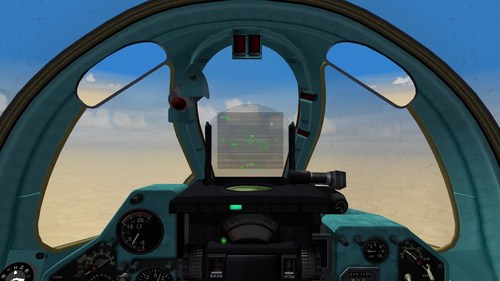 Correction of typos and misspelling for Stary's MiG-23 pit. Plus reworked the HUD a little.
All files converted to JPG to save space, it's 46mb now. Tuned for Mirage Factory MiGs, but could be used for stock ones with little tweaking.
Some changes of HUD:
Removed unnecessary ПР (launch authorized) marks - now it will flash only when you are actually in range
Changed ОТВ (break) - now it will flash when you are too close
Removed РЛ/ТП marks - they make no sense as the game doesn't support IRST. Now you will have Р (for search), З (for lock), B (for air-combat mode)
Changed selected weapon display - now you will have type of weapon and amount remaining. Not really authentic but more useful
Things I couldn't do:
can't fix RWR - can't copy working RWR from MiG-21MF cockpit
MiG-29 pit has authentic and working selected weapon display - can't copy that
can't add proper IRST - game doesn't support it. tried with non-launching heatseeker missile on hidden pylon, it could lock targets but not really useful for anything else
Readme inside.
By OlWilly279 1 -
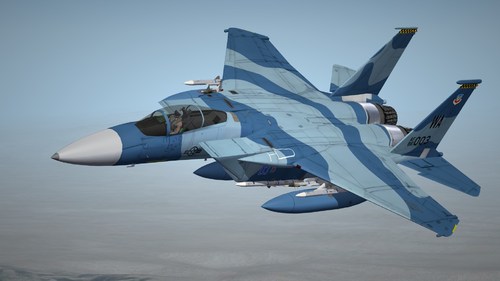 The 65th Aggressor Squadron stationed at Naris Air Force Base operated F-15C fighter jets from 2005 to 2014, and used a variety of unique Schemes. This mod is one of the two types they have used. I will use it in the game Called "Blue" and "Tan" in
Made this for my personal campaign "Red Flag", based on the F-15C, to share with you all.
Special thanks to:
Fast Cargo provides a great collection of F-15 packs for the community
Viper63 added accurate machine number decals to his Aggressor pack
usage:
1. Put the "65AGRS_Blue" and "65AGRS_Tan" folders into your F-15C module;
2. Put the "Decals" folder into: your SF2 directory\Objects;
3. Start the game and start your F-15C, the game will automatically inject data.
89 0 -
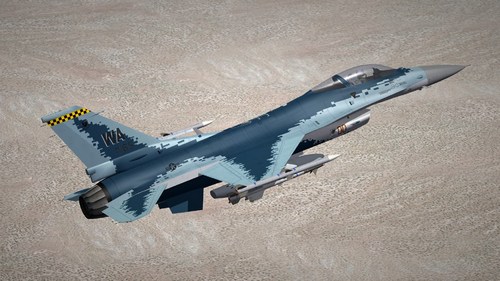 The 64th Aggressor Squadron, stationed at Naris Air Force Base, use this skin for their F-16C, which is based on a similar skin for the Russian Air Force Su-57
This is made for my personal campaign "Red Flag", Based on F-16C Block30/32, and I will share it with you.
Special thanks to:
Viper team provide those great Falcon mod
Usage:
1. Put the "64_AGRS_Ghost" folder into your F-16 mod (block 30 recommended);
2. Put the "Decals" folder into: your SF2 directory\Objects;
3. Start the game and read your F-16C block 30, the game will automatically read the data.
83 1 -
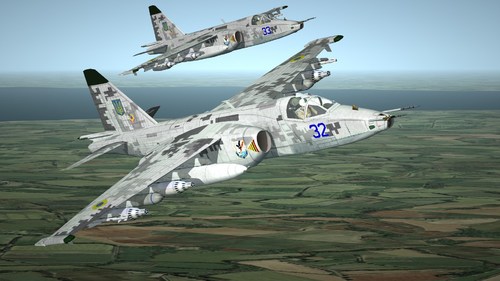 While upgrading the old Su-25s to Su-25M1/M1K, Ukraine also digitized their camouflage to make them more modern inside and out.
299th Tactical Aviation Brigade is currently operating Su-25M1/M1K, this mod is based on this unit as a prototype, I picked some numbers(From 30-51), but according to the wiki, the Blue 39/49 of the brigade had been shot down, so I deleted them.
I originally made it for my personal campaign "West Wind", but I also hope that more people will get it
Special thanks to:
ShaKhrai, in order to save time, I asked his permission to use his existing files for deep editing;
paulopanz, who contributed a refined Su-25 mod to our community;
Usage:
1. Put the "299_TAB" folder into your Su-25 mod;
2. Put the "Su-25M1_Ukr" folder into: your SF2 directory\Objects\Decals;
3. Start the game and read your Su-25, the game will automatically read the data.
Su_25M1_299_TAB.zip
114 1 -
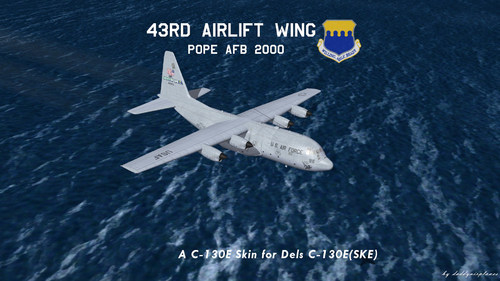 43rd Airlift Wing Pope AFB 2000
Hello everyone, this is a simple skin and decal set to represent the 43rd Airlift Wing and the aircraft it had on hand around the turn of the century.
You will need a C-130E SKE aircraft for this mod. you can find them either in Dels C-130 Superpack #1
or my 23rd Wing Package
once you have that, just unzip, add to the mod folder of your choice and allow overwrites.
Credits
daddyairplanes skin and tga work, new loading screen
Dels C-130E_SKE model, original templates
Thank you for checking this out, and I hop you enjoy this mod
Kevin Unruh
aka daddyairplanes
8 July 2023
*************************************************************
This is freeware; it CANNOT be distributed unless permissions are granted by myself.
The original readmes, if any, and all other pieces of the package MUST remain intact.
The names of all contributors, modders, suppliers, etc =MUST= be listed in any new readmes.
This package and any part of it may NOT in any way, shape, or form be used in any payware additions.
See the original readme documentation, if any, for further allowances and restrictions
Any persons wishing to make further modifications, contact me first.
Any persons wishing to make further modifications MUST remember to put everyone's name in it.
47 2 -
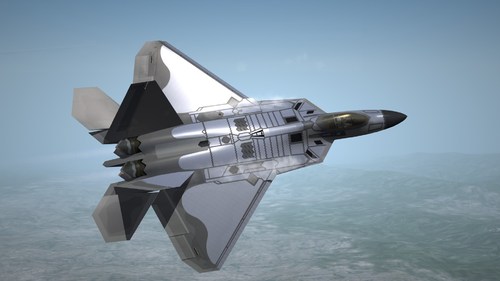 A Simple F-22 Tests New Coating, Spotted in 2022
usage:
Put the 422TES_Chrome folder into Menrva's F-22 mod, then start the game once and select F-22, the game engine will automatically inject the skin
P.S. Since SF2 does not seem to support setting the material of some areas separately, I cannot restore the mirror effect of the coating in reality, so I set it to visually white.
The reflection effect is solved, but maybe you will notice that in many cases it looks a bit blue-gray, which we think is caused by the color of the reflected sky.
99 0
-
Download Statistics
14,453
Files12,697
Comments27,080
Reviews