
-
Subscription required to download files
-
- 105 replies
- 3,916 views
-
-
Available Subscriptions
Strike Fighters by Thirdwire
All SF / WOV / WOE / WOI Simulation Modifications and Add-Ons
Subcategories
-
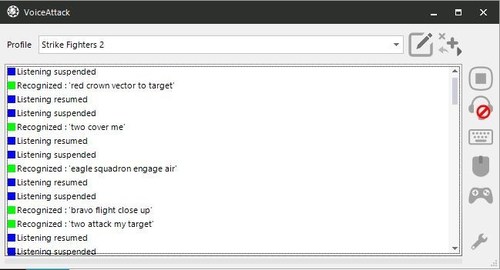 This is a basic profile for use in VoiceAttack so you can speak to your wingmen and squadron to command them instead of hitting keys - voiceattack does the pressing for you.
All spoken phrases are fully editable within Voiceattack, so you can change any to whatever suits you, doesn't matter what you say, so long
as it's in the profile and matches the programmed keypresses.
Makes the game a little more immersive and fun. But it won't make your wingmen actually obey the commands any more than usual
The separate Voiceattack program is required, but only costs a small fee to buy.
By thereg54 1 -
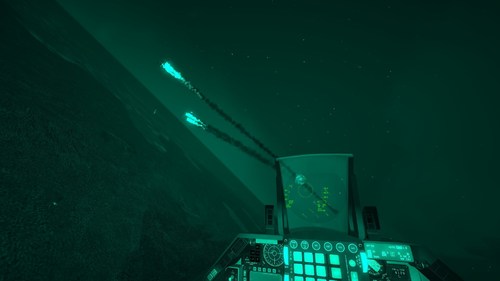 【GPNVG-18 is a special NOD offering greater strength and durability during rough use in the field, as well as four high performance, MIL-SPEC Unfilmed White Phosphor image intensifier tubes that combine using specialized hybrid optics to provide the end user with an umatched 97° degree field of view, as opposed to the standard 40° field of view provided by traditional binocular night vision systems.】
Highly recommond you guys use it with Realsky Environment Mod.
This is a shader that can change the original color of the game to make it close to the color of White Phosphor Image Intensifier Tubes in reality. Of course, it will also really brighten the brightness of the picture.
===========================================================================================
Usage/ Read Me!!!!!:
1.put [TWPOSTPROCESS.FX] into your SF2's Flight folder【Back up recommonded】;
2.check your graphics option and make sure Effects Detail choosed for Unlimited;
3.make sure your Mission Start Time choosed for Night;
4.fly and control the night!
This is a shader ,so even in day time the night vision effect will trun on,delete [TWPOSTPROCESS.FX] to return default.
165 0 -
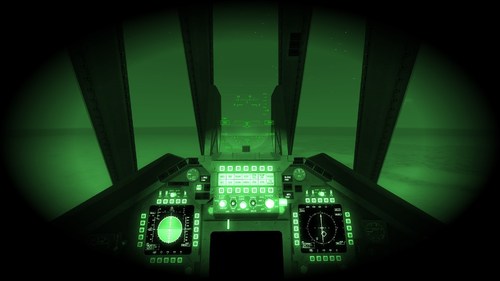 Just like my former mod,this is a shader that can change the original color of the game to make it close to the color of Green Phosphor Image Intensifier Tubes in reality.
This one is more like AVS6/9 NOD usded by USAF during 1990s-2000s
And Of course, it will also really brighten the brightness of the picture, highly recommond you guys use it with Realsky Environment Mod.
===========================================================================================
Usage/ Read Me!!!!!:
1.put [TWPOSTPROCESS.FX] into your SF2's Flight folder【Back up recommonded】;
2.check your graphics option and make sure Effects Detail choosed for Unlimited;
3.make sure your Mission Start Time choosed for Night;
4.fly and control the night!
This is a shader ,so even in day time the night vision effect will trun on,delete [TWPOSTPROCESS.FX] to return default.
66 1 -
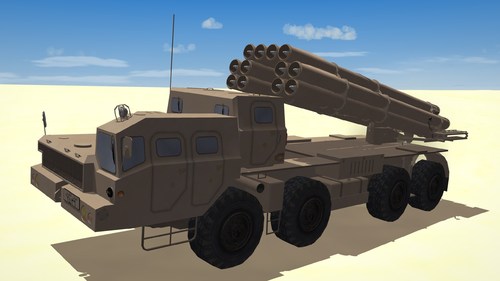 Hello and thank you for downloading my work.
https://gkabs.net
https://gulfknights.net
What's included:
Two BM-30 Smerch models with 3 textures also 2 new sound files
All my files should include the Strike Fighters 2 Series game file (.old) and the texture required. (tested and work only for SF2)
Installation:
Copy files to their proper folder
add this to your soundlist under the Flight folder if you don't have it listed there.
[SoundList]
SoundFilexxx=9M55K
SoundFilexxx=MilitaryTruck
[9M55K]
Priority=NORMAL
3DSound=TRUE
DopplerEffect=TRUE
NumBuffers=4
MaxDist=2500.000000
MinDist=400.000000
InsideConeAngle=360
OutsideConeAngle=360
ConeOutsideVolume=100
[MilitaryTruck]
Priority=NORMAL
3DSound=TRUE
DopplerEffect=TRUE
NumBuffers=4
MaxDist=2500.000000
MinDist=400.000000
InsideConeAngle=360
OutsideConeAngle=360
ConeOutsideVolume=100
Note Change the XXX with the last number in your soundlist
If you need any further help please read the Knowledge Base at:
https://combatace.com/forums/forum/268-thirdwire-strike-fighters-2-series-knowledge-base/
1.0.0
LICENSE:
You are allowed to use this model and everything included with it for personal non-profit use for Strike fighters 1 and 2. For use outside of this scope, you need to contact me for permission.
gkabs@gkabs.net
Credit goes to the following:
Third Wire for making this outstanding game.
Credit goes to https://www.textures.com as I use a lot of their photos to create the skins.
Google for some photos and information.
And finally, not to forget the wonderful site of https://combatace.com and all the nice members and their dedicated support for this game.
Software used:
3d Max 2009
UVLayout v2 PrO
Substance Painter
Adobe Photoshop
If you need any assistance please contact me at
gkabs@gkabs.net
gulfknights.net
By GKABS140 2 -
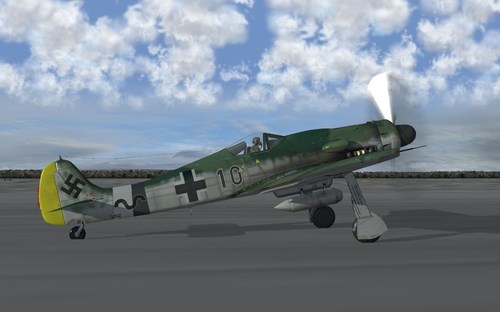 FW 190D, this is my final version of this device that includes all the experimental effects never seen in this simulator, this pack contains the plane with its corresponding cabin with 8 historical skins, plus one without insignia, to fly it with the nation you please , the new pilot of the luftwaffe (there are 2 lods, one with goggles and one without glasses, by default the pilot has glasses). I included all the weapons of the F model (THE ER4 MULTIPLE LAUNCHER THAT BY ERROR I WAS NOT INCLUDED IN THE FW190F PACKAGE) even if this model only carries a bomb or 2 models of disposable tanks.
I hope you enjoy it, more information in the readme file.
Sorry my English is bad
Torno.
By torno293 0 -
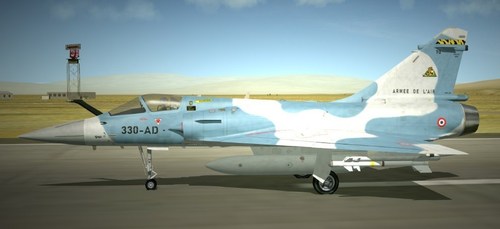 This pack is designed for the Mirage 2000 by the Mirage Factory, available in Combatace download section.
What's in ?
11 4096x4096 skins.
Covered units
EC 1/2 Cigognes 1999, 2007, 2009, 2010 and 2011. EC 2/2 Côte d'Or 2000, 2004, 2007. EC 3/11 Corse, Djibouti 2008. EC 3/30 Lorraine, Al-Dhafra UAE 2010. CEAM (Weapons test squadron). Any omission in credits is totally unwanted, if I forgot somebody, let me know, I will correct this.
This addon is and will in all cases remain freeware.
Released under CombatAce Fair-Use terms.
Enjoy
Ludo
By ludo.m54124 2 -
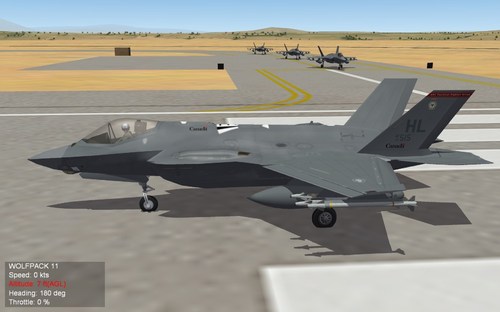 Canadian 401 Tactical Fighter Group F-35 Lightning II Mod
This mod requires Strike Fighters 2 and a working installation of
the Operation Darius Mod available at the Combat Ace website:
Strike Fighters 2
https://www.thirdwire.com
Combat Ace
https://www.combatace.com
Direct Link to Operation Darius
https://combatace.com/forums/topic/74627-operation-darius-final-part-1-of-4/
What Is It?
This is a mod for Strike Fighters 2 and Operation Darius that adds the
Canadian 401 Tactical Fighter Group to the squadron choices when flying
the Operation Darius campaign. The original Operation Darius was limited
to the CF18 as the Canadian Forces multi-role fighter.
This mod adds the recently acquired F-35 Lightning II to Single Missions and
the Operation Darius Campaign for Canadian Forces. Canada, having recently
procured a number of F-35 jets for their fleet are replacing the aging CF18s
with the stealth and tactically aware F-35A Lightning II.
If you're a fan of this sim and the Lockheed-Martin jet, then this is your
chance to try it if you'd prefer to play as the Canadians.
What's Included?
I've included textures with proper Canadian markings, including the official
401 Tactical Fighter Group's own patch on the tail fins. These are simply
modded textures of one of the other squadrons texture packs, which were
crafted by the Operation Darius team.
I simply used their work and composited the 401 Patch and the appropriate
Canadian insignias on the wings, tail and fuselage. I've included the
original Photoshop layered files in case you want to alter the positioning
of the "Canadian" elements on the textures.
Installation:
Simply copy the two folders: Campaigns and Objects to your Operation Darius
mod directory which is located at:
WinXP or earlier:
.\Documents and Settings\<username>\My Documents\ThirdWire\StrikeFighters2\[OpDarius]
Vista/Win7/Win8/Win8.1/Win10/Win11
.\Users\<username>\Saved Games\ThirdWire\StrikeFighters2\[OpDarius]
where [OpDarius] is the name of the folder where you chose to install Operation Darius.
When you do, it should asked if you want to a bunch of files replaces, just replace all and have done with it and once they're done copying, you should be ready to go.
Thank you to the Combat Ace website, Thirdwire and to the Operation Darius team for making such a great
addon for an already awesome jet simulator/trainer. Thank you to the Government of Canada for
making the decision to upgrade our aging fleet of DEW line tasked multi-role fighters with the
now mature F-35A, and of course Lockheed-Martin for such an awesome aircraft.
Special thanks to the Canadian 401 Tactical Fighter Group.
Shameless Plug
I will post this file archive on Combat Ace, but also this file may be freely downloaded directly
from my own Shhhh! Digital Media website at https://www.shhhhdigital.ca under
the software section.
Disclaimer
These files are shared as is and the creators and file hosts of these files claims no responsibility for any damages incurred from copying them or using them. They have been thoroughly scanned for malware and viruses but no warranty is offered for their use. By downloading and using these files, you are agreeing to the terms indicated in this readme.txt file.
131 1 -
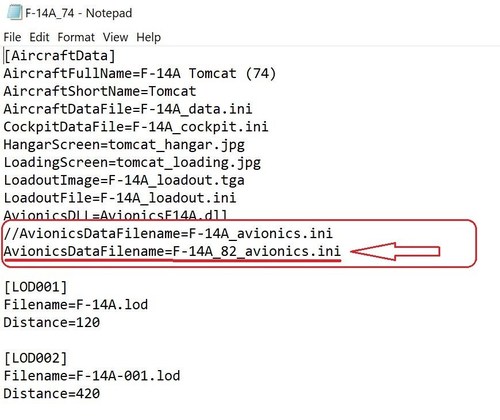 Update - sorry, forgot to mention you also have to go into the Cockpit INI and change the [RadarScope] NodeName from =radar_screen to =vdi; see pic.
-----
Third Wire's F-14 was nice but didn't have a dedicated RWR display. The Mirage Factory's F-14 was fantastic, but the radar doesn't work anymore. Both are needed, and a fleet defender that's sans-radar is pretty useless.
I edited the INI for TMF's F-14 (see first pic) and spliced in the avionics from TW's F-14_82. So now TMF's awesome cockpit has a working radar, sort of....
Problem: TW's radar image is too large for TMF's radar display screen, so the edges are cut off. I'm guessing you can only see about half to two-thirds of the radar image. See pics for comparison. Besides not seeing the full radar display, important target data along the edges are cut off also.
Does anyone know how to scale down the TW radar image to get it to properly fit in the TMF cockpit display? I haven't had any luck
Thanks
By bop170169 0
-
Download Statistics
14,437
Files12,675
Comments27,064
Reviews