Jump to content

Strike Fighters by Thirdwire

Sub Category  

All SF / WOV / WOE / WOI Simulation Modifications and Add-Ons

    1. Beta Release for the CVN-75 Harry S. Truman Model Build 06.13.06 RC2
       
      This Model is intended to ONLY be used with:
       
      -Strike Fighters : Project One
       
      -Strike Fighters Gold
       
      -Wings Over Vietnam
       
      -Wings Over Europe
       
      The Current Model Is Total: (12977 polys, 38931 verts)
       
      Read The Readme
       
      Online Readme : http://digitalov.freelinuxhost.com/PHP/mod...wforum&f=14
      6,399 0
    2. You have to manage axis settings in game option section to use this profile properly.
       
      X-Y Axis : Roll and Pitch (If you want, you can also assign Y axis as Roll )
      Rudder : is Rudder (Yaw)
      Rotary 1 : Thruster vector axis (for Harrier)
       
      Note : Please do not change keyboard key mappings. This profile depends on default layout.
      Archived with WinRAR
       
      Now, I'm trying to add Radio messege targeting and utilizing AUX buttons. Especially AUX buttons, I'm having real trouble since this button is not an ordinary button.
      290 0
    3. Here is the only third party speech pack for Strike Fighters to date: it includes files that will turn your Strike Fighters experience "Red"! The files are freeware from the EECH Helicopter Sim, converted by me for use in Strike Fighters.
       
      The Russian Speech Pack will replace all stock speech files, so it is highly recommended that a clean install of Strike Fighters is used for your "Soviet Strike Fighters Project" experience.
       
      Now be warned - this Speech Pack is for immersion only. Whilst the phrases are actual Russian, and actual combat/flight phrases, the probably will not make much sense to an actual Russian speaker. Due to the different way SF builds a sentance compared to EECH, and my limited Russian, many phrases will be gramatically incorrect. No complaints from Russian speakers, ok! They sure sound good when you're flying a MiG though!
       
      Also, the sound quality is not as good as stock SF speech, must be those Russki radios! And you'll have to read the radio chatter to know what's going on....
       
      Installation:
       
      1/ Back up your Speech Folder - or preferably do a clean install of SF for the Soviet Strike Fighters Project.
       
      2/ Unzip the Gramps Speech Pack file. Copy the files from the Speech Pack folder and paste them into the Speech Folder.
       
      3/ Go on a mission and defend The Rodina!
       
      Also in the file is a new Russian mainscreen wav file:
       
      The Soviet National Anthem (recently re-introduced by Putin as the Russian National Anthem). The file was a MP3 file from Timaham's Funet Russian Archive site, converted into WAV format for use in Strike Fighters.
       
      This version is music only, I personally use a version by The Red Army Choir (also from Timaham's site), which was a 3.5MEG MP3 file I again converted to WAV for use in Strike Fighters. I had hoped to have this version available for download, but the MP3 came to 19MEG when converted to WAV - too big for me to upload unfortunately. If you have a sound editor and can convert files yourself, go to Timaham's site:
       
      http://www.funet.fi/pub/culture/russian/ht...ges/soviet.html
       
      and download this MP3 file and convert it yourself. There are also other version available but The Red Army Choir's version is the best, IMHO. As stated, SF uses WAV format files, and they need to be 8 bit stereo, and unsigned.
       
      Installation:
       
      1/ Back up your Mainscreen WAV found in the Menu Folder. The Mainscreen BMP is in a cat file, so no need to back up.
       
      2/ Copy and paste both Mainscreen files from my zip into the Menu Folder, and you're good to go.
       
      3/ I have made this WAV file to replace the stock mainscreen WAV file, if you like my file and would like it to play in other screens, just copy and rename to whatever screen you want the music to play in (such as BaseScreen, CreditsScreen, SingleMissionScreen etc.)
       
      Enjoy!
      1,032 0
    4. Menu elements and .ini-files for the USNF/USMC/ATF/FA-themed menu sets.
      368 0
    5. Skin for the Northrop F-5E model from the Mirage Factory.
       
      Skin plates based on the original templates by Sony Tuckson, based on WPNSSGT's original work.
       
      Northrop F-5E, Al-Quwwat al-Jawwiyah al-Malakiyah al-Urduniyah (Royal Jordanian Air Force).
       
      Skin Installation:
       
      Unzip to a temporary folder. Move the RJAFCamo and RJAFSilver folders into the F-5E folder in your Objects\Aircraft folder in either SFP1 or WOV.
       
      Michael "Mike1" Riddell, 25/06/06.
      264 0
    6. Skin for the Northrop F-5E model from the Mirage Factory.
       
      Skin plates based on the original templates by Sony Tuckson, based on WPNSSGT's original work.


      Northrop F-5E, No.10 Squadron, Al-Quwwat al-Jawwiyah al-Malakiyah as-Sa'udiyah (Royal Saudi Air Force).
       
      Skin Installation:
       
      Unzip to a temporary folder. Move the 10RSAF folder into the F-5E folder in your Objects\Aircraft folder in either SFP1 or WOV.
       
      Michael "Mike1" Riddell, 25/06/06.
      307 0
    7. Skin for the Northrop F-5E model from the Mirage Factory.
       
      Skin plates based on the original templates by Sony Tuckson, based on WPNSSGT's original work.
       
      Northrop F-5E, Escadrille de Chasse 15, Al-Quwwat al-Jawwiyah al-Jommhuriyah at'Tunisia (Tunisian Air Force).
       
      Skin Installation:
       
      Unzip to a temporary folder. Move the TuAF folder into the F-5E folder in your Objects\Aircraft folder in either SFP1 or WOV.
       
      Michael "Mike1" Riddell, 25/06/06.
      211 0
    8. Skin for the Northrop F-5E model from the Mirage Factory.
       
      Skin plates based on the original templates by Sony Tuckson, based on WPNSSGT's original work.
       
      Northrop F-5E, No.6 Squadron, Bahrain Amiri Air Force.
       
      Skin Installation:
       
      Unzip to a temporary folder. Move the BAAF folder into the F-5E folder in your ObjectsAircraft folder in either SFP1 or WOV.
       
      Michael "Mike1" Riddell, 25/06/06
      137 0
    9. Menu Set III: Advanced Tactical Fighters '06
      406 0
    10. Menu Set II: U.S. Marine Fighters '06
      243 0
    11. Menu Set I: U.S. Navy Fighters '06
      614 0
    12. Replacement loadingscreen for USNF
      252 0
    13. The USNF/USMC/ATF/FA-themed menu sets use a modified awards screen, using smaller medal images.
      286 0
    14. This file contains a .pdf-file with the installation instructions for the menu sets based on the USNF/USMC/ATF/FA-games. Please read these instructions before installing.
      252 0
    15. Replaces No.14 Squadron (flying Hunters) in the Red Thunder 1962 campaign for WoE, with No. 11 Squadron flying the Lightning F.Mk.6.
       
      For all those English Electric rocketeers out there, here is the rocket with wings, flying and fighting against the might of the Warsaw Pact. Hold on to your hats!
      1,557 0
    16. Alternate main screen for Kouts USNF mod.
       
      You must have it installed for it to work. You can get it here:
       
      http://forum.combatace.com/index.php?download=2704
      259 1
    17. Burning Sands 'Upgrade'
       
      This is a major upgrade to the default Burning Sands Campaign for SFP1. You can now fly the following aircraft in addition to the stock aircraft:
       
      USAF: F-5A, F-104C, F-105D-25, F-105D-31, F-105F-1 Early and Late Models, F-105G, A-7D, B-57A, B-57B
       
      USN: F-8E, A-6A, A-7B, A-7E
       
      RAF: Hunter F6, EE Lightning Fmk6, Canberra B(I)8
       
      IDF: Mirage IIICJ
       
       
      All US Navy and Marine Units are carrier based.
       
      -----------------------------------------------------------------------------------------
       
      Installation:
       
      Just extract into main folder of SFP1 SP4. Install latest Weapons Pack. Have Fun!
       
      Advanced user may wish to use own method of installing.
       
      -----------------------------------------------------------------------------------------
       
      Thanks goes out to TK and his team, all modders, and fans of the series.
       
       
      Vince
      2,381 1
    18. My second attempt at missile skins. The Aim-7M, Aim-9JNP, Aim-120.
       
      Tested in SFP1 and WOV.
      1,364 0
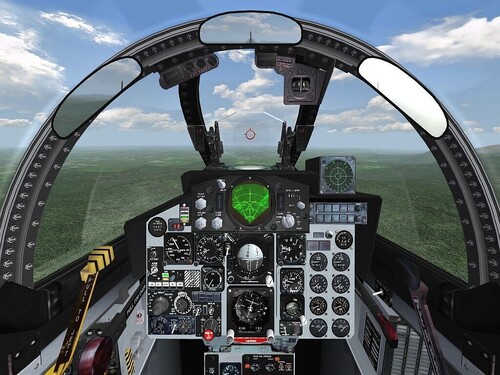
    19. Reworked Pit for WPNSSGT's(Model), Column5's(FM) and USAFMTL's(Skins?) A-10A V1.5
       
      it includes a modern HUD, TV-Screen and some other minor changes. Cockpit, and INI-improvement by Kesselbrut.
       
      Ready
       
      Have fun
       
      Kesselbrut and A-10 Team
      2,359 1
    20. WOV/SFG/SFP1 Patch 4 Groundobjects Updates
       
      These are formatted for the new patch. Read the readme or you will be lost in the sauce.
      1,777 0
    21. A simple mission I made. Fly a F-15E and blow the MiGs out of the sky.
      You need:
      F-15E
      MiG-29A
      ANWgreen terrain
       
      THIS IS MY FIRST RELEASED MISSION, DON'T GET YOUR HOPES UP
       
      (If you like it, I might do more)
       
      ISSUES:
      I forgot to include this in the README:
      Do not use ALT-N, as this will lead you to the landing, if you are in a hurry, use ALT-T, and the AI landing (if you use autopilot) isn't perfect, so if you want, do it manually. (but you shouldn't crash) ;)
      528 1
    22. This is a repaint of Pasko's JU-87b Stuka. I used his original paint and modified it a bit by recoloring the cowling and giving it a spiral spinner. Also included is a modified DATA.ini to give the siren better sound fx
       
      Enjoy!
      171 0
    23. Here you will find three new ground object mods:
       
      1/ An M113_ACAV re-textured and renamed as an Australian Army M113 FSV.
      2/ Opfor Indonesian AMX-13 light tank.
      3/ Opfor Indonesian soliders
       
      Just paste the three folders into your main Objects folder.
       
      Then paste the following into your GroundObjectData.ini in your Objects folder (you may need to extract this file):
       
      [Object0xx]
      ObjectName=AMX-13
      ObjectFullName=AMX-13 Tank
      ObjectDataFile=AMX-13\AMX-13_DATA.ini
       
      [Object0xx]
      ObjectName=IndonSquad
      ObjectFullName=Indonesian Infantry squad
      ObjectDataFile=IndonSquad\IndonSquad_data.ini
       
      [Object0xx]
      ObjectName=M113_ACAV
      ObjectFullName=M113 Cavalry APC
      ObjectDataFile=M113_ACAV\M113_ACAV_data.ini
       
       
      Remember to rename the XXX to the appropriate object number in your GroundObjectData.ini file.
       
      Thanks to Kesselbrut for the M113 ACV and the Infantry. Thanks to whoever made the AMX-13!
       
      This most excellent mod brought to you by Charles!
       
      Thanks Charles!
       
      Uploaded by:
       
      Richard "Gramps" Kaminski
      1,263 1
    24. Hanger and Loading for SFP1 F-4B
      If you want a different screen leave me a post.
      120 0
×
×
  • Create New...

Important Information

By using this site, you agree to our Terms of Use, Privacy Policy, and We have placed cookies on your device to help make this website better. You can adjust your cookie settings, otherwise we'll assume you're okay to continue..