-
Subscription required to download files
-
- 92 replies
- 3,042 views
-
-
Available Subscriptions
Strike Fighters by Thirdwire
All SF / WOV / WOE / WOI Simulation Modifications and Add-Ons
Subcategories
-
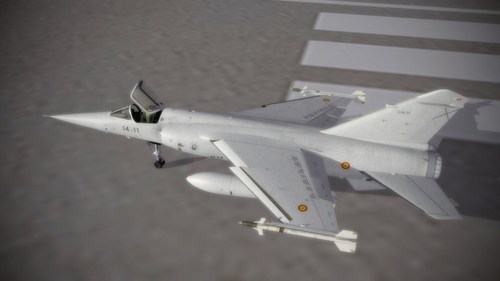
Mirage F-1CG Late.
This mod is dedicated to BPAO, nothing would have been possible without him.
Greece operated 40 Dassault Mirage F1CG single seat aircraft. F1CG was first ordered in 1974 and entered service with the Hellenic Air Force in 1975. The aircraft were used by 334 Squadron and 342 Squadron. Mirage F1CG was armed with the Sidewinder AIM-9P missile, rather than the most commonly used Matra Magic II, and it could carry four AIM-9Ps, rather than just two.
Upgraded version from 1984 with MK6 ejection seat, RWR and additional wings missile pylons.
Covered unit :
334 MIRA
342 MIRA
This addon is and will in all cases remain freeware.
Released under CombatAce Fair-Use terms.
Enjoy
The Mirage F.1 Team
By ludo.m54260 2 -
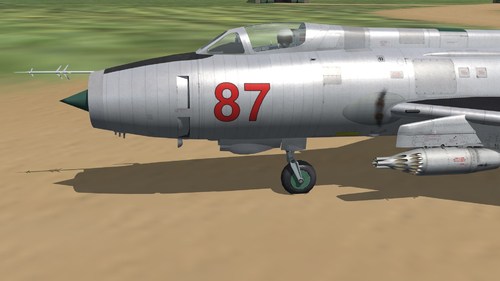
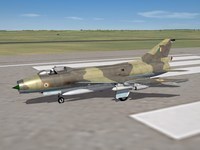
Above all this is a what if mod in order to create a new flyable fighter.
*JH-9 'Shen Jian' ('Excalibur') v1.0.0
First flight : 1976
Developped by the PLAAF
This fighter is derivated from the MiG-21PF.
It was first observed and pictued in October 1976 over the China Sea.
*SF2 basical game from Thirswire is needed.
*I would like to thank :
- Combat Ace Team for their hosting,
- Thirdwire their game,
- Mago/Paladrian for their cockpit,
- and the creator of the GP-9 gunpod.
Best regards,
Coupi
By Coupi41 0 -
Mirage F-1CG.
This mod is dedicated to BPAO, nothing would have been possible without him.
Greece operated 40 Dassault Mirage F1CG single seat aircraft. F1CG was first ordered in 1974 and entered service with the Hellenic Air Force in 1975. The aircraft were used by 334 Squadron and 342 Squadron. Mirage F1CG was armed with the Sidewinder AIM-9P missile, rather than the most commonly used Matra Magic II, and it could carry four AIM-9Ps, rather than just two.
Covered unit :
334 MIRA
342 MIRA
A big thank to all on Combatace and C6 forums that helped us solving issues we encountered.
Any omission in credits is totally unwanted, if I forgot somebody, let me know, I will correct this.
This addon is and will in all cases remain freeware.
Released under CombatAce Fair-Use terms.
Enjoy
The Mirage F.1 Team
By ludo.m54893 13 -
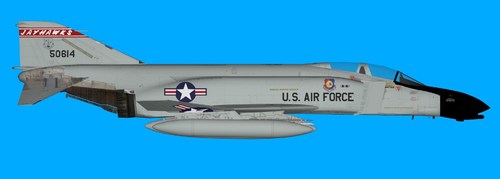
JASDF F-4EJ cockpit pack
includet in this pack are
F-4EJ_72_cockpit F-4EJ_85_cockpit this cockpits will only work with the F-4EJ pack i made , here is the link to this aircrafts https://combatace.com/files/file/14263-f-4ej/
this cockpits will not work with the TW F-4EJ DLC06 , at least not with out a lot of rework and repositioning
to install just drop the content of the F-4EJ_72 and F-4EJ_85 folders in to the respective aircraft folders and let overwrite if ask to
i hope i got everything right this time and the cockpits will work for you as they should
have fun , ravenclaw_007
125 0 -
F-4D Cockpit Pack
includet in this pack are
F-4D cockpit F-4D_67 cockpit F-4D_71 cockpit ( full aircraft folder ) F-4D_75 cockpit F-4D_78 cockpit weapons pack nuclear effects for B61 and Walley Mk6 ( only in case you dont have this files ) if you have the BETA cockpits for testing than PLEASE delete them before you install the new ones , to install just drop the files in to the respective aircraft folder
i corrected the existing position lights and added the missing position lights as well as the landing lights , i also addet the cockpit open/close function and the functioning arresting hook , the top fuselage position light ( behind the cockpit ) is more or less on the right position ( i did not change this position ) but the texture for it on the skin is on the wrong position , maybe somebody can come up with some new and corrected skins for this F-4D aircraft
NOTE: the files includet in the Effects folder are only in case you dont have them , if you have this files than there is no need to install them again , the files are neede to have the nuclear effects for the B61 bombs and the Walley Mk6
NOTE: Before installing the new weapons i strongly recomend to delet or remove the existing ones with the same name as the new ones ( i know that this is time consuming but this way you make sure that this weapons work as they should )
i made a lot of test with the cockpits and the changed data.ini´s and loadout.ini´s if there are still problems please let me know
have fun , ravenclaw_007
311 2 -
In this package you find the current versions of my programs. Since all programs are using the same Qt and Microsoft Visual Studio libraries I thought it is convenient to put them all together.
This package contains currently:
LOD Viewer V0.5.2 (old obsolete version, please download and use V0.6.3)
Target Area Editor V0.2.2 (Updated)
CAT Extractor V0.1.0 (NEW!)
For usage instructions of the programs please read the readme files located in the Readme folder.
Update 29.03.2025: I think it's best for the community if my tools are freely downloadable for everyone. External download link: https://www.dropbox.com/scl/fi/uy29n6jh3fu35inxlhhuf/MuesToolBox.zip?rlkey=94k9s0iv3enz4b6b6l2tstfyz&st=vtdl2gh9&dl=0
By mue1,863 14 -
This is the newest version of the LODViewer.
New features:
-decal support
-display of collision and pivot points
-added transparency and wireframe display mode
-user definable background color
-view manipulation via keyboard
-64 bit application
-uses the OpenSceneGraph library and Qt 5.9.5
Install instructions:
Extract the content of the zip package to a convenient location.
The LODViewer depends on the Microsoft Visual Studio 2017 C++ libraries. If not already installed on the computer (e.g. by other applications) it has to be installed by running vcredist_x64.exe (you can find it in the redist subfolder of this package).
Have fun! And report bugs
Update 29.03.2025: I think it's best for the community if my tools are freely downloadable for everyone. External download link: https://www.dropbox.com/scl/fi/a4ah52r9gb2cm3rwhi3iz/LODViewer-0.6.3.zip?rlkey=e1l9jlvagiroyoc88xy5jahr3&st=si329dc9&dl=0
Mue
By mue1,661 2 -
I tried to implement the exporter only based on the information I found by investigating LOD files. I'm not a 3D Modeler myself. I only tested the exporter with rather simple object (hierarchies).
The bottom line is that I have no idea if the exporter works for you. So please give feedback.
Note: This plugin requires blender version 2.78 or 2.79. It is not compatible with blender versions 2.8+.
1.) Installation
Open the Blender User Preferences - Add-ons Tab
(File -> User Preferences... -> Add-Ons)
Click "Install from File..."
Browse to and select the exporter python script "io_export_sf2_lod.py"
Click "Install from File..." (or double click on the script name)
In the Add-Ons Tab under Supported Level select Testing and enable "Import-Export: Strike Fighters 2 LOD Exporter"
The LOD exporter is now installed and enabled. Under File -> Export you should see the menu item "Strike Fighters 2 LOD (.lod)". It's greyed out until an exportable object is selected.
2.) Usage
Select the object you want to export and click File -> Export -> Strike Fighters 2 LOD (.lod)
The file browser opens. In the lower left area you see the LOD exporter options:
-enable/disable writing the out file (text file with information about the exported object(s)).
-enable/disable animation export
-allow decals:
This option is similar to the option in the original TW-Exporter: "Exporting using AllowDecals=0 causes the vertex to be shared, so it can reduce the size of the .LOD but also causes decals to "bleed" along the edges."
This dialog setting is used as default for all objects to be exported. However, it can be overwritten by each individual object via the custom object property "AllowDecals" = 0(false) or 1(true)
The selected object and all child objects are exported.
Two custom object properties are supported by the exporter:
-AllowDecals = 0 or 1, This option is similar to the option in the original TW-Exporter: "Exporting using AllowDecals=0 causes the vertex to be shared, so it can reduce the size of the .LOD but also causes decals to "bleed" along the edges."
-UseFlatNormal = 0 or 1, if set to 1 then all vertex normals are pointing straight up (normal = (0,0,1)) in the objects local coordinate system.
Please note!
The objects must meet the following requirements:
-No scaling in the Transform Properties allowed (that means: scale x = y = z = 1.0). If your object has scaling, it should be applied to the mesh (Ctrl-A)
Scaling is only allowed for animations.
-A material must be assigned to the object. Only the first material of an object is exported.
The following material parameters are exported:
-Diffuse Color (the lod file format also contains ambient color. Currently the exporter set ambient color = diffuse color)
-Specular Color
-Specular Intensity
-Specular Hardness (I think in 3ds Max it's called glossiness)
-if "Shading -> Emit" > 0.0 then self illumination is enabled
-Transparency (if transparency is enabled, then the object doesn't cast and doesn't catch shadow. if transparency is disabled, then the object cast and catch shadow. The specific LOD format version the exporter writes, doesn't support arbitrary cast/catch shadow combinations. The other LOD formats I don't understand enough (yet). Sorry!)
-Alpha
-Mirror Reflectivity
-Diffuse texture image name (as diffuse texture the exporter uses the texture where "Influence -> Diffuse -> Color" is enabled)
-Normal map texture image name("Influence -> Geometry -> Normal" is enabled and the Normal value is also exported)
-Specular map texture image name("Influence -> Specular -> Intensity" is enabled)
-Normal and specular map can only be used together with a diffuse map. (If I exported a normal or specular map without diffuse map, then the LOD wasn't shown in the game or the game crashed. I don't know why...)
Animation Export:
This exporter supports the following object animation types: location, rotation and scaling.
Frames 10, 20, 30, ..., 100 are exported as animation 1
Frames 110, 120, 130, ..., 200 are exported as animation 2, ...
3.)Credits:
Thanks to logan4 and angelp who provided me with specific lod files that helped me to understand the lod file format better.
4.)Changelog:
Version 0.1:
-initial release
Version 0.2:
-bugfix: didn't work in blender version 0.79
Version 0.3:
-animation support
-added custom object properties: "AllowDecals" and "UseFlatNormal"
Update 29.03.2025: I think it's best for the community if my tools are freely downloadable for everyone. External download link: https://www.dropbox.com/scl/fi/71mc5oztx01xer7m2eq71/io_export_sf2_lod.py?rlkey=aid9klb0azyfu5tm2t7a3q7pc&st=n60cb7n0&dl=0
By mue470 6
-
Download Statistics
14,433
Files12,671
Comments27,059
Reviews